
Car Electronics & Driving Tech Buying Guide for Vehicle Compatibility Checks
Electronics compatibility is not established by matching a vehicle name and model year. Manufacturers can change radios, amplifiers, camera formats, connectors, networks, trim geometry, and firmware within the same apparent application. Previous owners may also have altered wiring or coding. The exact vehicle must therefore be inspected as a configured system.
Create a compatibility sheet before ordering. Record the VIN, build date, trim, option codes, module and radio identifiers, connector photographs, factory features, phone models, and every function that must remain. For each proposed component, obtain written evidence for physical fit, power, data, audio, video, controls, antennas, software, and installation accessories. Resolve contradictions with current manufacturer or interface documentation rather than guessing from wire color or marketplace reviews.
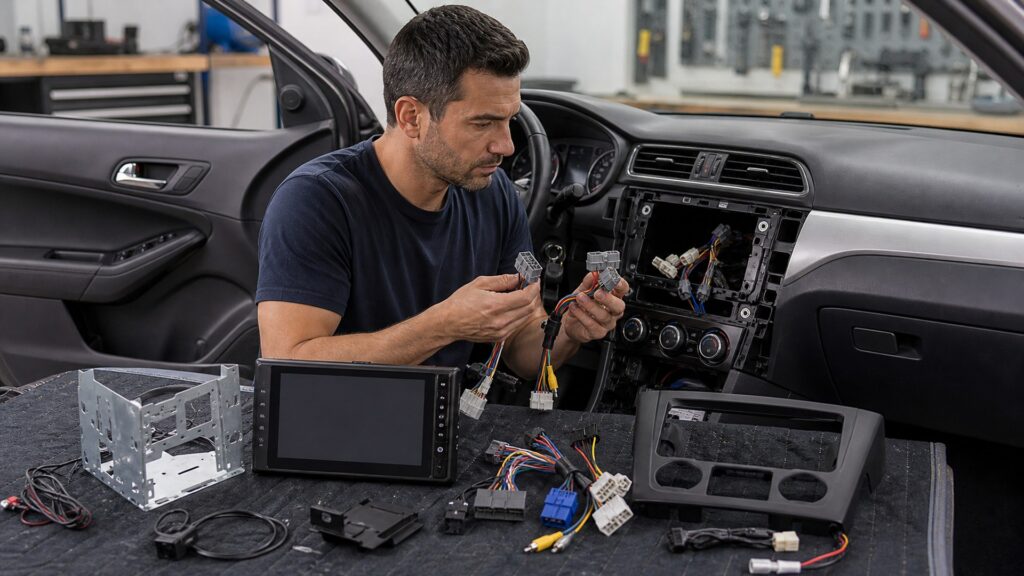
Buying framework
Build the purchase around the real job
Define the outcome, constraints, and verification steps before comparing products. Let build the purchase around the real job shape the comparison.
Vehicle identity: Begin by documenting vin, production date, body style, region, engine, trim, option codes, factory packages, and current software level.
Installed-equipment baseline: Make a separate decision about radio and module part numbers, screen, amplifier, speaker layout, cameras, microphones, antennas, usb ports, controls, and vehicle menus.
Connector inspection: Before shopping, establish plug shape, keying, pin count, unused cavities, wire labels, prior splices, corrosion, available depth, grounds, and fuse locations.
Retention requirements: Use a test to settle chimes, warnings, climate display, settings, backup camera, steering controls, amplifier, satellite radio, usb, microphone, and diagnostics.
Compatibility matrix: Complete the plan with one evidence source and verification test for each physical, electrical, signal, data, software, and human-interface requirement.
Who this is for
Different users need different priorities
Frequency, environment, skill, vehicle design, and tolerance for downtime change the best choice. Let different users need different priorities shape the comparison.
Unmodified late-model vehicle: This use pattern rewards documented data interfaces, retained safety and convenience functions, firmware support, and fully reversible harnessing.
Older analog-wired vehicle: This owner should prioritize wire condition, grounding, alternator noise, speaker impedance, antenna type, dash depth, and charging-system health.
Previously modified vehicle: For this situation, compare restored wiring diagrams, unknown modules, cut connectors, coding changes, added amplifiers, and a new verified baseline.
Rare trim or midyear build: This project needs part-number and connector evidence, specialist support, return rights, and refusal to rely on a generic vehicle selector.
What to pay attention to
Specifications that change the result
Published numbers matter only when they connect to fit, performance, safety, and repeatable use. Let specifications that change the result shape the comparison.
Exact-Vehicle Evidence
VIN, build date, trim, option codes, installed module numbers, connector inspection, service diagrams, recalls, and prior modifications.
Interface-by-Interface Proof
Power, ground, data, audio, video, antenna, controls, USB, microphone, physical fit, firmware, coding, and retained functions.
Harness pinout: Read listings for circuit purpose, voltage state, current capacity, polarity, grounding, data lines, shield, connector key, and included terminals.
Data-interface coverage: Confirm the published details for exact platform, retained features, programmable outputs, steering-control mapping, update method, diagnostic behavior, and known exclusions.
Audio-system topology: Compare evidence covering amplifier location, analog or digital signal, balanced or unbalanced input, channel count, speaker impedance, turn-on, chimes, and summing.
Camera and video format: Treat as essential composite or digital transport, resolution, frame rate, voltage, connector, reverse trigger, dynamic guidelines, latency, and image orientation.
Physical installation envelope: Look beyond headline claims to opening dimensions, dash-kit geometry, rear clearance, bracket position, ventilation, display overhang, moving panels, and service removal.
Phone and firmware matrix: Require documentation of supported operating systems, wired and wireless modes, usb port, cable requirements, radio firmware, interface firmware, and update sequence.
Avoid these traps
Shortcuts that create avoidable problems
A plausible product can still fail when preparation, interfaces, or operating limits are ignored. Let shortcuts that create avoidable problems shape the comparison.
Relying only on model year: This fails when buyers overlook production changes and optional factory packages can place several incompatible systems behind the same dashboard appearance.
Matching wires by color: The hidden problem is colors vary by vehicle and prior work; an incorrect guess can damage modules, trigger faults, or misroute data and power.
Forgetting non-audio functions: Avoid assuming that the original radio may host settings, microphones, climate information, cameras, warnings, diagnostics, and network termination.
Assuming adapters combine freely: This shortcut can cause two individually compatible modules may conflict in power timing, programming, connectors, firmware, or responsibility for retained features.
Cutting before bench verification: Correct the plan by checking irreversible trim or harness changes remove return options before the complete component and interface chain has been proven.
Decision guidance
Turn the evidence into a shortlist
Use conditional choices instead of treating one configuration as universally best. Let turn the evidence into a shortlist shape the comparison.
Catalog and vehicle evidence agree: Choose this path only after confirming the listed kit only after comparing exact options, connector photos, firmware, exclusions, and retained-feature tests.
Factory amplifier is present: This option fits when a documented integration or bypass strategy that preserves signal quality, gain structure, chimes, channels, and safe speaker loading.
Camera retention is required: Prefer this approach if an interface supporting the actual format, voltage, trigger, guidelines, orientation, switching speed, and display input.
Prior wiring is altered: Escalate the project when diagnosis and restoration of a trustworthy baseline before adding another adapter or relying on factory pin assumptions.
One interface remains uncertain: Delay purchase until you resolve temporary connection, manufacturer confirmation, or specialist inspection before ordering the rest of a dependent system.
Ownership & compatibility
Keep the system dependable after purchase
Maintenance, records, updates, inspection, and storage determine whether the initial result lasts. Let keep the system dependable after purchase shape the comparison.
As-built diagram: After installation or use, track actual connector paths, fuse locations, grounds, adapters, programmed functions, cable routes, and deviations from the planned installation.
Software baseline: Preserve a record of device, radio, phone, and interface versions plus configuration files, update dates, release notes, and verified functions.
Fault-free operation: Routine care should include stored codes, battery behavior, sleep and wake, warning messages, controls, camera switching, audio, calls, and vehicle settings.
Future removability: Recheck the system whenever saved factory parts, uncut plugs, labeled adapters, trim fasteners, security codes, configuration backups, and instructions for the next technician.
FAQ
Vehicle compatibility questions
Resolve exact-vehicle, interface, retention, and verification questions before ordering electronics.
Why does the same model year have different radio systems?
Can a VIN prove every electronics option?
How do I know whether my vehicle has a factory amplifier?
Will steering-wheel controls work with a new receiver?
Can the factory backup camera be retained?
What does a data interface preserve?
Should I trust an online fitment selector?
Can firmware solve a hardware mismatch?
What should be tested before reassembling the dash?
Bottom line
Make the final choice defensible
The strongest purchase connects the requirement, evidence, and verification plan without adding unsupported complexity. Let make the final choice defensible shape the comparison.
Exact configuration evidence: Anchor the purchase to vin, build, options, modules, connectors, and existing modifications recorded.
Complete interface proof: Protect the result through physical, electrical, data, signal, software, and retained-feature requirements matched.
Reversible verification: Leave room for the system tested before cutting, coding, or discarding factory components.
Reading Shortcuts
Move directly to the decision you need to resolve.
Decision Reminders
Use these checks while narrowing the field.
- Identify the exact application: Names alone do not prove fit.
- Read primary instructions: Limits and steps matter.
- Test before full commitment: Small trials expose mismatch.
- Budget the complete system: Accessories and labor count.
- Protect safety functions: Convenience never overrides control.
- Keep records: Future diagnosis needs evidence.
Glossary Snippets
Terms that appear in listings, labels, and service information.
When to Use a Top 10 Review
Use rankings after requirements and exclusions are clear.
- Scan candidates: Find credible options.
- Compare strengths: See major tradeoffs.
- Build a shortlist: Choose what to inspect.
- Check availability: Confirm current offerings.
Already down to 2–3 options? A Comparison is usually the faster next step.
When to Use a Comparison
Compare directly when only a few candidates remain.
- Align versions: Compare equivalent configurations.
- Trace differences: Locate meaningful distinctions.
- Price the outcome: Include continuing costs.
- Verify uncertainty: Inspect unresolved details.
Still exploring? Start with a Top 10 to build a shortlist first.