
Dash Cameras Buying Guide: How to Choose the Right One
Choose front, rear, cabin, or multi-channel coverage by image quality, field of view, low-light performance, dynamic range, storage endurance, heat tolerance, parking mode, power protection, GPS, mounting, privacy, app support, evidence handling, and reliability.
This guide treats complete dash-camera selection as an evidence chain. Keep the recommendation conditional until coverage and channel plan, storage and endurance, mounting and privacy, and an original-file retrieval test agree.
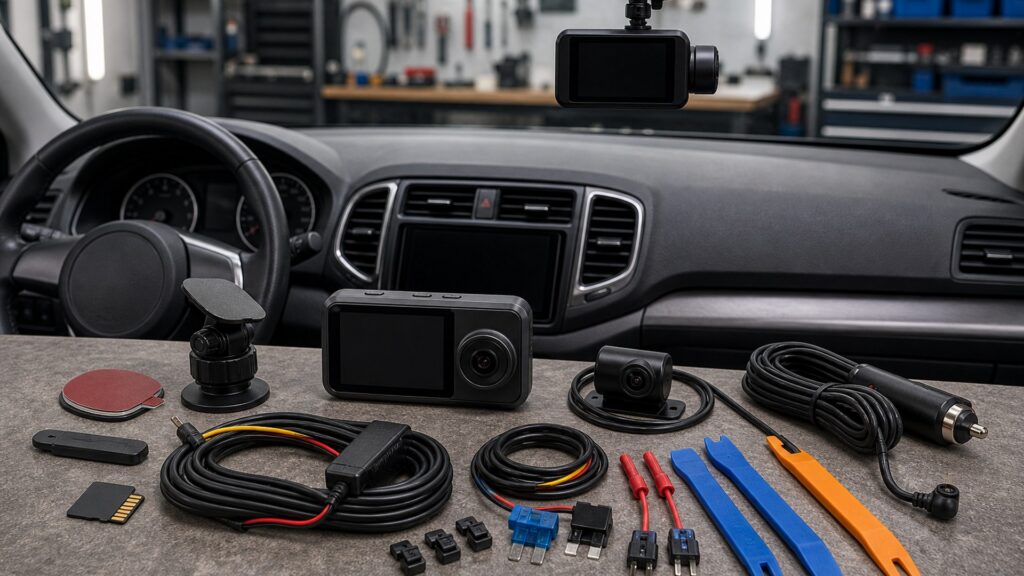
Buying framework
Build an evidence-first dash-camera plan
A useful camera must capture the relevant view, start reliably, survive the environment, protect the vehicle battery, preserve files, and support a lawful retrieval process.
Define likely incidents: Map coverage and channel plan, road use, parking exposure, cabin needs, vehicle geometry, privacy, and which details must be readable.
Set evidence requirements: Translate image and lens quality into representative day, night, motion, weather, rear, cabin, and plate-reading tests instead of relying on a box label.
Design power and storage: Connect storage and endurance to channel bitrate, recording hours, overwrite behavior, endurance, parking duration, cutoff, and battery condition.
Plan installation: Make parking power protection agree with legal placement, airbags, sensors, tint, wiper sweep, cable routing, service access, and heat.
Prove retrieval: Close the plan through evidence reliability and support: record test clips, lock events, verify timestamps, remove power, restart, export originals, and document the workflow.
Who this is for
Driving and parking situations that change the camera choice
Road exposure, incident geometry, privacy, parking duration, vehicle construction, and evidence responsibility reshape the system.
Daily commuter: Prioritize readable plates and signals, reliable startup, heat tolerance, simple event locking, discreet mounting, and storage that survives continuous overwriting.
Rideshare cabin: Add cabin coverage only with lawful notice and privacy controls; separate access, audio, retention, upload, and passenger-facing mounting decisions.
Parked city vehicle: Verify supported parking mode, low-voltage cutoff, battery condition, event sensitivity, recording duration, heat, cellular needs, and recovery from long unattended periods.
Road-trip vehicle: Plan front and rear coverage, power reliability, high-endurance storage, GPS time, quick incident review, spare media, and operation without dependable mobile data.
Commercial fleet: Standardize mounting, settings, cards, firmware, privacy policy, driver training, file retrieval, chain of custody, replacement stock, and health checks across vehicles.
What to pay attention to
Specifications that determine useful evidence
Treat optics, exposure, storage, power, mounting, heat, software, and retrieval as one chain; failure at any link can erase the needed clip.
Capture lens
Coverage and channel plan, Image and lens quality, Exposure and night performance, Storage and endurance.
Ownership lens
Parking power protection, GPS and event data, Mounting and privacy, Evidence reliability and support.
Coverage architecture: Choose front, rear, cabin, side, or multi-channel coverage by likely incident geometry, vehicle size, window layout, privacy, installation complexity, bandwidth, and storage impact.
Recorded detail: Compare actual day and night footage, plate readability at relevant closing speeds, bitrate, compression, exposure transitions, motion blur, lens flare, and windshield reflections—not resolution alone.
Field of view: A very wide lens captures more context but can shrink distant detail and distort edges. Match framing to the hood, lanes, rear glass, cabin, and camera placement.
Storage endurance: Use manufacturer-supported capacity and file system with endurance-rated media where specified. Calculate recording hours across every channel, inspect health, format correctly, and schedule replacement.
Parking power: Use a supported hardwire, battery pack, or outlet strategy with correct fuse access, grounding, sleep behavior, low-voltage cutoff, climate limits, and vehicle battery assessment.
Mounting and routing: Keep the lens in the cleared viewing area while respecting wiper sweep, tint, sensors, airbags, trim clips, mirror housings, legal obstruction limits, cable strain, and service removal.
Evidence workflow: Verify date, time, GPS, event lock, audio setting, file continuity, card removal, app export, original-file preservation, hash or copy procedure, firmware, and incident notes before relying on evidence.
Avoid these traps
Dash-camera mistakes that destroy reliability
These shortcuts substitute marketing labels or a successful first recording for sustained, retrievable, vehicle-safe evidence.
Buying by 4K label: Resolution cannot compensate for weak bitrate, poor exposure, heat shutdown, compression, focus, dirty glass, or an unreadable plate at motion.
Using any memory card: Ordinary cards may fail under continuous writes and heat. Follow supported type, capacity, format, health-check, and replacement guidance.
Hardwiring without battery planning: Parking mode can drain an aging battery or interact with smart charging. Use documented fuse points, cutoff settings, load behavior, and qualified installation.
Mounting in an airbag path: A cable or camera near curtain airbags, sensor housings, or driver sightlines can create safety and service problems. Follow vehicle routing and placement instructions.
Assuming saved clips are proof: Confirm the original file, time accuracy, continuity, metadata, export method, retention, privacy, and a documented incident timeline before sharing or editing copies.
Decision guidance
Choose coverage by the unresolved incident
Branch on the event the camera must document, then verify view, detail, power, storage, privacy, and retrieval under representative conditions.
If front-only coverage is enough: Choose the strongest usable forward detail, reliable storage, discreet legal mounting, and fast evidence retrieval rather than paying for unused channels.
If rear impacts matter: Add a rear camera only after checking glass angle, tint, defroster lines, hatch cable movement, routing length, channel bitrate, and installation access.
If parking surveillance is required: Calculate event type, monitoring duration, battery reserve, cutoff, heat, storage, connectivity, theft exposure, and notification expectations as one system.
If cabin recording is proposed: Define the business need, lawful notice, audio policy, access, retention, encryption, passenger privacy, and whether outward coverage can meet the goal instead.
If incidents are rare but critical: Favor verified automatic startup, storage health alerts, simple lock controls, accurate time, redundant retrieval methods, spare media, and periodic test clips.
Ownership & compatibility
Keep recording trustworthy
Dash cameras are continuous-write, heat-exposed systems. Scheduled checks matter as much as the initial purchase.
Inspect test clips: Review front, rear, and cabin samples for focus, framing, exposure, sound policy, timestamps, gaps, and corruption after heat, cold, and night use.
Maintain storage: Use supported media, format through the specified method, monitor errors, track installation date and write load, replace on schedule, and retain a tested spare.
Control software and settings: Back up settings before supported firmware or app changes; recheck time, channels, bitrate, parking mode, cutoff, Wi-Fi, privacy, and startup afterward.
Preserve incident files: Stop unnecessary overwriting, lock the event, copy the original through a documented method, preserve metadata, note time and context, restrict access, and follow applicable rules.
FAQ
Dash Cameras Buying Guide FAQ
Direct answers about coverage, image evidence, storage endurance, parking power, installation, privacy, and retrieval.
How should channel count be evaluated?
How should night footage be evaluated?
How should field of view be evaluated?
How should storage capacity be evaluated?
How should endurance cards be evaluated?
How should parking mode be evaluated?
How should low-voltage cutoff be evaluated?
How should mounting location be evaluated?
How should evidence export be evaluated?
Bottom line
Choose the camera as an evidence system
A defensible choice links incident coverage, readable detail, reliable power, durable storage, safe placement, privacy, and repeatable original-file retrieval.
Cover: Begin with coverage and channel plan and image and lens quality.
Record: Validate exposure and night performance and storage and endurance using sample files.
Protect: Control parking power protection and mounting and privacy during installation.
Retrieve: Finish with gps and event data and evidence reliability and support.
Reading Shortcuts
Choose views from the events the camera must record.
Decision Reminders
Checks to complete before committing.
- Check legal placement: Protect sightlines, airbags, sensors, tint, and privacy.
- Use supported media: Follow capacity, format, endurance, and replacement guidance.
- Validate parking mode: Test cutoff, sleep behavior, climate, and restart recovery.
- Keep time accurate: Confirm timestamps, GPS, channel continuity, and audio policy.
- Inspect after heat: Review focus, corruption, gaps, mounts, and cable condition.
- Preserve originals: Control overwriting, metadata, access, copies, and incident notes.
Glossary Snippets
Terms used in this decision.
When to Use a Top 10 Review
Rank dash cameras after the evidence workflow is proven.
- Coverage chosen: Map front, rear, cabin, and parking views to likely incidents.
- Footage inspected: Compare readable detail at relevant light, weather, and speed.
- Reliability designed: Match power, heat tolerance, storage, mounting, and firmware.
- Retrieval rehearsed: Export an untouched file and verify time, continuity, and playback.
Already down to 2–3 options? A Comparison is usually faster.
When to Use a Comparison
Compare camera systems under the same incident scenarios.
- Capture result: Review exposure, motion detail, field of view, and reflections.
- Recording endurance: Contrast bitrate, card support, overwrite time, and health alerts.
- Vehicle impact: Check power draw, cutoff, mounting, cable routing, and service access.
- Evidence handling: Compare event lock, app export, original files, privacy, and support.
Still building a shortlist? Start with a Top 10.