
Rotor Disc
The rotating metal disc bolted to the hub and swept by the brake pads.
- Role: Carries the friction surface at wheel speed
- Check: Cracks, scoring, rust ridges, and thickness
- Limit: Must be evaluated with pads and calipers
Brake rotors work as rotating friction surfaces and heat sinks. When the caliper squeezes pads against the disc, vehicle motion is converted into heat at the rotor faces, then spread through the rotor mass and airflow.
This explainer follows the path from clamp force to friction, heat storage, cooling, and surface condition. Understanding that sequence helps readers separate normal rotor wear from vibration, scoring, overheating, and fitment-related problems.
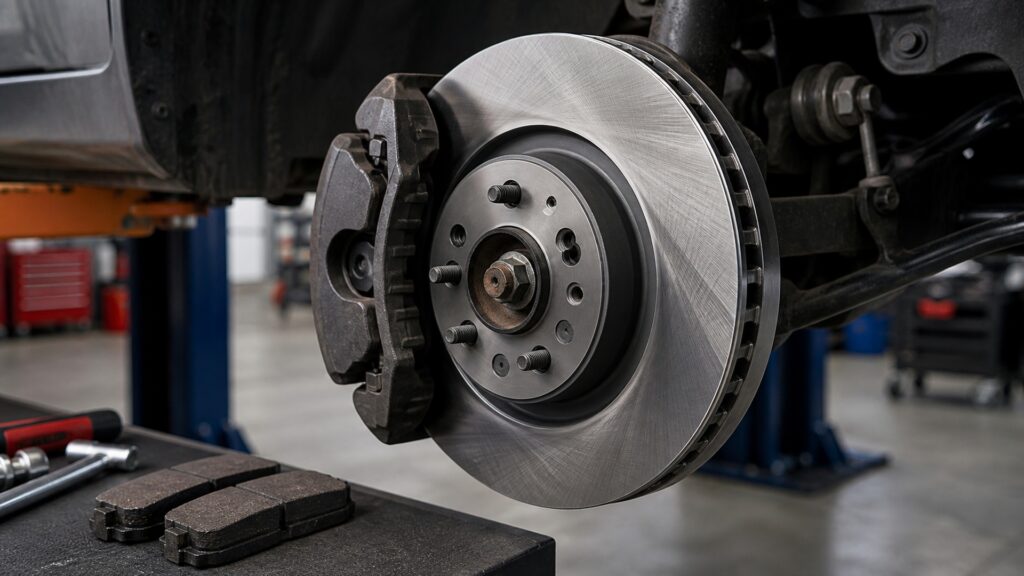
A system-level look at the rotor as the disc-brake surface where pad contact, rotation, heat, and cooling meet.
Tip: Read the concept as part of a system, then connect it back to the use case.
These definitions connect the main idea to the variables, limits, and practical signals readers need to compare options.
The rotating metal disc bolted to the hub and swept by the brake pads.
One of the flat surfaces where the pad contacts the rotor.
The rotor material that absorbs heat during braking before releasing it to surrounding air.
Internal passages between rotor faces that increase cooling airflow on many front rotors.
The flat contact between rotor hat and wheel hub.
A controlled film of pad material on the rotor face.
Tip: Keep the definitions connected; the strongest answer usually comes from the whole system, not one term.
The rotor is fixed to the hub, so it spins with the wheel. When pads squeeze both faces, friction resists that rotation and converts kinetic energy into heat inside the disc and pad surfaces.
A rotor works by managing contact and heat every time the vehicle slows.
Rotor faces need stable, even contact. Grooves, heavy rust, thickness variation, or uneven pad deposits can interrupt the pad film and create noise, vibration, or faster pad wear.
Brake feel often changes because the surface condition changed.
Heat control depends on rotor mass, vane design, airflow, and driving pattern. A rotor that overheats can discolor, crack, glaze pads, or leave uneven transfer material on the faces.
Cooling design matters most when braking is repeated or heavily loaded.
A rotor can be new and still behave poorly if it does not sit flat on the hub. Rust, debris, or uneven lug tightening can create runout that pushes pads back and creates pulsation.
Mounting accuracy is part of rotor performance, not just installation cleanup.
A practical rotor check combines surface reading, thickness measurement, mounting inspection, and symptom history. That keeps replacement decisions tied to the disc behavior instead of one vague brake complaint.
Rotor replacement makes sense when the disc can no longer provide a clean, true, heat-stable surface.
Rotor function explains many brake complaints, but it still has to be read with pads, calipers, hubs, and installation details.
It explains why surface condition, thickness, heat capacity, and hub seating can change braking even when pads are new.
It also helps readers understand why vibration or noise can come from deposits, runout, heat, or scoring rather than one simple cause.
Rotor knowledge does not diagnose a seized caliper, contaminated pad, loose suspension part, or wheel bearing issue by itself.
The right repair still depends on inspection, measurement, vehicle fitment, and matching symptoms to the whole brake corner.
Common shortcuts and misunderstandings can make the topic seem simpler than it is.
A rotor is also a heat sink and rotating reference surface. Its thickness, face condition, cooling design, mounting accuracy, and transfer layer all affect how smoothly and consistently the pads can slow the wheel.
A shiny face can still hide thickness variation, hard spots, uneven deposits, heat damage, or runout. Rotor health needs measurement and surface inspection, not just a quick glance through the wheel.
Pulsation can come from uneven pad deposits, lateral runout, hub debris, thickness variation, or caliper drag. The rotor may feel warped even when the real cause is surface variation or mounting error.
New rotors still need clean handling, correct installation, and proper pad bedding. Grease, dirty hubs, uneven lug torque, or poor initial transfer can create noise and vibration early in service.
Tip: Treat strong claims as starting points for comparison, not final answers.
Concise answers to common questions readers may have after the main explanation.
A brake rotor spins with the wheel and gives the pads a controlled surface to squeeze. That friction slows the vehicle while the rotor absorbs heat and releases it between braking events.
Grooves usually come from abrasive debris, worn pads, corrosion, overheated surfaces, or hard particles in the friction material. Light marks can be normal, but deep scoring can reduce contact and shorten pad life.
Yes. Heat can create uneven pad deposits, hard spots, surface changes, and thickness variation that feel like vibration. The cause should be measured because caliper drag or poor mounting can create similar symptoms.
Not always. Rotors may be reused when they are thick enough, smooth enough, true on the hub, and compatible with the new pads. Scoring, cracks, heat damage, or runout changes that decision.
Check thickness, both friction faces, cracks, heat marks, rust ridges, hub seating, runout, and pad wear pattern. Those details show whether the rotor can support clean contact and stable braking.
Brake rotors work by turning pad clamp force and wheel motion into controlled heat at the disc faces.
The practical takeaway is to judge rotors by surface condition, heat behavior, mounting accuracy, and measurements instead of treating every brake vibration as the same problem.
Use these Review Streets paths to connect the explainer to related categories, comparisons, and next decisions.
Explore related Review Streets coverage in Automotive Replacement Parts.
Explore related Review Streets coverage in Brake Components.
Explore related Review Streets coverage in Brake Rotors.
Choose a retailer
Prices checked regularly. We may earn a commission at no cost to you.