How Packing Machines Fit Into Your Workflow

A packing machine takes on a defined job between preparing goods and passing the pack onward. In Lantech’s ProfitPack, for example, machines bring an empty case to a person who packs it, then receive it for sealing. Understanding those handoffs explains what the machine does and what remains someone else’s task.

By: Review Streets Research Lab
Updated: November 27, 2026
Explainer · 8–10 min read
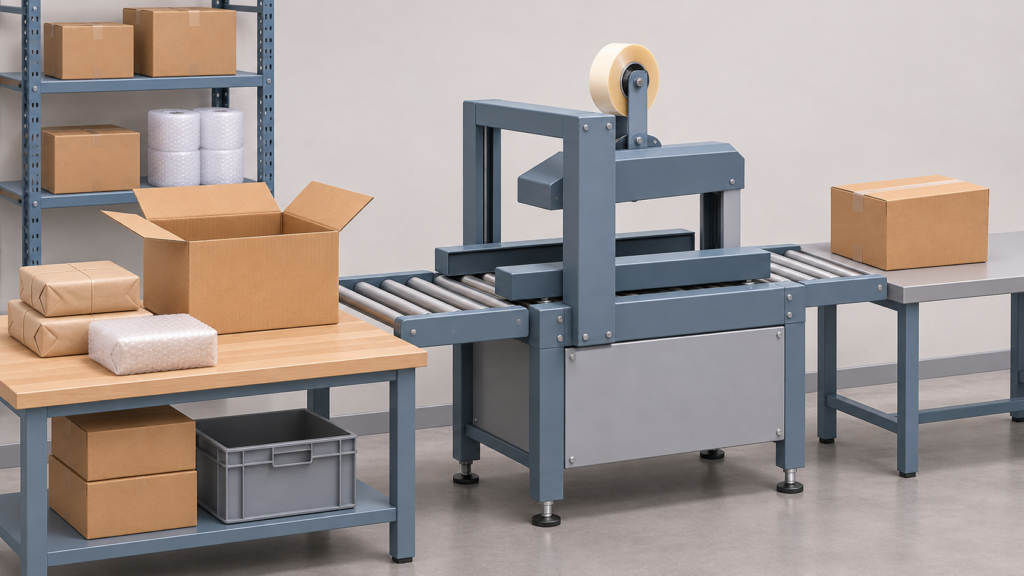
Editorial illustration of a carton preparation table beside a case-sealing machine and a closed carton on a receiving table.
Start here

Follow the work through the station

A combined work cell contains different jobs. Follow each contribution.

  • Why an empty case must be prepared before filling.
  • How goods and cases arrive by separate routes.
  • Why a receiving surface belongs in a handoff.
  • Why machine operation can still include hand packing.
  • Where a person releases a packed case for sealing.
  • How moving filled bags differs from packing them.
  • Which extra tasks neighboring equipment can add.

Tip: Read “automated” alongside the task it describes: forming, loading and sealing need not have the same owner.

The vocabulary

Six terms for reading a packing workflow

Start with the state of the container, then identify the position or machine receiving it.

Case blank

The flat corrugated input that an erector turns into an open case.

  • Before forming: It has not yet become the open container used for packing.
  • Supply point: Lantech describes blanks feeding from a magazine.
  • Next state: Its described erector delivers a bottom-sealed case for loading.

Hand pack station

The position where a person loads products into cases.

  • Human contribution: Products are placed in the case by hand.
  • Two arrivals: A configured Ergopack presents products and cases.
  • Neighboring jobs: Combi combines this position with an erector and sealer.

Infeed

The receiving side where work approaches the case sealer.

  • Transition: The 3M-Matic Infeed/Exit Conveyor connects this side to existing conveyor lines.
  • Packing surface: The named extension also supports cases during packing.
  • Boundary: The incoming case crosses from its previous work area toward sealing.

Case sealing station

The station that applies the carton closure, illustrated here by BestPack’s MSD-EB.

  • Task: The MSD-EB combines top-flap folding and carton sealing.
  • Presentation: Its extended belts receive the carton.
  • Nearby space: Listed conveyor options provide carton staging surfaces.

Bagger cycle

For the SX models covered here, this is one repeated processing operation on a bag, separate from loading it.

  • Before sealing: Loading comes first.
  • Manual cycle: A person initiates it for each bag.
  • Loading: Auto Mode still leaves a person filling it.

Takeaway conveyor

Sealed Air’s AUTOBAG Takeaway Conveyor moves filled bags away from packing.

  • Incoming work: The contents have already been put inside.
  • Destination: It can bring the output to bench height.
  • Assigned job: Continuous movement is its documented function.

Tip: A holding attachment, a flap folder and a conveyor have different jobs, even when they sit beside one sealer.

Before the station

What needs to arrive first

Preparation determines what the station receives. A bottom-folding packing position, for example, is receiving different work from a sealer.

  • Separate the two supplies. Combi’s Ergopack combines case preparation with a position for hand loading; an available product infeed brings the goods.
  • Prepare the empty container. In Lantech’s erector description, a flat blank becomes an open, bottom-sealed case before reaching a packer or manual loading position.
  • Distinguish holding from closure. BestPack’s MBF folds the bottom flaps and holds the carton while a person fills it; that description does not establish a taped bottom.
  • Provide the specified bag material. Sealed Air describes AUTOBAG 500 operation with its pre-opened bags on a roll, or bags in a box where applicable.
  • Bring the case to its loading position. Wexxar’s BEL 505 holds the case ready for the operator, rather than placing the products inside it.

An empty case leaving an erector is therefore ready for the loading task, not the end of the packing workflow.

The incoming handoff

How work reaches the next task

Lantech’s ProfitPack shows how products and packaging can arrive by different routes.

  • The erector supplies empty cases; the integrated product conveyor brings goods for inspection and packing. These streams meet at the operator.
  • For that Wexxar model, its roller deck supports transfer into a sealer. The surface alone does not establish powered feeding.
  • That 3M extension also serves as workspace, joining the loading position to the sealer.

Here, the incoming handoff brings goods and empty cases together for loading.

People and machines

Who loads, closes and releases the case

Lantech describes automated case erection and sealing with a person packing between them.

  • The person can retain product judgment. In Lantech’s discussion, an operator may load an inspected item or remove it for later assessment or rework. That is a human decision, not guaranteed defect detection.
  • Automation before and after loading does not turn the intervening hand-packing task into automatic filling. The machine’s job remains specific.
  • Release is a separate handoff. On the described ProfitPack, the operator sends the packed case onward to the sealing unit. Loading ends before that next machine task begins.

Attach automation to an individual task when describing the division of work.

The outgoing handoff

What leaves, and where it goes

The output depends on the station’s job. BestPack’s MSD-EB is a sealing station, with optional surfaces for outgoing cartons.

  • A filled carton is one result; a sealed carton is another. The MBF hands a filled carton to the next station. The separate MSD-EB example adds carton sealing.
  • A receiving surface belongs in the picture too. BestPack lists infeed/exit conveyor options that provide staging space at either end of the MSD-EB station.
  • For the defined takeaway device, transport can connect the packing position to a different receiving location. The workflow therefore continues beyond the point where loading finishes.

An exit extension describes a physical transition from the sealer. It does not, by itself, describe what the following workstation does.

Neighboring equipment

How an option changes the station boundary

Additional equipment can move a particular task into the station. The change should be described by that task.

  • Holding and folding are distinct additions. 3M lists a hold-down for filling regular slotted cartons on an optional infeed conveyor, and a separate accessory for folding three of their flaps before taping.
  • In the documented optional Filler Mode, a separate device takes over loading. This adds a job beyond merely starting the next operation.
  • Integration expands the arrangement. The AUTOBAG 500 supports compatible counters and conveyors for bagging applications; those named integrations do not mean every neighboring device is included.

Identify the added job before calling the result a complete station. An AUTOBAG integration is a configured bagging arrangement, not a universal equipment package.

Put it in context

Two illustrative station boundaries

These hypothetical examples explain the documented task divisions. They are not reports of tested production lines.

A carton waiting for closure

Imagine a hand-filled carton leaving a holding position and going onward for sealing. BestPack’s MBF illustrates the first handoff: it holds a carton during filling, then the operator transfers the carton to the next station.

The next task in this hypothetical workflow is closure. BestPack’s MSD-EB separately illustrates a carton-sealing station; the examples do not establish a verified pairing between the two products.

A bagging position gains neighboring equipment

Imagine a bagging position with an added counter or conveyor. This uses the compatible neighboring equipment described above. The illustration assigns the extra device a particular job instead of treating all accessories as part of the supplied machine.

In this hypothetical arrangement, the receiving task still needs an owner. Moving the output onward does not establish that every later operation is complete.

Avoid these inferences

Five misleading shortcuts

A broad automation label can hide a narrower division of work.

Does a packing machine eliminate hand packing?

No. Lantech’s hybrid arrangement retains hand loading between automated case erection and sealing. Those machine tasks do not remove the person’s packing job.

Is a held carton already sealed?

Not necessarily. The MBF’s documented role is bottom-flap folding and holding during filling. Those tasks alone do not establish a sealed carton.

Must a person push every carton into a sealer?

No. BestPack says the MSD-EB’s extended belts receive the carton without that push. That is a named-model handoff, not a rule for every machine.

Does automatic operation also take over loading?

No. Auto Mode in the cited example still leaves a person loading the bag. Automation there describes the repeated processing step.

Is the advertised machine rate the station’s guaranteed output?

No. Combi qualifies Ergopack speeds by case size and operator. A machine figure therefore cannot establish the output of every packing arrangement.

Tip: An attachment’s name should point to its actual contribution: holding a case is different from folding its flaps.

Remaining questions

Packing workflow FAQ

Small differences in loading and presentation can change the division of work.

Which products might keep a human packing step?

Lantech discusses irregular, complex or expensive products as candidates for hybrid packing. It is a qualitative judgment about retaining human handling, not a universal rule.

Can a station feed a sealer without an upstream production conveyor?

Yes. The 3M-Matic Infeed/Exit Conveyor can provide a platform for non-conveyor operations too. Its compatibility with the particular station still matters.

Can machine loading still leave a person responsible for starting each operation?

Yes. For the cited SX models, optional Filler Mode puts a device in charge of loading while the operator provides the start.

Can goods wait near the person doing the packing?

The BEL 505 also has an optional rotary product accumulation turntable. It presents goods within reach; no universal waiting capacity is stated.

Where can flat cases wait before forming?

In the BEL 505 arrangement, an optional KDF Box Stand supplies that empty packaging rather than the goods going inside.

Does one combined work cell always mean one operator?

No. Combi describes available one-, two- and three-operator Ergopack stations. The staff arrangement belongs to the configured cell, not simply to the word “combined.”

Does a three-flap folder also fill the carton?

That is a different task. 3M’s listed accessory folds the front minor flap and two side major flaps of regular slotted containers before taping; its description does not assign product loading.

Must filled bags collect in a floor-level bin?

No. The AUTOBAG Takeaway Conveyor can deliver them at bench height. This gives the receiving position an alternative to a bin.

Tip: The SX examples refer to Pregis/Sharp’s 2022 Rev 1 manual for models 1153-02, 1189, 1189-02 and 1190; other versions may divide tasks differently.

The useful mental model

Think of the machine as one job inside a larger sequence. A combined cell such as the Ergopack still contains distinct forming, hand-packing and sealing positions.

Trace what reaches the packer and what receives the packed case afterward. In the ProfitPack example, that means following both incoming streams to the operator, then the operator’s release to sealing.

Continue exploring

Choose your next reading format

Use these Packing Machines archives to continue from the workflow explanation.