How Shipping Label Printers Fit Into Your Workflow

A shipping label printer produces a selected label for attachment to a parcel. Matching that label to the intended package remains part of packing. Repeat copies, changed shipment details and carrier handover need separate attention, as the provider examples below explain.

By: Review Streets Research Lab
Updated: November 25, 2026
Explainer · 8–9 min read
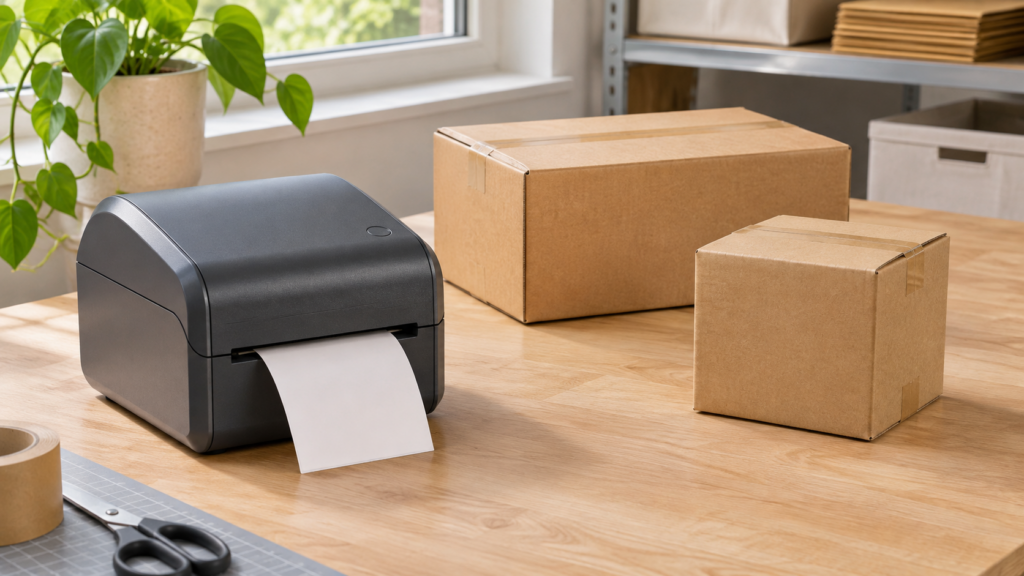
Unbranded label printer with a blank label strip beside two closed cardboard parcels on a packing table.
What you’ll learn

Follow the label through the task

These distinctions explain the work immediately around the printer.

  • Where a purchased label enters the printing task.
  • How a packing slip differs from a shipping label.
  • Why label fields cannot be assumed identical.
  • How physical attachment follows printing.
  • When another copy can replace failed output.
  • Why duplicate paper is not another shipment.
  • What separates prepared parcels from carrier receipt.

Tip: Separate parcel matching from print completion.

Key definitions

Six terms around the printer

The examples use provider-specific document and action names.

Shipping label

Carrier information accompanying a shipment; FedEx describes route details and a tracking barcode.

  • Route: Identifies origin and destination.
  • Identity: FedEx requires a unique label for each shipment.
  • Related document: Shopify’s packing slip supplies the shipment’s item list.

Packing slip

In Shopify, a list of the items sent in a particular shipment.

  • Print access: Shopify offers packing slips among documents available from purchased labels.
  • Split orders: Separate shipments can have separate slips.
  • Provider wording: eBay describes its slip as an order’s detailed contents list.

Reprint

Another physical copy of a purchased label.

  • Shopify purpose: A misprint can be replaced before the package ships.
  • Location: Shopify offers reprinting from its Shipping labels page.
  • Boundary: A duplicate Click-N-Ship copy does not supply extra postage.

Void

Cancel an eligible purchased label through its provider.

  • Shopify route: Void, correct the order details, then buy again.
  • Conditions: Label age, tracking events, service and manifest timing affect eligibility.
  • Separate action: Discarding paper is not Shopify’s label-cancellation procedure.

Shipping date

The intended sending date selected when purchasing the label.

  • Advance printing: Shopify allows selection of a future sending date.
  • Use: Its guidance says to use the label on the indicated date.
  • Delay: Shopify warns that using labels long after purchase can cause delivery problems.

SCAN form

A USPS Shipment Confirmation Acceptance Notice groups associated packages under a master barcode.

  • Service: Described by USPS for Click-N-Ship postage.
  • Receipt: USPS scans it when receiving the shipment.
  • Different object: The form groups labels; it is not each parcel’s label.

Tip: Keep the item-list question separate from the label’s route information.

Before printing

Start with the intended shipment label

The printing task begins with a label selected in the shipping service or selling platform. In Shopify, eligible fulfillment locations can purchase labels while fulfilling an order.

  • Shopify’s individual-label flow starts with an order containing unfulfilled items, giving the printing task a specific record to work from.
  • Selecting the included items defines which part of that order the shipment is meant to contain.
  • The shipping-details summary comes before Shopify’s label purchase, putting the sender’s review before those details become the purchased label.
  • In bulk printing, Shopify’s order and document selections determine which paperwork enters the task; document size is another explicit choice.
  • Shopify allows printing during purchase or later from purchased labels, so physical output can follow an earlier label purchase.

The printer enters an already-identified task; it does not choose which order you meant to send.

Keeping the association

Carry the parcel’s identity through the handoff

Match the label’s destination to the parcel; use the associated packing slip when checking shipment contents.

  • An order number is not a reliable universal handoff field: Royal Mail labels bought through Shopify Shipping omit it.
  • Shopify’s optional Collate setting changes the grouping: documents stay together by order, rather than being grouped by document type.
  • That setting organizes paperwork. The shipment-specific packing slip supplies the item list for the person checking the parcel’s contents.

If another person takes over, pass on which parcel the selected label belongs to, rather than relying on a loose stack.

Physical output

Inspect and attach the intended copy

Printed output has to become an attached label. Etsy describes separate attachment methods for paper labels and adhesive sheets.

  • Etsy’s distortion warning explains why inspection comes before attachment: a distorted label may hinder scanner reading and delay the package.
  • In FedEx’s Netherlands guidance, attachment leaves the information and barcodes visible; tape belongs away from those details.
  • On a reused box, the new label does not remove old identifiers. USPS says previous labels, barcodes and addresses should be covered or blacked out.

Attachment is part of the task: USPS also says not to fold labels over edges or overlap them.

Interrupted work

Separate a failed print from changed details

Shopify distinguishes an unshipped parcel’s misprinted label from changes to its shipment information.

  • For an unshipped Shopify parcel with a misprinted label, the problem is physical output; its existing label can be reprinted without another purchase.
  • Changed shipment details require a different Shopify action: an eligible label is voided, the order details corrected, and the label purchased again.
  • A second Click-N-Ship copy carries the same once-usable label number. That is why USPS instructs senders to discard an accidental duplicate.

Resolve whether the problem is the copy or the shipment information.

After attachment

Hand the parcel onward

A labelled package still needs its carrier handoff. eBay’s US guidance describes prepaid-label printing and carrier pickup or drop-off as separate tasks.

  • A label printed early may wait for its chosen shipping date; Shopify’s guidance says to use it on that date.
  • Printing a USPS SCAN form prepares the paperwork for a later event: the Postal Service scans it when receiving the associated shipment.
  • USPS describes label creation while awaiting the item separately from possession. The latter means USPS has received or picked up the parcel.

Finishing the print is a packing milestone; carrier receipt remains a separate handoff.

Reality check

Two illustrative interruptions

These fictional situations explain the distinctions; they are not test results.

A colleague takes over

Hypothetical eBay example: a seller deliberately adds order numbers to the labels using optional custom text. A colleague uses each reference to identify the corresponding order and packing slip.

The colleague compares the bookmark or badge contents with that order’s item list and keeps the corresponding label with its parcel. This is manual matching.

An extra copy appears

Hypothetical example: a second Click-N-Ship copy lies beside a parcel after printing. It is another copy of the same postage identity, not postage for another parcel.

USPS’s instruction is to discard the accidental duplicate. The useful distinction is between replacing a physical print and creating a different shipment.

Common myths

Five conclusions to avoid

These are misleading inferences, not claims about how often senders make them.

“A shipping label is my packing list.”

FedEx describes carrier-routing information. Shopify’s packing slip lists shipment items.

“An extra copy covers an extra shipment.”

USPS Click-N-Ship ties postage to its unique label number. Its duplicate-copy instruction is disposal, not reuse.

“Reprinting applies my new details.”

In Shopify, changing a location address affects newly purchased labels, not ones bought earlier. Another print is not an address update.

“Old box labels can stay visible.”

USPS tells senders reusing boxes to cover or black out previous shipping labels, barcodes and addresses. The new print does not remove those competing identifiers.

“Label created means the carrier has it.”

USPS’s label-created status describes a label awaiting the item. Its possession status describes receipt or pickup.

Tip: Treat the move from printing to carrier pickup or drop-off as an actual task, not a consequence of pressing Print.

FAQ

Other questions at the packing station

These follow-ups address documents, parcels and printing arrangements.

Can I print a shipping label in Shopify without an order?

Shopify’s admin requires an order for this. Depending on the carrier, its own website may offer a different label-printing route.

How do paper and sticker labels attach?

USPS Click-N-Ship describes securing paper labels with clear shipping tape on four sides, leaving barcodes and the Postal Use area on Priority Mail Express labels uncovered. Etsy describes peeling a sticker’s backing away and applying its adhesive surface to the parcel.

What if one order leaves in two parcels?

eBay documents a different label for each package, with its own tracking number. Another parcel therefore needs its own label, rather than another copy of the first.

Does a USPS label need to match its packaging?

Yes. USPS requires the label and packaging to match. Its example is a Priority Mail box or envelope requiring the Priority Mail rate.

Can I print just the shipping label for an order?

Shopify’s individual-label dialog lets you select that order’s label, choose a printer and select matching paper size. You do not have to start with a batch.

Can the label be printed somewhere else?

USPS Label Broker lets you take a packed, sealed parcel and its Label Broker ID to a participating location for printing. Support is location-specific; a random QR code is not a substitute.

Must every USPS batch have a SCAN form?

WooCommerce Shipping describes its USPS SCAN forms as optional. Its documentation applies to US-based stores using USD; the form provides a grouped handoff rather than a universal printing requirement.

Should a changed Etsy label simply be printed again?

Etsy describes a refund request for the incorrect label followed by purchasing a new one with updated specifications. Requesting a refund does not establish its approval.

Tip: For printing away from your own station, verify the actual supported service and location; USPS Label Broker requires both its ID and a participating site.

Bottom line

A shipping label printer supplies physical output. The parcel still needs label attachment and a separate carrier handoff.

Before passing the box onward, resolve whether any extra sheet is a replacement copy or a separate shipment label. Keep the carrier handoff distinct from the print task.

Next steps

Continue with the relevant format

Use the Shipping Label Printers category for the next part of your reading.