
Point-of-sale app
The seller’s software for starting and taking an in-person payment.
- Screen: The seller chooses the payment method at checkout.
- Input: A sale can start from selected items.
- History: Recorded payments can be opened later.
In a compatible smartphone point-of-sale (POS) setup, the phone running the checkout app can also read a contactless card or wallet in person. Take Square’s U.S. iPhone checkout in standard mode. The customer holds a contactless card or wallet device near the seller’s iPhone. A successful read starts payment processing. Square keeps the payment in the seller’s transaction history.
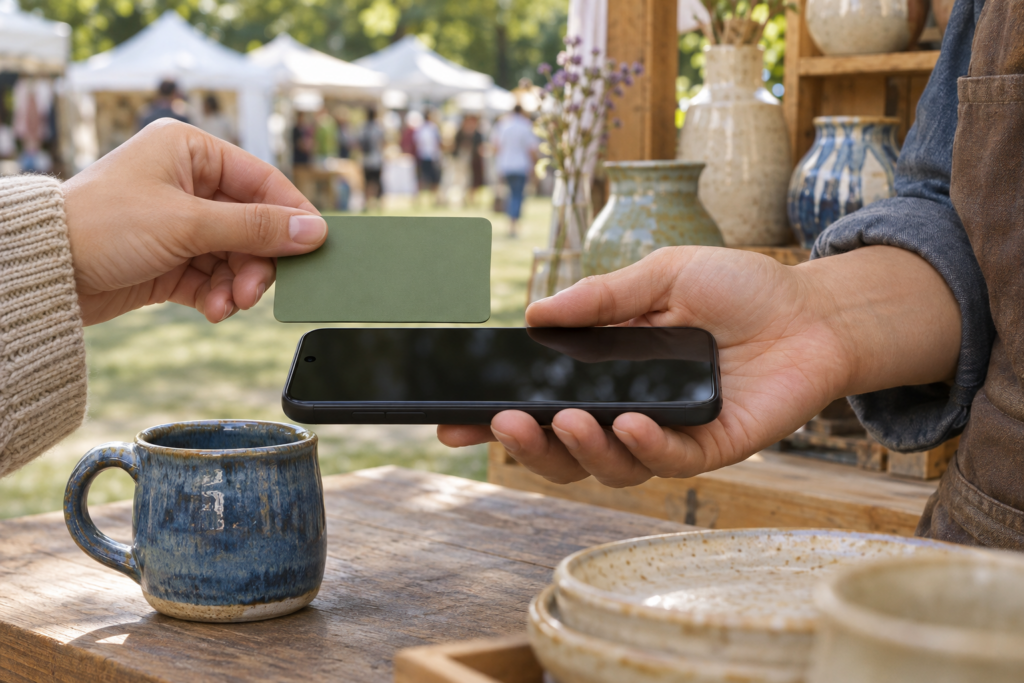
Follow the sale amount the seller enters, the card read and the payment the seller can look up afterward.
Tip: If the phone has read the card, give payment processing time to finish before interpreting the result.
Some labels name a way to pay. Others tell you where a payment stands.
The seller’s software for starting and taking an in-person payment.
Short-range wireless communication used for a contactless read.
A way to present a payment from a customer’s device.
The decision to approve or decline a card payment request.
The customer’s electronic copy of the transaction.
An attempt recorded while offline that is still awaiting processing.
Tip: At the counter, authorization refers to the payment decision and receipt refers to the customer’s copy.
In the phone-native setup, a supported app turns the seller’s iPhone into the device the customer pays against.
When the seller reaches the payment choice, Square still needs the customer’s presentation and the authorization response.
On a physical card, look for the contactless symbol on either side. That capability lets the card communicate with a reader at close range.
Apple Pay on the buyer’s device is the way the buyer presents payment. Tap to Pay on the seller’s iPhone is the acceptance feature.
The iPhone reads the payment information and the app’s payment provider processes it. The payment app displays the result.
A checkmark at the read stage answers whether the phone received the card information. The app’s result answers whether processing succeeded.
A receipt gives the customer a copy they can keep.
With that ID, the seller can find the payment even if the card is already back in the customer’s pocket.
Square’s phone-native route relies on an internet connection. An eligible offline reader setup leaves an attempt in the app to be processed later.
The reader’s offline session has a window for taking payments and a deadline to upload them.
A ceramics seller uses Square’s standard mode at a fictional U.S. craft fair. During the outage, a payment attempt can wait in the app for upload.
The seller has a working iPhone setup and a connection. A customer picks up a blue mug. The seller keys in the agreed amount, and the customer brings their contactless card to the tap area. A successful read tells the seller the phone picked up the card.
The buyer asks for the receipt by text. Once Square indicates acceptance, the seller can send the customer’s copy from the receipt screen if it’s offered. If they need to find the payment later, the seller can open the original record in Square.
Later, the booth loses internet access. The seller already has a compatible second-generation Square Reader paired, with offline card payments permitted for this outage. The buyer holds a contactless card near the reader. The attempt appears as pending in the app.
The seller can say the attempt was recorded. Completion or decline can appear after the phone reconnects and uploads the attempt. The customer may already be at the next stall by then. If Square completes the payment and a digital receipt is due, it goes out after processing.
Square can skip the receipt prompt at checkout. That’s one reason to ask what each screen actually tells you.
The buyer can hold an eligible contactless card up to the seller’s iPhone.
A read checkmark means the phone picked up the card. Treat the app’s transaction result as the payment decision.
In this setup, chip insertion takes place at a compatible Square Reader.
The merchant’s iOS device can skip the prompt by design. Look up the original payment separately in Square’s history.
Apple offers an offline feature when the payment provider implements it. Square’s U.S. offline options exclude the direct iPhone tap.
Tip: When someone says the tap went through, find out whether they saw the card-read screen or the payment result.
These questions cover what to do when a card stays unread or a customer needs a second copy of a receipt.
Square lists this direct acceptance feature for compatible iPhones and excludes iPads.
Yes. Accessibility Options on the PIN screen can guide the customer by audio as they draw digits or enter them with taps.
Try holding the card at a different position over the marked tap area. Apple notes that the card’s design can affect where it reads.
Square says that charge did not process. Making a new attempt requires the customer to present the card or wallet again.
An interrupted or declined attempt can leave a pending entry on the buyer’s side. Check for a successful payment in Square’s app or Dashboard.
Open the original payment in Square’s Transactions and use its receipt action. The action sends a copy of that payment’s receipt.
Yes. Square can expire the pending attempt if the seller misses the upload deadline for that offline session.
The completed payment and transfer are separate records. Square lets the seller check a transfer’s status and see which card payments it includes.
Tip: If the customer’s bank and your checkout screen seem to disagree, start by looking for the completed payment in Square.
In Square’s iPhone checkout, the app’s acceptance screen tells the seller the payment succeeded. That payment is the one the seller can open again in Square’s history.
On the offline reader path, treat the pending entry as an attempt and look for the result after upload.
Choose a Mobile POS archive by format.
Browse the parent category’s lists archive.
Open the Mobile POS comparisons archive.
Go to the category’s buying guides archive.
Choose a retailer
Prices checked regularly. We may earn a commission at no cost to you.