
How to Choose a Travel Accessory for Family Trips
A stand that fits your family’s tablet can work for a video together at the rental table. When two people use their own phones there, the same purchase may leave both without the support they need. Start with the screens you’ll actually prop up, then check which holders fit and how many are worth buying.
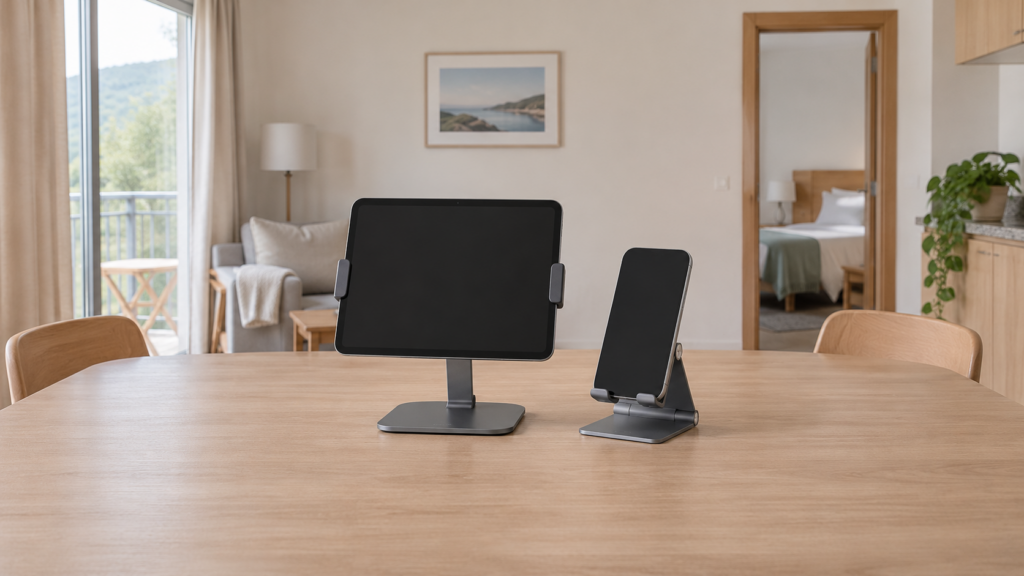
Buying framework
Plan the screens before you shop
Sketch what people will do at the accommodation table. The screen plan tells you what the holder has to do and whether you need to buy one.
Start with the activity: A family video calls for one display that the group can see. Independent tasks can put a screen in front of each person who uses one.
Note when the activities overlap: Two devices used after dinner may take turns or be in use together. That timing determines whether you can move a holder between tasks.
Decide which screens need propping: Someone reading a short message may prefer to hold their phone. A screen that needs to stay up while someone uses both hands earns a spot in the plan.
Look at the holders you already have: Set aside a stand or case with a built-in rest if it props up the intended device for that task. The remaining gap is what you need to shop for.
Pick the table and the seats: Plan around a flat, stationary tabletop you’re allowed to use. Choose where people would sit and where each supported screen could go.
Who this is for
Which setup fits your family?
A group watching together and two people working side by side can leave very different gaps. Find the arrangement that matches how your family will actually spend the time.
Everyone watches the same screen: If everyone will follow a video on one tablet, shop for one compatible tabletop stand when that screen needs support. The seats around the table determine where you’ll want to aim it.
Two screens stay up together: One person might read a reference while another takes a call. If both devices need propping, each needs its own support so either person can aim their display independently.
One screen is fine in hand: A person checking a route in short bursts might keep their phone in hand while someone else leaves a screen up for a longer task. Shop for the display that will stay on the table.
Different devices take turns: If one person reads before another starts a call, a single holder can serve both uses. Verify that its maker supports both exact devices before buying it for the two jobs.
Existing supports cover the setup: A tablet case with a rest or a phone cradle you own may already put each display where it needs to be. If the arrangement works from the seats you’ll use, skip the extra accessory.
What to pay attention to
Read the holder specs in two passes
First see where the holder meets the device. Then read what the base and adjustments let you change once that device is on the table.
Device contact and verified fit
Use the maker’s compatibility information to see whether the holder can take the device in the form you’ll use it.
Table placement and adjustment
Look at where each support can sit and what you can change about the screen’s position once it’s there.
Spring-loaded edges or cradle hooks: The spring-loaded holder in this guide grips opposite tablet edges. The folding phone cradle supports the bottom edge on hooks while the phone leans against a backrest.
Exact device names: Find the exact device model in the holder maker’s compatibility list. If the maker gives a screen size range, check it against the device maker’s corner-to-corner display measurement.
Room for the case: The folding cradle’s maker gives a 0.71-inch thickness limit for phones with cases. A protruding grip or an unusual case shape can still change where the phone meets the hooks and backrest, so check those contact points.
Base and table space: Both examples use bases on the tabletop. Allow room for the tablet stand’s base and arm in the shared spot, or for a folding cradle at each seat where a phone needs support.
Height and angle controls: The tablet pedestal has an adjustment ring and knob for setting height and angle. The folding phone cradle changes height and angle through two pivot points.
One aim per holder: Each documented holder has a single device position. Aim a shared display for the group, or give different activities their own displays and set each one where its user needs it.
Avoid these traps
Where a holder purchase can go wrong
It’s easy to read the right number or feature on a listing and apply it to the wrong part of the setup. These mistakes show where a promising option can cost you a return or an extra purchase.
Shopping for each person at the table: Buying a stand per person can leave extras unopened when everyone watches the same video. Work out where the actual displays will be before deciding how many holders belong in the order.
Using the outside width as the screen size: A tablet’s width across its casing and its display diagonal measure different things. Width belongs in a check of the physical contact space when the maker gives that dimension.
Assuming a device family name covers every version: A listing that names one generation gives you evidence for that generation. Copy the exact designation from your device information before relying on the listing for a similar-looking version.
Taking bare-device fit as proof of cased fit: A case adds material right where a hook or grip may need to sit. If the case will stay on during the trip, confirm the fit of that combination while you still have a choice of holders.
Planning to share a single position during overlapping tasks: A single-device cradle can be passed along after someone finishes. If a reading session continues into the start of a call, the second person needs a separate way to prop up their screen.
Stopping at whether the bases fit: There may be room for a base even if the screen would face away from a viewer. Allow space to position the displays for the people using them and keep the parts of the table they need clear.
Decision guidance
How a change of activity changes the purchase
Imagine one family with a tablet and two phones it already owns, all without cases. Both plans use the same permitted, flat, stationary accommodation table. Only the activities and the screens in use change.
If the family watches one video together: They use their 10.86-inch tablet as the only screen and choose a place to aim it toward the group. A single stand covers that position if the family needs the tablet propped up.
If the shared tablet needs a stand: Choose the base-and-arm tablet stand if no existing support does the job. Its maker explicitly lists the exact tablet, and the stand has one spring-loaded holder with adjustable pedestal height and angle.
If they switch to separate activities: The tablet goes aside, with the family still at the same table. One person reads reference material on one 6.1-inch phone while another takes a video call on the other 6.1-inch phone. Assume both screens need propping at once, each aimed for its own task.
If both phones need new supports: Buy two of the folding tabletop cradles if both positions are uncovered. The maker lists both exact phones, and each cradle holds one device against its backrest and hooks. The cradle’s stated 4–8-inch screen range puts the shared tablet outside its documented size range.
If something the family owns covers a position: Use an existing holder where it already fits the phone and serves the activity. If either phone can stay in hand or use a suitable holder the family owns, buy just one cradle for the remaining position. Skip the purchase if both positions are covered.
Ownership & compatibility
Set up the holders at the table
Use the directions that match the holder you receive. Once the screens are in place, the people using them can see whether the arrangement serves their activity.
Match the stand to its directions: Compare the model on the package with the listing and instructions you used to check fit. Use the directions for the delivered version if the seller lists several under similar names.
Start with the table you chose: Set the bases on the permitted, flat tabletop. Place them where you planned to use the screens and leave the rest of the needed table space clear.
Set the tablet pedestal and retighten: On the assembled base-and-arm stand in the example, use the ring and knob to adjust height and angle as directed in its manual. Retighten the adjusters to set the position.
Place and aim each phone on its own cradle: Seat the bare phone against the folding cradle’s backrest and hooks. Set the angle and height for that phone’s activity, then do the same for the second phone from its own seat.
Try the arrangement from the actual seats: For the shared video, have each viewer look from where they’ll sit. For separate tasks, each person can see whether their screen is readable and whether they can reach any controls they need.
FAQ
Questions about tabletop holder fit and use
Use these checks when a listing leaves a fit question open or when the family changes how it plans to use the screens.
Where can I find the exact version of my device?
What if the listing only gives screen inches?
What if the maker’s page and manual disagree?
Can two people take turns with the same holder?
Could the folding phone cradle also hold the shared tablet?
How should I check a phone with its case on?
Should I check which way the screen can face?
What if only one of two people wants hands-free use?
How can I tell whether everyone can see the shared screen?
Bottom line
Buy only the tabletop support you’re missing
A holder earns its place when it fills a specific gap at the table. Settle the shared or separate screen plan, then choose equipment for the positions that are still open.
Name the screens for the activity: Decide which display people will actually look at and whether it needs to sit on a holder.
Match each device to documented fit: Use evidence for the exact model and check the fitted case or attachments if they’ll stay on.
Count the gaps at the busiest moment: Buy for the supported screens that need to be up together and still have no suitable place to sit.
Give each screen a place at the table: Allow room for the bases and choose a display position that people can check from the seats they’ll use.
Use the supports you already have: If your holders or cases cover the planned positions, leave the new stand off your list.
Reading Shortcuts
Plan which screens need support, check holder fit or see how the purchase changes from one shared tablet to two phones.
Before you order
Keep the devices and the table you’ll use in mind as you read holder listings.
- Use a permitted flat table: Pick the stationary surface where you’ll put the displays.
- Write down the model: Use the designation on each device or in its settings.
- Account for the case: Check the phone or tablet in the form you’ll use it.
- Count at the same time: Mark which screens need a holder during overlapping tasks.
- Allow room at each spot: Leave table space for the bases and the activity itself.
- Check what you already own: Keep any holder or case that already serves one of the planned positions.
Tabletop holder terms
Use these terms to find the measurements and contact points that matter in a holder listing.
When a list can help
Browse the Travel Accessories lists when you’re still looking for possible holders.
- Start with the holder form: Look for a tabletop tablet stand or a folding phone cradle according to the activity.
- Record the exact product: Keep the full holder model so you can find the right maker details.
- Follow up on fit: Use the maker’s documentation to check the devices you plan to prop up.
- Keep the quantity in view: A list can help you find options. Your planned screen positions tell you how many you need.
Use a comparison to see where each holder grips or cradles the devices you’ll bring.
When a comparison can help
Use the Travel Accessories comparisons when you have candidates to weigh against the same screen arrangement.
- Look at the contact points: See where each holder engages the edges or supports the device from below.
- Match the device lists: Check which candidate names the exact phone or tablet you plan to use.
- Compare the adjustments: Look for the height and angle settings relevant to your seats and activities.
- Compare the whole setup: Work out how many of each option you would need and where they would sit on the table.
Use a list to look for a tablet stand for shared viewing or separate cradles for phones that both need propping.