
How to Choose Car Phone Mounts for Ride-Share and Commuter Cars
A phone mount in a working or commuting car is handled far more often than one used for occasional trips. The useful choice must accept the phone quickly, hold its angle over rough pavement, support a sensible charging route, and avoid becoming an obstacle when passengers enter or leave.
Start with the car, phone, case, and driving routine rather than a preferred attachment style. A parked mock-up can reveal reach, sightline, cable, vent, and passenger-space conflicts before adhesive is exposed or hardware is tightened.
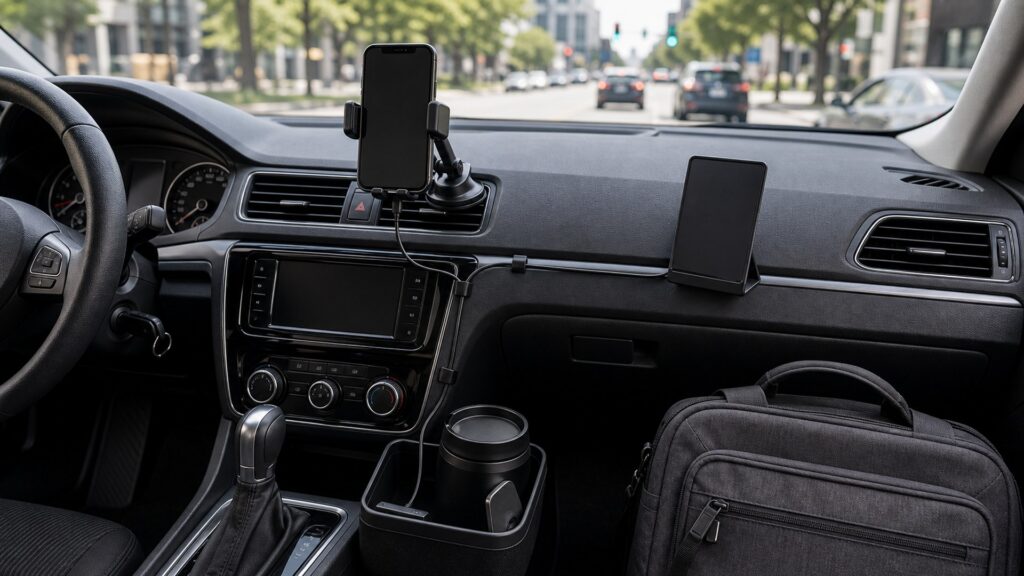
Buying framework
Design the setup around a full driving shift
Work through placement, retention, power, and repeated handling in that order. A mount that fails an early boundary should not advance because it offers faster charging or a clever release.
Choose a low-distraction viewing zone: While parked, compare locations from the normal driving posture. Keep the phone outside the forward road view and away from airbags, gauges, built-in displays, and controls that must remain immediately available.
Match the base to the vehicle: Inspect the actual vent geometry, dash texture, windshield reach, or cupholder dimensions. Thin vent vanes, soft-touch coatings, steep glass, and frequently used cupholders can eliminate an attachment family before phone retention matters.
Test the complete phone load: Install the everyday case, magnetic ring if required, and charging lead. Confirm that the cradle supports the phone without pressing side buttons, covering cameras, or letting the cable pull the handset out of alignment.
Simulate repeated stops: With the vehicle stationary, dock and release the phone through a realistic series of pickups. Note two-handed corrections, release hesitation, joint movement, and any need to reset the screen angle.
Who this is for
Let the driving pattern set the priorities
A full-time ride-share driver, delivery worker, highway commuter, and shared-fleet user create different cycle counts, passenger constraints, and power demands.
Full-time ride-share driver: Prioritize a predictable one-hand release, an unobtrusive passenger-facing installation, and a joint that does not need constant retightening. Check rear-seat entry and front-passenger knee space with the mount loaded.
Delivery and service driver: Frequent exits favor fast docking and a cable that stays captured when the phone leaves. Test the holder with gloves if they are part of the job and reject small release controls that are hard to locate.
Long-distance commuter: Emphasize a stable glance angle, low vibration, and charging that keeps pace with navigation. A vent mount may be convenient, but directed heating or cooling can make that location undesirable for the phone.
Shared or fleet vehicle user: Favor reversible installation, broad case compatibility, and simple adjustment that returns to a known position. Avoid solutions that require each driver to move permanent hardware or route a personal cable through controls.
What to pay attention to
Translate specifications into shift-level consequences
Published dimensions and charging claims become useful only after they are related to the loaded phone, the attachment surface, and hours of navigation.
Docking cycle
Judge jaws, magnets, buttons, and joints by how consistently they repeat the same action.
Sustained operation
Assess power and temperature with navigation, screen brightness, case, and cable considered together.
Phone and case envelope: Compare the supported width, thickness, weight, and magnet arrangement with the phone in its normal case. Leave clearance for camera islands, side buttons, charging ports, and folding-phone hinges where applicable.
Joint and arm leverage: Long arms can improve reach but multiply vibration and load at the base. Prefer the shortest geometry that reaches the chosen sightline, then check whether the ball joint holds orientation under gentle parked handling.
Attachment interface: Vent hooks need compatible vane depth and spacing; suction bases need an approved smooth surface; adhesive pads need compatible trim and preparation. Treat manufacturer exclusions as limits, not suggestions.
Charging system: For wireless charging, confirm phone alignment, case compatibility, cable rating, and adapter output as one system. For wired charging, leave enough slack for adjustment without creating a loop near pedals or controls.
Heat management: Long navigation sessions, direct sun, wireless charging, and heated vent airflow can add heat at the same time. Follow the phone maker's temperature guidance and move or discontinue the setup if charging pauses or warnings appear.
Avoid these traps
Shortcuts that fail during daily service
Most poor installations look acceptable in an empty, parked cabin. Test the conditions that appear after repeated pickups, passenger changes, and sustained navigation.
Buying for the phone without measuring the car: A compatible cradle can still have an incompatible base. Photograph and measure the proposed interface, including vent controls, trim curvature, display edges, and the distance from the driver's seated reach.
Using road driving as the retention test: Do not manipulate or evaluate a mount while moving. Establish fit while parked, install it exactly as directed, and stop using hardware that shifts during normal travel until the cause is corrected.
Treating charging watts as a guarantee: Advertised peak output does not describe the whole installation. Phone model, case, coil alignment, cable, adapter, temperature, and vehicle power source can each reduce or interrupt charging.
Ignoring the passenger turnover zone: A mount may clear the driver yet intrude on a passenger's knees, bag path, air vent, or entry motion. Load the front seat and open nearby compartments before approving the location.
Decision guidance
Choose by the failure that would disrupt the route
Use conditional priorities instead of selecting the longest feature list.
If stops are frequent: Choose the simplest release that works with the everyday case and can be repeated from the seated position while parked. Cable capture and a consistent return angle matter more than extra articulation.
If roads are rough: Reduce arm length and leverage, then favor a positive vent hook, well-supported cupholder base, or approved bonded surface. Remove any option whose joint creeps during a stationary shake check.
If navigation runs for hours: Prioritize a stable sightline and a power path tested with the actual adapter and cable. Keep the phone away from concentrated heat and preserve airflow required by the vehicle or device.
If passengers change constantly: Keep hardware compact and inside a zone that does not compete with entry, seat adjustment, storage, or controls. A clean, reversible attachment is preferable when the cabin must remain presentation-ready.
Ownership & compatibility
Inspect high-cycle parts before they become route problems
Frequent docking gradually changes pads, springs, joints, hooks, adhesives, and cables. Short inspections make movement easier to catch.
Weekly stability check: With the vehicle parked, check the base, arm, and cradle for new play. Remove grit from contact pads and follow the maker's tightening guidance rather than overtightening a vent or joint.
Power and cable check: Replace damaged or intermittently connecting cables and inspect the adapter for heat or looseness. Reroute any lead that has migrated toward a control, shifter, steering column, or footwell.
Revalidate after changes: A new phone, thicker case, different vehicle, moved seat, or seasonal temperature change can invalidate the original fit. Repeat the parked clearance and retention checks instead of assuming compatibility carries over.
FAQ
Questions about mounts for commuting and ride-share work
Use these answers to resolve the fit and operating details most likely to affect a long driving day.
Is a vent, dash, windshield, or cupholder mount best for ride-share driving?
How can I check one-hand docking safely?
What helps a phone mount stay stable on rough roads?
Will a wireless charging mount keep up with navigation?
Where should the charging cable run?
Can heated or cooled vent air affect the phone?
How do I preserve passenger space in a ride-share car?
How often should a commercial-use mount be inspected?
Should a shared fleet use magnetic or clamping cradles?
Bottom line
Favor repeatability over novelty
The right work-car mount performs the same small actions cleanly through an entire driving routine.
Approve the location first: Clear sightlines, safety equipment, controls, passengers, and storage before comparing cradle features.
Test the real load: Use the normal phone, case, cable, adapter, seat position, and passenger configuration in every parked trial.
Plan for wear: Choose replaceable contact parts and a reversible installation, then inspect high-cycle components on a regular schedule.
Reading Shortcuts
Jump to placement, use profiles, shift-level specifications, or the FAQ.
Parked Shift Checks
Evaluate the loaded mount before driving.
- Sightline: Keep the road view and gauges clear.
- Docking: Repeat insertion and release.
- Retention: Check the base and joint under load.
- Power: Use the normal cable and adapter.
- Heat: Consider sun, vents, and charging.
- Passengers: Preserve entry, knees, and storage.
Glossary Snippets
Terms that matter during frequent phone-mount use.
When to Use a Top 10 Review
Use a ranked shortlist after deciding which attachment families fit the work car and daily docking volume.
- One-Hand Docking: The limiting condition is documented.
- Pothole Retention: The loaded behavior has been observed.
- Repeatable Screen Angle: The relevant movement path remains usable.
- Continuous-Navigation Heat: The recurring ownership demand is understood.
Already down to 2–3 options? A Comparison is usually the faster next step.
When to Use a Comparison
Compare finalists through the same parked shift simulation, including docking, loaded stability, power, heat, and passenger clearance.
- Repeatable Screen Angle: Both candidates preserve this boundary.
- Continuous-Navigation Heat: Both survive the representative routine.
- Adapter Output: Both include the complete everyday setup.
- Passenger Entry: The remaining difference changes a real outcome.
Still exploring? Start with a Top 10 to build a shortlist first.