
How to Choose EV Charging & Electric Vehicle Gear for Adapter and Connector Compatibility
An EV adapter solves a very specific mismatch: one charging cable must connect safely to one vehicle inlet for one charging mode. Matching the shapes is necessary, but it is not enough. AC destination charging and DC fast charging use different equipment, and a vehicle or network may require approved hardware, compatible software, and account enrollment before a session can begin.
Start by writing down the connector on the charger, the inlet on the vehicle, and whether the session is AC or DC. Then confirm that exact path in the vehicle manual and the charging-network app. That short trace prevents most wrong-direction purchases and keeps convenience features from distracting from electrical and protocol compatibility.
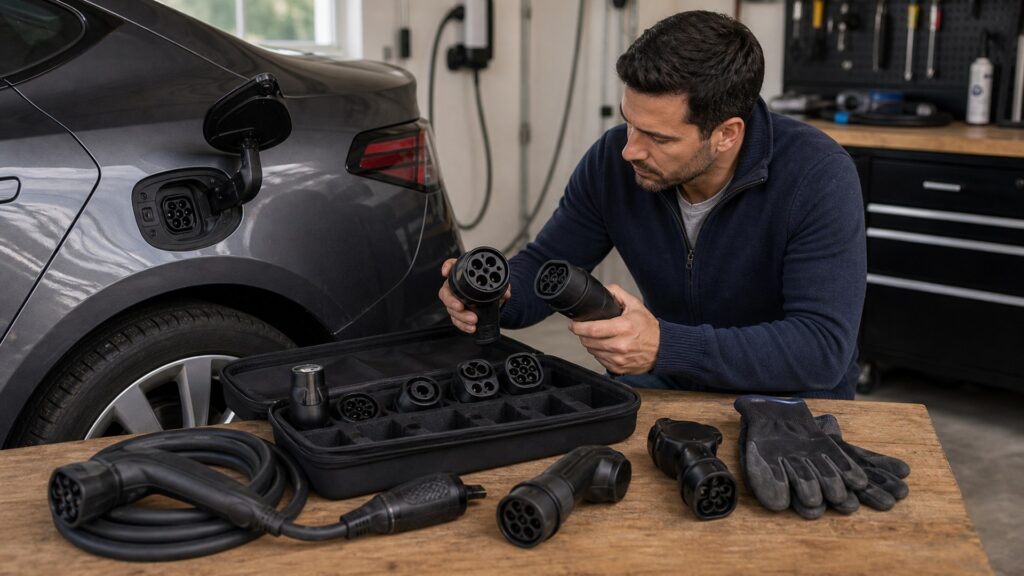
Buying framework
Trace the complete charging path
Treat compatibility as a chain rather than a plug-shape quiz. Every link—from the station cable to network authorization—must agree before an adapter earns a place in the vehicle.
Name both ends: Record the station-side connector and the vehicle inlet in that order. A J1772-to-J3400 AC adapter and a J3400-to-J1772 AC adapter solve opposite problems even though the same standards appear in both names.
Separate AC from DC: J1772 is associated with North American AC charging, while CCS1 adds DC contacts for fast charging; SAE J3400/NACS can be used for either mode. Buy for the actual power path, never from the connector silhouette alone.
Verify the vehicle: Check the owner's manual, charge-port information, and current automaker support page for the exact model and model year. Physical fit does not establish communication support, firmware readiness, or approval for a particular adapter.
Verify the station: Use the automaker or charging-network app to confirm that the specific site and charger generation accept the vehicle. Connector compatibility does not automatically grant network access or determine how the session is started and paid for.
Choose qualified hardware: Favor an adapter supplied or approved for the vehicle and intended network, with clear AC or DC labeling and traceable safety certification where applicable. Ratings and molded ends are not substitutes for documented interoperability.
Who this is for
Build a kit around the charging you actually use
The useful adapter is the one that closes a known gap in a regular route or charging routine. Different drivers need different combinations, and carrying every possible conversion adds clutter without guaranteeing access.
J1772 or CCS1 vehicle owners adding J3400 access: Separate home or destination needs from road-trip needs. An approved J3400-to-J1772 device may cover AC charging, while designated J3400 DC sites require a different adapter approved for the CCS1 vehicle and network.
Native J3400 vehicle owners using legacy equipment: A familiar J1772 workplace cable may call for one direction of AC adapter, while a CCS1 fast charger calls for a distinct DC product. Confirm whether the vehicle supports each route; native port shape alone does not answer both questions.
Apartment, workplace, and frequent-travel drivers: Inventory the connectors at the properties and networks you visit most, including whether access is AC or DC. Prioritize one verified adapter, a protective case, and the required apps over a speculative collection of couplers.
Owners of CHAdeMO or other legacy-inlet vehicles: Do not assume the J3400-to-CCS transition created a simple bridge for every older inlet. DC conversion can depend on vehicle-specific electronics and approved equipment; route planning around native compatible stations may be safer and more reliable.
What to pay attention to
Read beyond the connector label
The most useful specifications tell you whether the adapter supports the intended mode and whether it remains secure under high current and cable weight. Translate each claim into a compatibility or safety consequence.
Interface & Authorization
Confirm direction, AC or DC operation, vehicle protocol support, eligible station generations, and the account or app used to authorize charging.
Electrical & Mechanical Integrity
Check documented current and voltage limits, certification, latch engagement, contact protection, housing condition, and how the cable load reaches the vehicle inlet.
Standards and direction: Look for explicit charger-side and vehicle-side labeling rather than a vague list of supported connectors. The packaging should make the direction unmistakable and identify whether the product is for J1772 AC, CCS1 DC, or SAE J3400/NACS service.
AC/DC designation: An AC adapter routes power to the vehicle's onboard charger; a DC adapter participates in a fast-charging path that bypasses it. A product approved for one duty should not be improvised for the other.
Current and voltage limits: Both ratings must cover the intended equipment, but they describe a ceiling rather than promised speed. The station, vehicle, battery temperature, state of charge, and communication handshake can all impose a lower rate.
Qualification and certification: Check for automaker or network approval and verify any independent certification in the issuer's product directory. Adapter evaluation can include temperature rise, insulation, grounding, endurance, vibration, latching, and resistance to mechanical abuse.
Latch, insertion, and strain: The connectors should seat fully and latch without unusual force or looseness. At a fast charger, the cable should reach without twisting the adapter or pulling sideways on the inlet; a technically correct plug can still be a poor physical setup.
Contact and weather protection: Choose caps and a case that keep grit, road salt, moisture, and metal objects away from the contacts during storage. Weather resistance is not permission to connect damaged, contaminated, submerged, or iced hardware.
Avoid these traps
Compatibility shortcuts that fail at the charger
Most expensive errors begin with a correct observation—two shapes seem to match—followed by an unsupported assumption. Correct the assumption before buying more hardware.
Shopping by shape alone: A mating connector says nothing about AC/DC duty, communication support, or station authorization. Trace connector, mode, vehicle eligibility, and network access as four separate checks.
Treating AC and DC adapters as interchangeable: A destination charger and a fast charger can both use a J3400-shaped handle while delivering different current types. Use only the adapter documented for that charging mode and vehicle.
Reversing the conversion: Search results often place both connector names in either order. Verify which end accepts the charging cable and which end enters the vehicle before relying on a product title or photo.
Stacking adapters: Combining couplers creates extra contact interfaces, additional heat and leverage points, and an unverified communication path. If no single approved adapter supports the connection, treat that charging option as unavailable.
Chasing the largest power number: An oversized rating cannot make the vehicle or station deliver more power, and it does not prove interoperability. Put documented approval, full electrical ratings, secure engagement, and usable cable reach ahead of a headline kilowatt figure.
Decision guidance
Match the adapter to the exact charging scenario
Use these branches only after identifying the inlet and the station handle. If the manual or current support channel does not confirm the path, pause instead of guessing from a marketplace compatibility chart.
If the station is J1772 AC: A vehicle with a matching J1772 inlet connects directly. A native J3400/NACS vehicle may use a vehicle-approved J1772-to-J3400 AC adapter; a CCS1 inlet normally accepts J1772 through its upper AC portion without a separate adapter.
If the station is J3400/NACS AC: A native J3400 vehicle may connect directly. A J1772 or CCS1 vehicle needs an AC adapter in the correct direction, and the driver should confirm that the particular charging equipment and vehicle allow that use.
If the station is J3400/NACS DC: Native J3400 fast-charge support may allow direct connection. A CCS1 vehicle needs an approved J3400-to-CCS1 DC adapter plus explicit vehicle and site eligibility; an AC adapter is not an acceptable substitute.
If the station is CCS1 DC: A CCS1 vehicle connects directly. A native J3400 vehicle needs a supported CCS1-to-J3400 DC adapter and may require vehicle-specific hardware or software compatibility, so verify by model and model year.
If the inlet is CHAdeMO or the route remains uncertain: Use the vehicle maker's documented options and plan around native compatible stations. Avoid improvised chains; if charging-equipment installation or cable condition is in question, involve the network operator or a qualified service professional.
Ownership & compatibility
Keep the connection clean, supported, and current
An adapter has little routine maintenance, but its contacts and housing carry consequential loads. A brief inspection and a deliberate connection sequence are more useful than cosmetic care.
Inspect before every session: Look for cracks, deformation, corrosion, debris, damaged seals, loose parts, or darkened contacts. Stop using equipment that will not latch normally, becomes unusually hot, or shows damage; do not open or attempt to repair it.
Connect and disconnect in the stated order: Follow the adapter, vehicle, and network instructions, and end the charging session before unlatching anything. Push each connection fully home without forcing it, then confirm the vehicle reports a normal charging state.
Control cable load: Park close enough that the charging lead reaches without being stretched, sharply bent, or suspended from the adapter. Keep the cable out of pedestrian and vehicle paths, and do not use the adapter as a handle.
Store and re-verify: Fit the caps, let wet exterior surfaces dry as directed, and secure the adapter in a clean case away from loose metal objects. Recheck automaker and network guidance before major trips because access can change without changing the plug shape.
FAQ
EV adapter compatibility questions
These answers address common edge cases after the connector, charging mode, vehicle, and network have been identified.
Can one J3400/NACS adapter handle both Level 2 and DC fast charging?
How do I tell which adapter direction I need?
Does a higher kilowatt rating make an adapter charge faster?
Is an independently certified adapter automatically approved by my automaker?
Can I use a third-party adapter at any compatible-looking fast charger?
Is it safe to charge outdoors with an adapter in rain or snow?
Can I stack two adapters to reach a legacy connector?
Do plug-in hybrids use the same adapters as battery-electric vehicles?
What should I carry with an EV charging adapter?
Bottom line
Three confirmations make an adapter useful
The right adapter agrees with the physical connection, the electrical and communication path, and the rules of the vehicle and charging network. Miss any one of those gates and a connector that looks correct can still fail—or be unsafe to use.
Trace the direction: Name the station connector first, the vehicle inlet second, and verify that the adapter is built in that direction.
Name the charging mode: Confirm whether the session is AC Level 1/2 or DC fast charging, then reject any product that does not state the intended duty clearly.
Confirm approval and condition: Use current automaker and network guidance, choose qualified hardware, and inspect the contacts, latch, housing, and cable load before every connection.
Reading Shortcuts
Jump to the compatibility check you need.
Decision Reminders
Check these before ordering or connecting.
- Direction: Station connector to vehicle inlet.
- Mode: AC Level 1/2 or DC fast charging.
- Vehicle: Exact model, year, protocol, and firmware eligibility.
- Network: Eligible sites, charger generations, and account setup.
- Hardware: Approved use, ratings, certification, and clear labeling.
- Condition: Clean contacts, sound latch, and strain-free cable reach.
Glossary Snippets
The labels most likely to appear on ports and adapters.
When to Use a Top 10 Review
Use a ranked roundup only after your required connector direction and charging mode are clear.
- Known direction: You can name both ends of the connection.
- Known duty: You have separated AC from DC products.
- Known approval: Your vehicle and network permit the adapter type.
- Need a shortlist: You want to compare verified candidates efficiently.
Already down to 2–3 options? A Comparison is usually the faster next step.
When to Use a Comparison
Compare finalists when compatibility is settled and the remaining differences are construction, handling, or storage.
- Same use case: Both products support the same direction and duty.
- Same eligibility: Both are documented for the vehicle and network.
- Different execution: Latch, case, size, and cable support differ.
- Close decision: You need a direct tradeoff rather than a broad list.
Still exploring? Start with a Top 10 to build a shortlist first.