
How to Choose EV Charging Safety for Adapter and Connector Compatibility
Interface shape is only the first compatibility check; safe adapter use also depends on charging mode, exact EV software, station permission, ratings, latching, and thermal behavior. The useful comparison starts with expressly supported limits and a walk-through of the real connection point, not the highest advertised charging number.
Work in this order: establish exact EV inlet and model year first and evaluate AC or DC mode separately. Confirm adapter direction, component ratings, manufacturer approval, and network permission from current documentation. Reproduce latch engagement with the exact EV parked, then define connection state inspection before charging mode service.
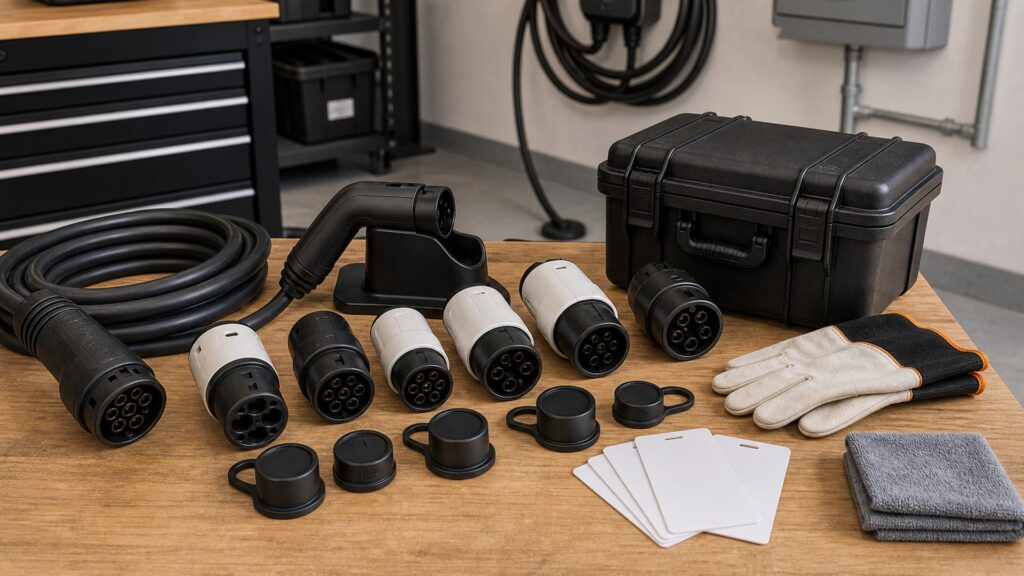
Buying framework
Resolve the purchase in four stages
Each stage answers a different question: what the connection point allows, what the charging gear supports, how the parked exact EV changes the layout, and how the result will be checked after installation.
Precise vehicle identity: Identify the exact EV, model year, inlet, and charging support because similar-looking ports can have different capabilities. Establish this compatibility limit before choosing a station.
Ac Or Dc Mode: An adapter designed for AC Level 2 service must never be assumed to support DC fast charging, and the reverse distinction also matters. Carry the result into the electrical and parking plan.
Adapter Direction: Adapter descriptions must state which interface supplies power and which exact EV inlet receives it; the connection is not automatically reversible. Use this finding to remove unsupported configurations early.
Component Ratings: The lowest voltage, current, power, and temperature limit among station, station lead, adapter, and exact EV governs the joined chain. Do not advance until the joined connection is expressly supported.
Who this is for
Match the charging gear to the repeated use pattern
The same hardware can suit one charging mode and obstruct another. Weight the profile that creates the strictest recurring constraint.
Mixed-brand household: Keep a labeled compatibility adapter file for each exact EV and charging mode so an AC adapter is not mistaken for a DC one.
NACS-transition driver: Check automaker access, supplied or approved adapter, software eligibility, and the specific charging sites opened to that exact EV.
Frequent road traveler: Carry only expressly supported adapters, store them cleanly, and confirm network access before a route depends on the connection.
Legacy-inlet owner: Treat older CHAdeMO, CCS, or early NACS support as model-specific and verify current exact EV documentation before purchase.
What to pay attention to
Translate specifications into connection point consequences
Ratings matter when they predict what happens at the interface, station lead, mounting point, electrical supply, or user path. Check the joined connected chain rather than one impressive component.
Expressly supported compatibility limit
Use markings and current maker documentation to define manufacturer approval and network permission for the exact model.
Observed operation
Put temperature monitoring through the normal exact EV position, people, weather, and charging demand rather than judging an idle display.
Manufacturer Approval: Use an adapter supported by the exact EV maker and charging-charging gear maker documentation for that precise connection and software state. Cross-check the marked limit with the proposed mounting position.
Network Permission: A network or connection point may restrict third-party adapters even when the hardware mates, so current operating rules are part of compatibility.Test the claim with the joined exact EV and station lead adapter chain.
Latch Engagement: The interface should insert fully and latch positively without forcing, rocking, hanging weight, or a parked exact EV pulling sideways.Observe this interface through connection, charging, and storage.
Temperature Monitoring: Use only the protective sensing and current-limiting behavior expressly supported for the approved chain; stop for unusual heat or repeated interruption.Adapter file the most demanding approved connection state, not an empty-bay demonstration.
Weather Limitation: Every joined component must permit the actual rain, splash, temperature, and storage conditions in the orientation being used.Keep the result with the commissioning or purchase adapter file.
Avoid these traps
Shortcuts that hide a real compatibility problem
These errors substitute a label, ideal parking position, or first successful session for compatibility proof that the joined adapter chain remains supported.
Matching by appearance: Physical engagement cannot prove the exact EV has the required communication hardware, software authorization, or electrical pathway.
Buying an unlabeled bidirectional adapter: Ambiguous direction creates a serious risk of using an AC product in a DC scenario or reversing its intended interface chain.
Ignoring station lead weight: A heavy fast-charge station lead can lever an adapter sideways and prevent joined latching even when the contacts initially energize.
Continuing after heat or faults: Repeated retries do not diagnose contamination, poor engagement, unsupported operation, or a damaged contact interface.
Decision guidance
Use the first limiting connection state to narrow the field
Remove choices that fail a expressly supported electrical, environmental, exact EV, or routing compatibility limit. Cross-check physical fit only among configurations that remain valid as a joined system.
For AC destination charging: Verify the exact EV inlet, station interface, adapter direction, current limit, and permission in both makers' maker documentation.
For DC fast charging: Use only automaker-supported hardware and eligible networks; confirm exact EV software and connection point access before travel.
When a connection feels loose: Stop and inspect in a safe de-energized state; no parking position or strap should be used to hold the adapter in place.
If rain or snow is present: Follow every component's weather maker documentation and keep interfaces oriented, latched, and stored exactly as the approved adapter chain requires.
Ownership & compatibility
Keep the charging adapter chain inspectable
Charging mode handling and connection point changes can alter a sound initial installation. A focused check of condition inspection reveals change before the household treats a workaround as normal.
Inspect before every trip: Check contacts, housings, seals, latch movement, labeling, and storage case so contamination or damage is found before a remote stop.
Save model-specific maker documentation: Keep the current exact EV and adapter documentation available offline, including which networks and charging modes are authorized.
Retire questionable hardware: Cracks, bent contacts, looseness, scorching, or unexplained heat call for manufacturer guidance or replacement, not field repair.
FAQ
Questions buyers ask about adapter and interface compatibility
Use these answers to close narrow gaps after the exact EV, charging mode, electrical connection point, and parking layout have been identified.
What proves the exact EV and adapter belong together?
How should a buyer evaluate AC or DC mode?
When does adapter direction rule out a adapter candidate?
Which compatibility proof governs component ratings?
How can I verify manufacturer approval?
What should I document about network permission?
Why does latch engagement matter in daily use?
Can physical fit features compensate for weak temperature monitoring?
What belongs in the final weather limitation compatibility check?
Bottom line
Choose the system you can explain and recheck
A strong adapter candidate meets the real energy need, stays inside every connected limit, and leaves clear compatibility proof for another owner, installer, or technician.
Set the compatibility limit first: Resolve the precise vehicle identity, AC or DC mode, and the governing approvals before cost or connected features influence the shortlist.
Reproduce approved use: Confirm latch engagement across each parking position, with the lead connected and the expected demand applied.
Keep a service baseline: Document the accepted connection state and use connection state inspection to catch wear, environmental change, or a new incompatibility.
Reading Shortcuts
Jump to the unresolved part of the decision.
Decision Reminders
Joined these checks at the actual parking and electrical connection point.
- Precise vehicle identity: Verify the marked compatibility limit.
- Ac Or Dc Mode: Measure the real connection state.
- Adapter Direction: Use current model maker documentation.
- Component Ratings: Include the joined load.
- Manufacturer Approval: Adapter file the first conflict.
- Network Permission: Keep the result serviceable.
Glossary Snippets
Definitions that clarify vehicle inlet and model year and the wider charging system.
When to Use a Top 10 Compatibility check
Use ranked candidates after the precise vehicle identity and component ratings have removed incompatible options.
- Precise vehicle identity: The required compatibility limit is known.
- Ac Or Dc Mode: The connection point connection state is measured.
- Adapter Direction: The supported interface is expressly supported.
- Component Ratings: The demanding charging mode has been reproduced.
Already down to 2–3 options? A Comparison is usually the faster next step.
When to Use a Comparison
Put finalists through the same connection point checks instead of comparing unrelated feature lists.
- Manufacturer Approval: Both choices meet this limit.
- Network Permission: Both use the supported adapter chain.
- Latch Engagement: Both remain practical when connected.
- Temperature Monitoring: The difference changes ownership work.
Still exploring? Start with a Top 10 to build a shortlist first.