
How to Choose Interior Comfort for Ride-Share and Commuter Cars
High-use comfort changes over time. Foam compresses after hours, seat surfaces warm, clothing traps moisture, settings drift between drivers, and rear passengers leave heat, odors, crumbs, and displaced cables behind. A five-minute parked trial cannot represent a commute or working shift.
Evaluate the duty cycle and the reset. Establish safe driver geometry, then test support and temperature through the longest normal use period. For passenger service, time inspection, ventilation, cleaning, drying, cable control, and storage between riders. Favor removable and individually replaceable pieces that preserve airbags and sensors. An upgrade that saves pressure but adds cleaning downtime or access confusion may not improve the operation.
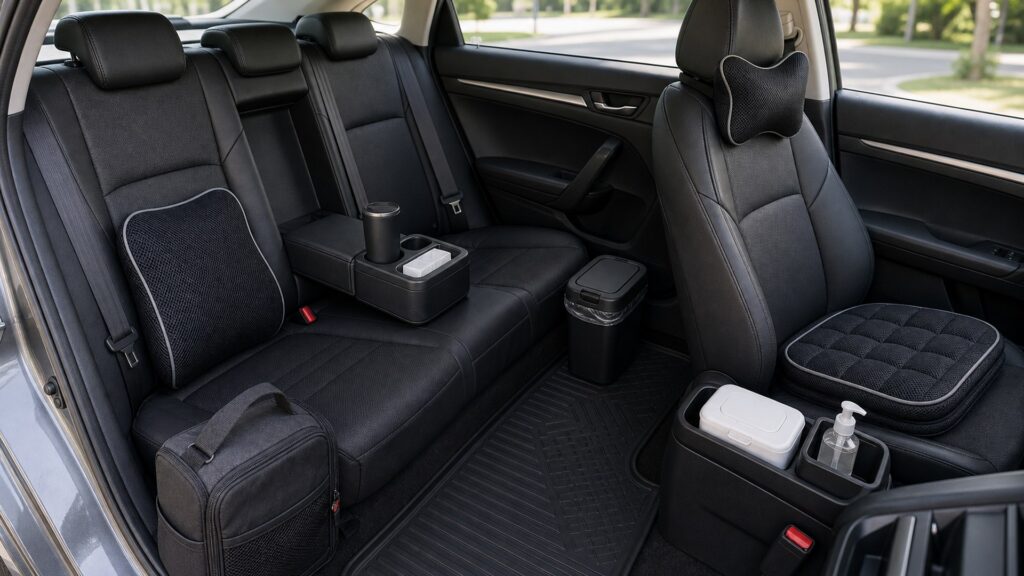
Buying framework
Set the high-use cabin comfort baseline before buying
Convert the desired high-use cabin comfort improvement into physical, functional, and maintenance requirements.
Quantify daily exposure: Record driver hours, trip length, entries, passenger count, climate, clothing, traffic, rear-seat use, cleaning opportunities, and overnight recovery.
Set the driving baseline: Mark seat, wheel, mirrors, belt, head restraint, lumbar, vents, and pedal reach before assessing any added support.
Measure the passenger reset: Time debris inspection, odor diagnosis, wiping, ventilation, cable retrieval, organizer check, accessory removal, drying, and return to service.
Define replacement thresholds: Set limits for foam collapse, strap stretch, surface polish, staining, odor, connector heat, attachment wear, and recurring position drift.
Who this is for
Match the solution to the high-use cabin comfort user
Different bodies, occupants, routes, climates, and cabin layouts justify different high-use cabin comfort priorities.
Long solo commuter: Driver pressure distribution, temperature, stable settings, glare, and easy seasonal removal lead without demanding commercial rear-cabin features.
Occasional ride-share operator: Quick rear cleanup, unobtrusive storage, secure charging access, and a reversible driver aid may provide the best balance.
Full-time passenger-service driver: Use durable, washable, replaceable solutions with strict airbag compatibility, fast reset, and supplier continuity.
Shared-driver vehicle: A neutral baseline, individual adjustment rules, labeled storage, and rapid removal prevent one person's comfort aid from misfitting another.
What to pay attention to
Evidence that predicts high-use cabin comfort performance
Specifications matter only when translated into what changes inside the exact vehicle during high-use cabin comfort use.
Driver Endurance
Evaluate support, pressure, temperature, moisture, reach, visibility, and adjustment stability over the complete commute or working shift.
Passenger Turnover
Evaluate quick resets, rear access, cleanable touchpoints, odor removal, cable control, secure storage, and low downtime between riders.
Long-duration support: Reassess pressure at intervals because cushion response, posture, and muscle fatigue change after the initial drive.
Adjustment repeatability: Seat markers, memory profiles, removable supports, mirror resets, and clear storage should return each driver to safe controls quickly.
Rear-zone cleanability: Inspect seams, organizer pockets, shade mounts, vents, charging ports, and seat gaps for surfaces that trap spills or extend turnaround.
Odor recovery: Identify food, moisture, upholstery, filter, pet, smoke, or cleaner sources; fragrance alone does not restore a healthy or comfortable cabin.
Commercial wear parts: Straps, covers, cords, remotes, clips, and support inserts should be individually replaceable with stable part numbers and known lead times.
Downtime economics: Combine active cleaning, drying, diagnostics, installation, replacement delivery, and lost operating hours rather than comparing accessory price only.
Avoid these traps
Mistakes that compromise high-use cabin comfort
Convenience becomes a defect when an add-on alters controls, restraints, airbags, visibility, airflow, or secure storage.
Choosing maximum softness for an all-day shift: Deep compression can reduce support and move the driver relative to wheel, pedals, belt, and head restraint as hours pass.
Covering stains before finding the source: A new cover can trap dampness or odor and may conflict with airbags or sensors; clean and diagnose first.
Letting passenger cables remain loose: Displaced leads become trip, pinch, entanglement, or seat-rail hazards; reset their length and anchor after every rider.
Using one personal cushion for every fleet driver: Different bodies require different geometry; removable aids need individual approval and cannot replace a safe shared-seat baseline.
Decision guidance
Choose a defensible high-use cabin comfort path
Select the least intrusive option that proves the required high-use cabin comfort outcome under representative conditions.
For long personal commuting: Improve factory adjustment and one measured pressure or thermal issue with a reversible, safety-compatible product.
For part-time passenger work: Prioritize rear cleanliness, accessible charging, secure small-item storage, and a short documented end-of-day reset.
For full-time service: Choose commercial-duty cleanability, component replacement, fast drying, simple passenger interfaces, and reliable installer or supplier support.
For rotating drivers: Keep the default cabin unmodified where possible and issue labeled personal aids that are removed and stored after each shift.
Ownership & compatibility
Maintain the high-use cabin comfort result
Inspection, cleaning, adjustment, records, and replacement keep the original high-use cabin comfort decision valid.
Log full-shift comfort: Record pressure locations, heat, reach, adjustment changes, accessory movement, alertness concerns, and whether the solution remains helpful at shift end.
Complete every turnaround consistently: Clear objects, check rear restraints and airbags, inspect surfaces, route cables, restore airflow, remove odor sources, and confirm driver controls.
Retire worn supports early: Compression, broken straps, slick fabric, exposed wiring, hot connectors, persistent odor, or unstable position ends the accessory's service life.
FAQ
Questions to resolve for high-use cabin comfort
Use exact vehicle documentation and product instructions to settle these points.
How long should a commuter cushion be tested?
What cabin material is easiest for ride-share cleaning?
Can an organizer improve passenger comfort?
How should odors be handled between passengers?
Are shared charging cables worth installing?
Should every driver use the same seat support?
How do I measure cleaning downtime?
Can a seat cover hide normal wear?
When should a comfort accessory be replaced?
Bottom line
Preserve safety while improving high-use cabin comfort
A successful upgrade remains compatible, removable, understandable, and safe throughout ownership.
Measure the full duty cycle: Test support, heat, control geometry, and movement for the longest real driving period.
Design a rapid reset: Make inspection, cleaning, ventilation, cable routing, storage, and passenger turnover consistent and timed.
Protect uptime and safety: Use compatible replaceable parts, documented baselines, wear thresholds, and prompt removal of failed accessories.
Reading Shortcuts
Move through the high-use comfort operations decision in order.
Decision Reminders
Comfort value includes both shift endurance and turnaround time.
- Quantify daily exposure: Verify and record this requirement.
- Set the driving baseline: Verify and record this requirement.
- Measure the passenger reset: Verify and record this requirement.
- Log full-shift comfort: Verify and record this requirement.
- Complete every turnaround consistently: Verify and record this requirement.
- Retire worn supports early: Verify and record this requirement.
Glossary Snippets
Terms used in this comfort accessory plan.
When to Use a Top 10 Review
Use rankings only after the requirements are fixed.
- Measure the full duty cycle: Use this as a shortlist filter.
- Design a rapid reset: Use this as a shortlist filter.
- Protect uptime and safety: Use this as a shortlist filter.
- Exclude: Use this as a shortlist filter.
Already down to 2–3 options? A Comparison is usually the faster next step.
When to Use a Comparison
Compare finalists through the seating, belt, airbag, sensor, control-reach, visibility, airflow, securement, power, and removal trial; make driver seat hours an explicit recorded result.
- Quantify daily exposure: Check both candidates against this requirement.
- Set the driving baseline: Record the result for each shortlisted option.
- Measure the passenger reset: Use the same operating conditions for both tests.
- Define replacement thresholds: Keep the evidence with the final decision.
Still exploring? Start with a Top 10 to build a shortlist first.