
How to Choose Interior Organization for Seat, Dash, and Console Layouts
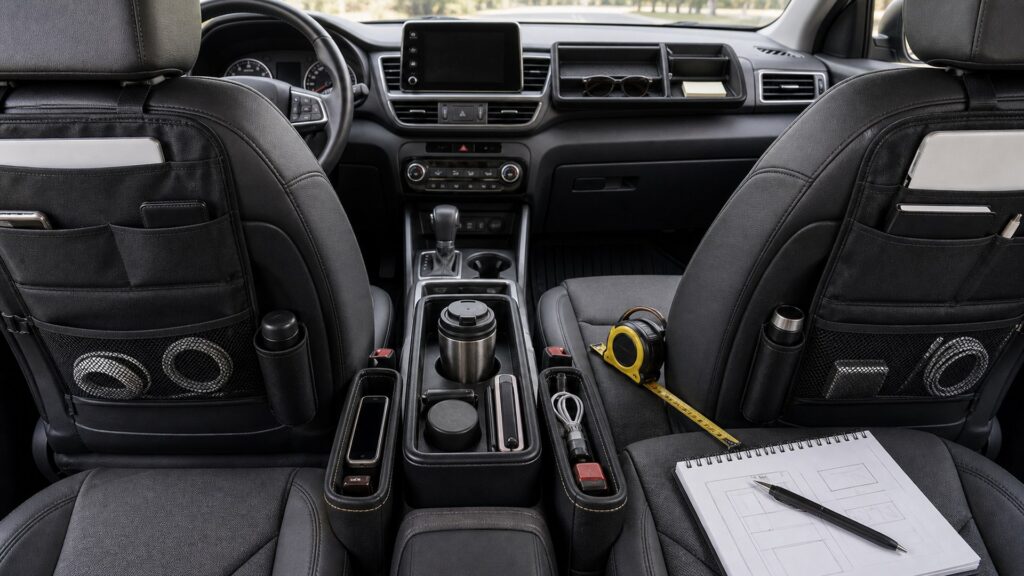
Seats, dashboards, and consoles look like convenient storage surfaces because they are close to the occupants. They are also packed with airbags, sensors, vents, displays, hinges, wiring, controls, and moving hardware. A pocket can remain attached yet still obscure a warning, increase glance time, pinch a cable, or release contents into the footwell.
Draw the primary control and visibility zones first. Identify every marked airbag panel and seat seam, then cycle seat travel, belts, buckles, console lids, shifter, brake, cupholders, screens, visors, doors, and HVAC modes. Add the organizer with its real contents and repeat the sequence. While parked, time retrieval and return; if the driver must look down or twist, make it stop-only. Remove products that rely.
Buying framework
Define the interface-aware organization job before shopping
Turn the interface-aware organization goal into measurable zones, loads, access rules, and safety exclusions.
Control envelope: Reserve unobstructed space for wheel movement, pedals, shifter, parking brake, ignition, releases, switches, and normal arm and knee motion.
Deployment map: Find frontal and knee airbag panels, seat-mounted side-airbag seams, curtain zones, sensor areas, and manufacturer accessory warnings.
Visibility map: Protect windshield and mirror views, displays, telltales, cameras, light sensors, speakers, demisters, and the driver's normal scan path.
Movement cycle: Operate seats, belts, buckles, head restraints, armrests, consoles, doors, glove box, visors, screens, cupholders, and storage lids.
Who this is for
Match storage to the people using it
Different occupants and routines place different demands on interface-aware organization products.
Driver needing small-item control: Start with latching factory console storage and a strict essentials list before adding any product near controls or the visual field.
Front passenger organizer user: Preserve occupant sensing, airbag operation, knee space, buckle access, seat travel, glove-box use, vents, and entry.
Second-row passenger setup: Seatback storage must stay light, clear of airbag seams and front-seat adjustment, and compatible with rear knees and restraints.
Shared or fleet vehicle: Use reversible modules with neutral baseline locations, obvious contents, no private data exposure, and documented removal before servicing.
What to pay attention to
Evidence that predicts interface-aware organization performance
Judge specifications by what they change in the exact vehicle during interface-aware organization use.
Driver and Passenger Interfaces
Map reach, glance demand, knees, belts, buckles, airbag surfaces, seat travel, entry, and occupant clearance around proposed storage.
Instrument and Console Interfaces
Preserve screens, cameras, sensors, vents, defroster grilles, shifter, brake, cupholders, lids, ports, wiring, and service panels.
Reach and glance demand: Assign motion-time access only to simple essential controls; storage requiring search, sorting, or body rotation remains parked-only.
Seat-gap control: Prevent bins and contents from entering tracks, motors, wiring, sensors, vents, buckles, heaters, or the driver footwell as gaps change.
Console function: Confirm inserts preserve latch engagement, hinge travel, shifter and brake clearance, ports, charging surfaces, cup fit, light, and emergency access.
Dashboard attachment: Reject suction, adhesive, clip, or friction mounts that impair airbag panels, defrost flow, sight lines, sensors, trim, or heat durability.
Cable architecture: Use correct ports and ratings, support short routes, avoid tight bends, and keep leads out of controls, rails, hinges, heat, and airbags.
Service removability: Technicians should reach fuses, diagnostic ports, fasteners, filters, connectors, trim panels, and manuals without hidden improvised wiring or damage.
Avoid these traps
Errors that undermine interface-aware organization
A convenient container fails when it creates movement, interference, or distraction within the interface-aware organization layout.
Mounting a phone pocket over a dashboard seam: An apparent gap can be a deployment or service boundary; consult the exact vehicle instructions before attaching anything.
Filling the seat-console gap: As the seat moves, a gap filler can press on buckles, wiring, rails, upholstery, controls, or passenger legs.
Routing charge cables through a hinge: Repeated closing can cut insulation, load a connector, jam a latch, and conceal damage beneath the organizer.
Letting organizer contents rise above the dash: Objects can obstruct sight lines, reflect in glass, cover indicators, move during braking, or increase driver searching.
Decision guidance
Choose a workable interface-aware organization layout
Select the smallest arrangement that proves the required interface-aware organization outcome.
Use a fitted console insert: Select one that remains stable, leaves all factory functions accessible, lifts out for cleaning, and does not overload the lid or ports.
Use a light seatback organizer: Limit it to specified low-mass contents after verifying attachment, seat airbags, full adjustment, rear clearance, and restraint interfaces.
Use parked-only removable storage: A temporary work or travel module can be useful when detached and restrained before driving and never attached to deployment surfaces.
Leave the interface clear: If the organizer increases glance demand or conflicts with controls, airbags, sensors, airflow, movement, or service, preserve the factory layout.
Ownership & compatibility
Keep the interface-aware organization system dependable
Inspection and deliberate resets preserve the original interface-aware organization decision.
Run a monthly interface audit: Empty organizers and operate every control, seat, lid, buckle, vent, screen, port, and door while checking for migration or obstruction.
Inspect mounts and surfaces: Look for loosened clips, stretched straps, adhesive release, heat distortion, scratches, dye transfer, rattles, and compressed upholstery.
Revalidate after service or reconfiguration: Seat repair, software hardware, console work, new devices, new drivers, and child restraints can change approved locations and cable routes.
FAQ
Questions to settle before purchase
Resolve these product-specific questions with the vehicle and accessory instructions.
How should I verify control envelope in this vehicle?
How should I verify deployment map in this vehicle?
How should I verify visibility map in this vehicle?
How should I verify movement cycle in this vehicle?
How should I verify reach and glance demand in this vehicle?
How should I verify seat-gap control in this vehicle?
How should I verify console function in this vehicle?
How should I verify dashboard attachment in this vehicle?
How should I verify cable architecture in this vehicle?
Bottom line
Build a safer, calmer cabin
The best interface-aware organization setup stays restrained, accessible, reversible, and easy to audit.
Map the real cabin: Measure the spaces, movements, loads, and exclusions that govern the interface-aware organization goal.
Prove every transition: Rehearse the representative parked sequence with normal users and contents before accepting the interface-aware organization arrangement.
Reset and inspect: Remove clutter, restore interface-aware organization clearances, and retire damaged parts before the planned use degrades.
Reading Shortcuts
Move through the seat, dashboard, and console organization decision in order.
Decision Reminders
A convenient surface is not storage space until its vehicle function is identified.
- Control envelope: Verify and record this requirement.
- Deployment map: Verify and record this requirement.
- Visibility map: Verify and record this requirement.
- Run a monthly interface audit: Verify and record this requirement.
- Inspect mounts and surfaces: Verify and record this requirement.
- Revalidate after service or reconfiguration: Verify and record this requirement.
Glossary Snippets
Terms used in this interior organization plan.
When to Use a Top 10 Review
Use rankings only after the requirements are fixed.
- Map the real cabin: Use this as a shortlist filter.
- Prove every transition: Use this as a shortlist filter.
- Reset and inspect: Use this as a shortlist filter.
- Exclude: Use this as a shortlist filter.
Already down to 2–3 options? A Comparison is usually the faster next step.
When to Use a Comparison
Compare finalists through the control-use, full-seat-motion, console-opening, sight-line, airbag-zone, and cable-routing trial; make driver reach an explicit recorded result.
- Control envelope: Check both candidates against this requirement.
- Deployment map: Record the result for each shortlisted option.
- Visibility map: Use the same operating conditions for both tests.
- Movement cycle: Keep the evidence with the final decision.
Still exploring? Start with a Top 10 to build a shortlist first.