
How to Choose OBD Diagnostic Tools for OBD Diagnostic Tools Feature Planning
OBD diagnostic tools can share the same 16-pin connector yet provide very different access. One may stop at regulated emissions codes and readiness monitors; another may scan body, brake, airbag, and transmission modules, record live data, run active tests, or support manufacturer software through a pass-through interface.
Feature planning starts with the faults and vehicles you expect to handle, not the longest specification list. This guide separates diagnostic evidence from control and programming functions, explains where vehicle-specific coverage matters, and shows how network support, secure gateways, software licensing, and interface design affect what remains useful after purchase.
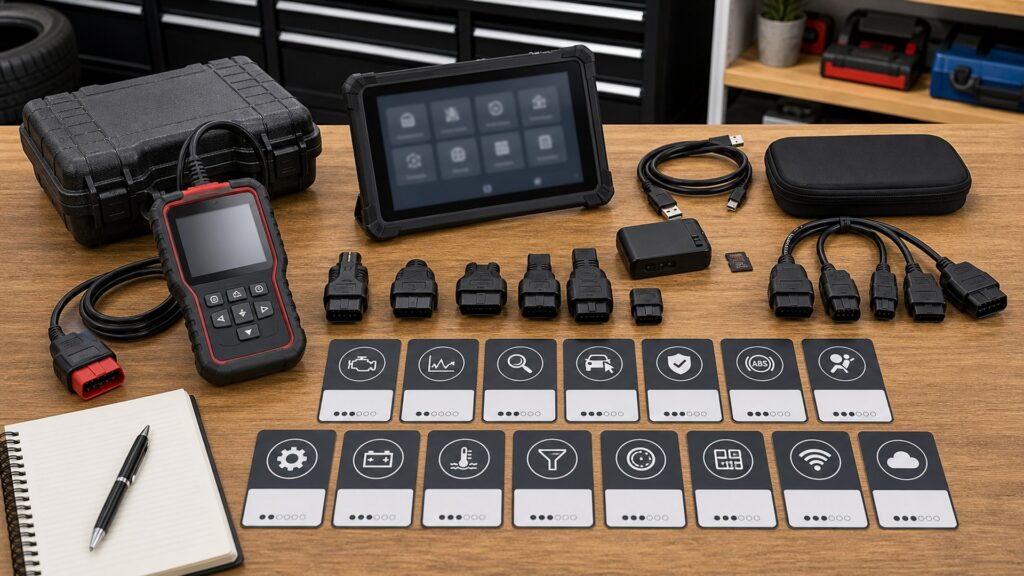
Buying framework
Build the feature plan from diagnostic decisions
A useful plan links each feature to a question you regularly need the vehicle to answer. Separate information you want to read from commands you need to send, then verify both against the exact vehicles in scope.
Start with recurring jobs: List the work you actually expect: checking a malfunction indicator light, confirming emissions readiness, capturing an intermittent sensor signal, scanning non-powertrain modules, performing a relearn, or using OEM reprogramming software. Each job points to a different access level.
Separate generic from enhanced access: Generic OBD services cover regulated emissions and propulsion information; they do not promise access to every ABS, airbag, body, climate, or ADAS module. Treat manufacturer-enhanced coverage as a vehicle-specific purchase requirement.
Plan the evidence workflow: Reading a DTC is only the opening step. Decide whether you also need freeze frame, pending and permanent code states, Mode 6 results, live-data graphing, recording, and export so you can test a hypothesis rather than guess a part.
Define command authority: Active tests, service resets, relearns, adaptations, coding, and ECU programming are distinct capabilities. Include only the layers your procedures require, because broader authority brings steeper coverage checks, account requirements, and operational risk.
Verify the access chain: The scan software, VCI, vehicle network, secure gateway, user account, and subscription must all support the requested function. A compatible connector or a broad brand logo is not enough evidence.
Who this is for
Match tool depth to the work you will own
Diagnostic ambition matters as much as vehicle count. Choose the profile closest to the decisions you will make without outside help, while allowing for the newest vehicle you realistically expect to service.
The emissions-status owner: You want to read and erase generic powertrain DTCs, view freeze frame, and check readiness before an inspection or repair follow-up. A clear handheld reader can be sufficient, provided it distinguishes confirmed, pending, and permanent codes and does not encourage blind clearing.
The data-driven DIY troubleshooter: You diagnose drivability complaints and intermittent faults on a small, known vehicle set. Prioritize responsive live-data graphs, useful PID selection, recording and export, Mode 6 presentation, and verified enhanced powertrain or transmission coverage over a huge brand list.
The multi-system home mechanic: You handle brake, steering, restraint, body, battery-management, or maintenance procedures as well as engine work. An all-system scanner with vehicle-specific service functions and selected bidirectional tests fits better, but every critical module and routine should be confirmed by year, model, and system.
The professional or broad-fleet user: You need fast vehicle identification, full-system scans, topology, extensive active tests, report export, current network support, and predictable update service across many makes. Secure-gateway access, account administration, VCI durability, and subscription cost become core workflow requirements rather than extras.
What to pay attention to
Specifications that determine real diagnostic reach
Scanner specifications matter when they describe an accessible data set, module, command, or communication path on a particular vehicle. Read coverage claims at function level and translate interface features into the evidence you can collect during a fault.
Diagnostic Reach & Test Authority
Trace the progression from generic emissions information to enhanced modules, recorded data, active tests, service routines, coding, and programming. Each step changes what the tool can observe or command.
Vehicle Communication & Software Access
Confirm that the VCI, protocols, vehicle database, security authorization, and software license all support the same target function. The weakest link sets the practical limit.
Coverage granularity: Look for a searchable matrix by year, make, model, engine, system, and function, not only a list of vehicle brands. VIN decoding can speed identification, but it does not prove that a promised active test or relearn exists for that VIN.
OBD evidence set: Useful generic support should clearly present confirmed, pending, and permanent DTCs where available, freeze-frame conditions, readiness status, and relevant monitor results. Mode 6 is most valuable when the tool labels test values and limits intelligibly.
Live-data performance: Compare graph readability, simultaneous PID capacity, sample rate under the chosen PID load, record length, trigger or marker tools, and export format. More selected channels can slow updates, so a stated maximum alone does not describe a usable trace.
Module discovery and scan reports: An automatic full-system scan can inventory responding modules and DTCs; topology adds a network map that may expose communication patterns. Check whether pre-scan and post-scan reports retain VIN, timestamps, code status, and readable export.
Commands and protected functions: Verify active tests, resets, relearns, adaptations, and coding separately. On secure-gateway vehicles, the tool may read data yet require an approved account or paid authorization before it can clear codes or send protected commands.
Network and interface support: Confirm legacy protocols for older vehicles and CAN FD, DoIP, or OBDonUDS where newer targets require them. Note whether support is native or needs an adapter, and whether the wired or wireless VCI can maintain a stable session for the intended task.
Avoid these traps
Feature-list shortcuts that lead to the wrong scanner
The biggest mismatches usually begin with an imprecise claim that sounds broader than it is. Replace each marketing shortcut with a testable question about a vehicle, module, function, or data workflow.
Counting service functions: A list of 20 or 40 resets says nothing about whether the two routines you need work on your vehicles. Ask for the supported function on the exact year and model, including any adapter, ignition state, or online-account requirement.
Treating a code as a parts verdict: A DTC describes the condition detected by the vehicle's fault logic, not a guaranteed failed component. Use freeze frame, live PIDs, circuit information, and directed tests to separate a sensor fault from wiring, operating conditions, or another system cause.
Clearing before preserving evidence: Erasing diagnostic information can remove freeze frame and reset readiness monitors before the fault is understood. Save codes, status, operating data, and a report first; clear only when the repair procedure or confirmation plan calls for it.
Blending resets, coding, and programming: A maintenance reset changes a service counter; an adaptation or relearn teaches a value; coding changes supported configuration; programming writes module software. Confirm the exact operation instead of assuming one label includes the others.
Buying a future-proof badge: CAN FD, DoIP, or J2534 on the box does not guarantee ongoing coverage, OEM software access, or every required cable. Check the complete communication and licensing path for the vehicles you expect, then budget for updates and supporting equipment.
Decision guidance
Choose the smallest tool class that closes your gaps
Once the feature plan is written, the tool category usually becomes clear. Use these paths to avoid paying for authority you will not use or discovering too late that a simple reader cannot reach the affected system.
If your goal is emissions status and first-pass code reading: Choose a basic handheld with readable DTC status, freeze frame, readiness, live data, and a clear erase warning. Favor quick startup and an always-available display over advanced functions that are outside your repair plan.
If you need portable logging on a few known vehicles: Consider a reputable app adapter with verified protocol and vehicle support, strong graphing, recordings you can export, and a transparent privacy policy. Confirm phone operating-system support and remove the adapter when continuous connection is unnecessary.
If faults extend beyond the powertrain: Move to an enhanced all-system handheld that explicitly covers the target ABS, restraint, body, steering, climate, or transmission modules. Add only the service routines and active tests you can connect to a documented repair process.
If you diagnose many makes or depend on active testing: A tablet and wireless VCI can justify its cost through faster identification, full-system scans, report handling, topology, broader bidirectional coverage, and current networks. Compare annual software cost and secure-gateway administration as part of shop throughput.
If you must write module software: Evaluate a compatible J2534 interface and the vehicle manufacturer's software, subscription, computer, cabling, internet, and power-supply requirements as a separate system. Programming mistakes can immobilize a module, so use OEM procedures or qualified professional service when the process exceeds your equipment or training.
Ownership & compatibility
Keep paid-for functions available and trustworthy
Diagnostic hardware is only one part of the ownership burden. Software entitlements, authenticated services, host devices, and the physical data connection all need attention if a feature is expected to work months or years later.
Record coverage and license terms: Save the supported-vehicle lookup, software version, included brands, subscription dates, and post-expiry policy when you buy. Before an update or renewal, confirm whether existing functions remain installed and whether online coding, reports, or security services have separate terms.
Maintain access accounts: Secure-gateway and OEM-service access can depend on verified identities, shop roles, registered serial numbers, multifactor authentication, and regional availability. Keep account ownership clear and renew authorization before a scheduled repair rather than at the vehicle.
Protect the communication path: Inspect the DLC, cable strain relief, adapters, VCI charge state, and connector pins when communication becomes unreliable. Store accessories together and test wired fallback options before blaming a control module for a dropped wireless session.
Manage host devices and diagnostic records: Keep the supported phone, tablet, or computer updated within the tool maker's compatibility policy, and export reports in durable formats. Review app permissions and cloud retention, and avoid leaving a wireless adapter connected when its sleep behavior or security is uncertain.
FAQ
Questions to resolve before choosing OBD features
These answers clarify the boundaries that product pages often blur. Verify any vehicle-specific function in the manufacturer's current coverage database before purchase.
Does every OBD-II scanner read every module in a vehicle?
Should I clear codes before an emissions inspection?
What makes live-data graphing useful for diagnosis?
Do I need Mode 6 support?
What is a bidirectional or active test?
Are service resets, coding, and programming interchangeable?
Why does secure-gateway support matter?
When do CAN FD and DoIP support matter?
What happens when a scan-tool subscription expires?
Bottom line
A shorter verified plan beats a longer feature list
Choose around the diagnostic decisions you will make, the vehicles you will connect, and the evidence you need to save. The best value is the least complex tool that reliably reaches those systems and functions without hiding essential access behind unplanned hardware or fees.
Prioritize reach: Confirm the exact vehicle, module, and function before comparing screen size, function counts, or brand totals.
Prioritize evidence: Demand the code states, freeze frame, readiness, live-data capture, and reports needed to prove or reject a diagnostic theory.
Add authority deliberately: Pay for active tests, relearns, coding, or pass-through programming only when your procedures, training, and supporting equipment can use them safely.
Price continued access: Include updates, subscriptions, secure-gateway accounts, adapters, and host-device support in the ownership decision.
Reading Shortcuts
Jump to the part of the feature plan that matches your current decision.
Decision Reminders
Use these checks before paying for a scanner or software package.
- Vehicle: Verify year, make, model, engine, and system coverage.
- Evidence: Define the data you must view, record, and export.
- Authority: Separate reading, active tests, relearns, coding, and programming.
- Network: Check required protocols, adapters, and VCI connection method.
- Security: Confirm gateway registration, fees, and online requirements.
- Renewal: Price updates and identify what works after expiry.
Glossary Snippets
Five terms that clarify common feature claims.
When to Use a Top 10 Review
Use a ranked roundup after the required functions and vehicles are defined.
- Best for: Building a shortlist within one clearly defined tool class.
- Bring: Your required modules, data functions, protocols, and budget.
- Confirm: That ranked strengths apply to the exact vehicles in scope.
- Avoid: Choosing the winner before checking coverage and renewal terms.
Already down to 2–3 options? A Comparison is usually the faster next step.
When to Use a Comparison
Compare finalists when small differences in access or workflow will decide the purchase.
- Best for: Testing two or three scanners against the same feature plan.
- Compare: Coverage evidence, logging workflow, command scope, and interface stability.
- Price: Hardware, subscriptions, gateway access, adapters, and host devices together.
- Decide: Which tool closes your documented gaps with the fewest unused extras.
Still exploring? Start with a Top 10 to build a shortlist first.