
How to Choose Radar Detectors for In-Dash Upgrade Planning
A clean dashboard does not require the radar receiver to live behind it. Radio-frequency antennas need suitable exposure, while displays and mute controls belong where the driver can interpret them with minimal effort. Combining those jobs in the wrong location can compromise both.
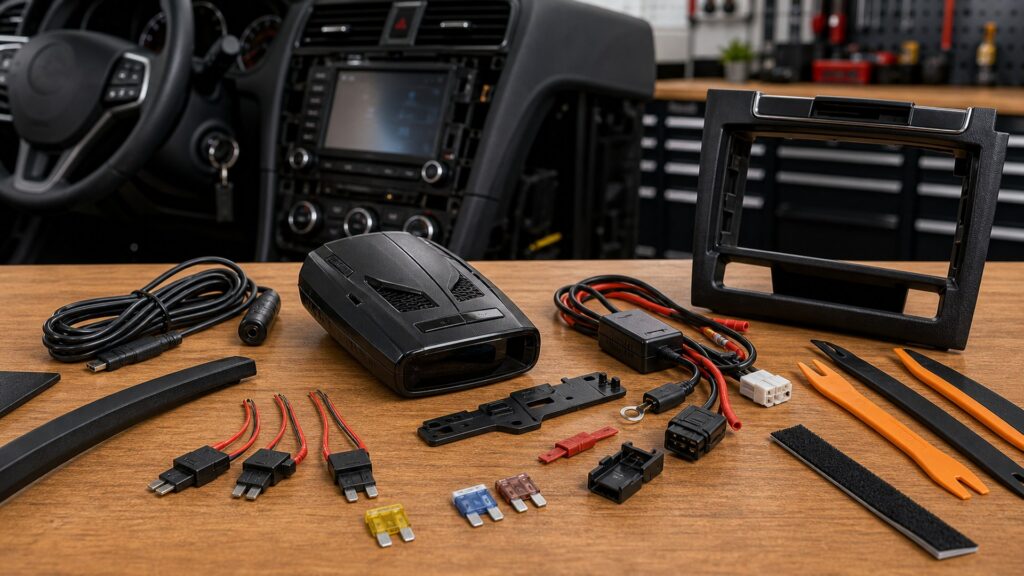
Plan an integrated upgrade as a distributed system: external or windshield receiver, cabin controller, protected power, routed harness, update connection, and service access. Start by deciding whether concealed power for a portable is enough. Move to a true remote platform only when the vehicle and ownership horizon justify installation labor.
Buying framework
Assign every component a functional zone
Reception, interaction, power, and maintenance impose different placement requirements. Draw those zones before selecting modules or removing trim.
Separate receiver from interface: Put antennas where the manufacturer specifies adequate radar, laser, and GPS exposure; place the display and mute control where alerts can be understood without obscuring factory information.
Map the electrical path: Choose a protected switched supply and ground, locate the fuse for later access, estimate current, and trace a harness route outside airbag, heat, movement, moisture, and data-network hazards.
Reserve update access: Identify how firmware, databases, pairing, resets, and diagnostics reach each component. Extend an approved service lead or make a module removable rather than sealing the update port behind permanent trim.
Design for the next repair: Consider bumper removal, windshield replacement, camera calibration, battery service, and interior trim work. Use documented connectors and service loops so unrelated work does not destroy the installation.
Who this is for
Choose the lowest-complexity route to a clean cabin
Many buyers need tidy power rather than a fully remote receiver. Escalate only when reception, controls, or desired direction information requires separated modules.
Portable owner wanting no dangling cord: Retain the proven windshield receiver and use an approved hardwire kit. This preserves easy replacement while improving appearance, provided the mount and legal position already work.
Driver needing a remote mute point: A compatible smart cord or button can reduce reach without relocating the antenna. Verify connector compatibility and position the control away from airbags and essential switches.
Coated-glass remote candidate: A purpose-built external antenna may solve blocked radar reception where no usable windshield cutout exists. Confirm environmental ratings, legal use, GPS arrangement, and front mounting guidance.
Buyer wanting directional coverage: Front and rear receiving modules, plus a capable controller, can supply directional context. Added wiring, calibration, interference testing, and repair access increase cost and installation responsibility.
Short-term vehicle owner: A major custom system may be poor value if removal damages trim or labor cannot be recovered. Prefer reversible mounting and concealed power unless the platform can transfer economically.
What to pay attention to
System details that determine installation quality
A premium remote platform can be undermined by an unsuitable antenna site or undocumented splice. Evaluate the kit and the installer as one deliverable.
Architecture & Reception
Validate antenna roles, placement envelopes, alignment, exposure, GPS, controller behavior, and interference tolerance.
Installation & Service
Review circuits, fusing, harness materials, connectors, update path, replaceable modules, records, and deinstallation.
Antenna modules: Confirm front versus rear roles, dimensions, orientation, field of view, operating temperature, water resistance, cable length, connector sealing, and manufacturer exclusions around metal or vehicle radar sensors.
Cabin controls: Compare display size, dark mode, alert priority, audio source, remote mute, status indicators, and menu access. Custom appearance should not make a warning ambiguous or a mute action difficult.
GPS architecture: Determine whether GPS resides in the controller, a windshield puck, or another module. Coated glass, metal structure, and hidden placement can prevent location lockouts or database alerts from working.
Electrical protection: Specify voltage range, current draw, fuse value, switched behavior, grounding point, sleep state, and low-voltage protection. Avoid unverified quick taps into sensitive or monitored factory circuits.
Harness and connectors: Use abrasion protection, strain relief, weather seals, grommets, drip loops, and service slack appropriate to each zone. Secure wiring without interfering with airbags, cooling airflow, latches, or moving panels.
Interference testing: Operate ignition, charging systems, ADAS, infotainment, dash cameras, USB supplies, heated glass, and other accessories while monitoring the detector. Move or shield components only within manufacturer-approved practices.
Software and diagnostics: Check whether updates require a Windows or macOS utility, mobile app, Wi-Fi, removable controller, or dealer visit. Accessible status codes and individually replaceable modules reduce troubleshooting labor.
Avoid these traps
Integration choices that turn neatness into fragility
The most expensive errors hide reception problems or service points behind completed trim. Prove operation in temporary form before final fastening.
Burying a portable receiver: Dashboard structure can block radar, laser, and GPS, while enclosed heat may exceed the unit's intended environment. Use portable hardware only in positions approved for its antennas.
Drilling before a live test: Temporarily place antennas, controller, power, and harness, then test routes and vehicle states. Permanent holes should follow verified reception, noise, control reach, and water management.
Selecting power by convenience: An easy wire may carry data, remain awake, or be monitored by the vehicle. Use documented circuits, correct protection, and qualified installation instead of trial-and-error tapping.
Making modules unreachable: A hidden fuse, update socket, or connector turns routine maintenance into major disassembly. Provide labeled access and document the removal order before closing panels.
Promising factory integration: A remote display does not automatically use the head unit, cluster, steering controls, or vehicle audio. Buy only documented interfaces and preserve factory safety functions.
Decision guidance
Select architecture by constraint, not appearance alone
A clean cabin can come from simple cable management or a full remote network. Choose the lowest layer that solves the actual obstruction or interaction problem.
If windshield reception is already good: Keep a portable receiver visible to signals and add approved concealed power or remote mute. This is usually the most reversible and serviceable upgrade.
If glass blocks every portable position: Choose a remote platform with documented external antenna sites and suitable GPS placement. Require an installer plan covering weather, interference, harness entry, and component access.
If directional context is essential: Evaluate complete front-and-rear systems, not a collection of accessories. Confirm arrow logic, antenna balance, cable lengths, calibration steps, and behavior when one module faults.
If the vehicle will be sold soon: Estimate removal labor, cosmetic restoration, transferable components, license rules, and lost installation cost. A tidy hardwired portable may deliver better ownership value.
Ownership & compatibility
Treat documentation as part of the installed system
Remote hardware disappears from view, so records become essential when updates, body repairs, electrical diagnosis, or resale reaches the same areas.
Keep an installation dossier: Store diagrams, photographs, fuse locations, grounds, cable paths, serial numbers, software versions, settings, receipts, and installer warranty information with the vehicle.
Inspect after adjacent work: Bumper, grille, collision, windshield, battery, ADAS, dashboard, and audio service can move antennas or disturb wiring. Recheck reception, faults, GPS, shutdown, and water seals afterward.
Preserve update and removal paths: Retain apps, utilities, credentials, service leads, spare clips, and component tools. Before transfer, decide whether the buyer receives the system or the vehicle returns cleanly to stock.
FAQ
Integrated detector planning questions
Use exact platform and vehicle installation manuals; these answers define the issues but do not replace an engineered installation plan.
Can I hide a portable radar detector inside the dashboard?
What makes a detector a true remote system?
Where should front and rear antennas be installed?
Do I need professional installation?
How should an integrated detector be powered?
Can vehicle electronics interfere with remote antennas?
How are hidden modules updated?
Could a custom installation affect the vehicle warranty?
Are remote detector systems legal wherever portables are legal?
Bottom line
Put antennas in signal zones and controls in human zones
A successful integrated upgrade separates reception from appearance while keeping power, wiring, software, and future repairs accessible.
Choose the architecture: Use concealed portable power unless a real reception or interaction constraint requires remote modules.
Validate before fastening: Test antennas, interference, controls, circuits, GPS, and vehicle states in a temporary layout.
Preserve serviceability: Label access, protect harnesses, document everything, and plan updates, repairs, transfer, and removal.
Reading Shortcuts
Plan the distributed system before removing trim.
Decision Reminders
Clean work should remain serviceable.
- Receiver: Use only approved antenna zones.
- Control: Keep alerts clear and mute reachable.
- Power: Protect and document the circuit.
- Harness: Avoid heat, motion, water, and airbags.
- Update: Leave a supported access path.
- Service: Label fuses, connectors, and removal order.
Glossary Snippets
Terms for a remote installation.
When to Use a Top 10 Review
Rank systems only after installation zones are mapped.
- Filter: By architecture and antenna sites.
- Measure: Controller and module clearances.
- Price: Hardware, labor, service, and removal.
- Exclude: Platforms without update access.
Already down to 2–3 options? A Comparison is usually the faster next step.
When to Use a Comparison
Compare full installed systems, not receiver boxes alone.
- Layout: Map every module and harness.
- Operate: Judge display, audio, and mute.
- Update: Reach software and diagnostic paths.
- Repair: Price module access and replacement.
Still exploring? Start with a Top 10 to build a shortlist first.