
How to Choose Radar Detectors for Radar Detectors Feature Planning
A radar detector can advertise Wi-Fi, Bluetooth, GPS, arrows, voice, multiple filters, database alerts, and expert band controls without explaining which problem each feature solves. Buying the longest list often produces a more expensive device with settings the owner never validates in ordinary daily driving.
Create a requirements matrix instead. Start with relevant reception and a clear alert, then add one layer for a documented route, cabin, or maintenance need. Record every dependency—phone, satellite view, subscription, accessory, computer, or local frequency knowledge—so convenience features do not quietly become failure points.
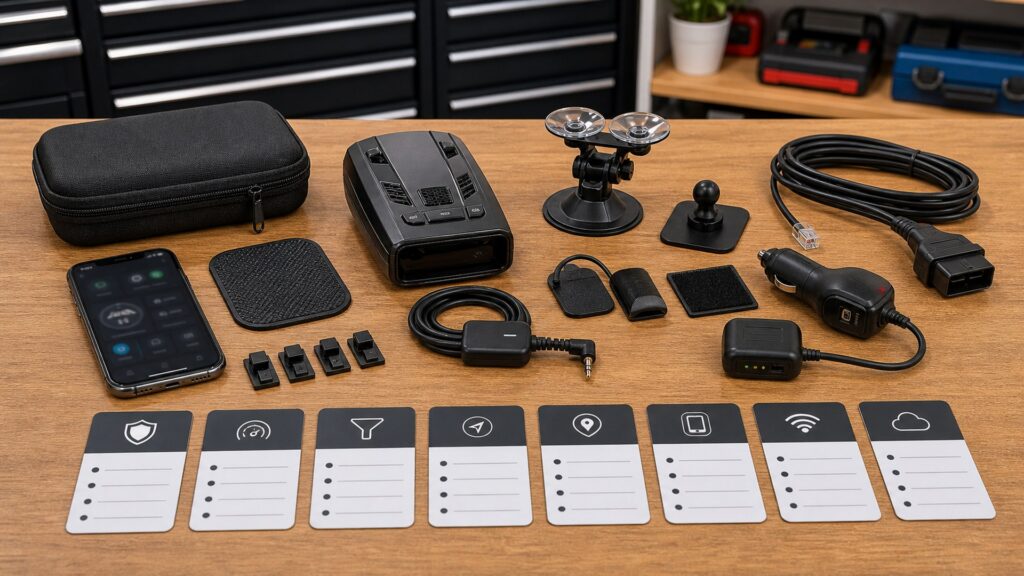
Buying framework
Make every feature answer five questions
A capability belongs in the plan only when its job and ownership cost are clear. This screen removes attractive extras that do not change a real driving problem.
What problem does it solve?: Classify the feature under reception, nuisance reduction, alert interpretation, installation, or upkeep. Reject vague promises that cannot be tied to a recurring route or cabin condition.
How often will it matter?: Estimate use on city streets, familiar commutes, open highways, cross-border travel, and parked updates. A rare benefit should not displace daily quietness or clear controls.
What does it depend on?: List GPS view, phone model, operating system, data plan, account, Wi-Fi, subscription, update utility, cable, hardwire part, or local band information.
How will it be verified?: Specify the route, alert pattern, update task, power cycle, offline test, or controlled comparison that proves the feature works and remains understandable.
Who this is for
Choose a feature depth you will actually maintain
Advanced controls create value only for owners willing to research, test, document, and revisit them as routes and firmware change.
Set-and-drive buyer: Seek relevant bands, effective default filtering, logical city and highway modes, a readable strength ramp, clear audio, and an easy mute. Favor robust defaults over deep menus.
Repeat-route commuter: Add GPS lockouts, low-speed quieting, automatic brightness, and straightforward database updates. Verify how learned locations are reviewed, corrected, and distinguished from new signals.
Highway context seeker: Directional arrows, frequency display, signal count, configurable sensitivity, and strong audio priority can explain changing alerts without making the driver study a dense screen.
Connected-feature user: Bluetooth apps or Wi-Fi may simplify settings, updates, or shared information. Confirm that essential detection remains independent and that phone, account, privacy, and subscription requirements are acceptable.
Technical tuner: Segmentation, filter blocks, percentage sensitivity, and custom sweeps suit an owner with dependable regional data and repeatable tests. Preserve defaults and rollback instructions.
What to pay attention to
Feature groups and the dependencies behind them
Features within a group may overlap or solve different sources. Compare behavior and ownership requirements, not just whether a box is checked.
Decision Value
Connect reception, quieting, context, location, connectivity, and controls to a concrete route or interaction need.
Dependency & Burden
Count supporting hardware, services, knowledge, update effort, settings risk, fallback behavior, and ongoing cost.
Core reception and sensitivity: Confirm selectable X, K, and Ka behavior, laser notification, and useful city or highway profiles. Digital processing matters through demonstrated filtering and response, not as an isolated acronym.
Quieting layers: BSM filters target automotive patterns, GPS handles recurring places, speed thresholds calm low-speed audio, and manual mute handles the immediate moment. Determine affected bands and exceptions for each.
Alert context: Strength ramp, frequency, direction, bogey count, voice, tones, and priority logic provide different clues. Choose the smallest display and audio set the driver can interpret quickly.
GPS and databases: Location memory, user marks, speed information, red-light or speed-camera data, and automatic dimming may share GPS. Check satellite reception, learning rules, supported regions, update frequency, and renewal terms.
Bluetooth, Wi-Fi, and apps: Identify the exact task: settings, firmware, database downloads, cloud sharing, or community alerts. Test offline operation and avoid designs that require phone handling for ordinary mute or mode changes.
Advanced tuning and accessories: Segmentation and custom filters need accurate guidance; mounts, cords, buttons, and hardwire kits need exact part compatibility. Include reset behavior and replacement availability before valuing either group.
Avoid these traps
Feature-list logic that inflates cost and complexity
Extra capabilities can add setup burden, alerts, accounts, and failure modes while leaving the detector no more useful on the owner's roads.
Treating premium as automatically quieter: Price and feature count do not prove that defaults suit local K-band clutter. Examine filtering behavior, update history, route tests, and control simplicity.
Confusing connectivity with reception: Bluetooth and Wi-Fi may move settings or data, but they do not inherently strengthen radar sensitivity. Buy the connection only for a defined app, update, or information function.
Copying advanced settings blindly: Another region's band segments or filter blocks may be unsuitable locally and can suppress needed coverage. Use manufacturer guidance and credible current regional information with a rollback.
Choosing a dashboard of every metric: Frequency, arrows, counts, speed, voltage, and graphics can compete for attention. Configure a glanceable priority and rely on distinct audio rather than continuous screen analysis.
Ignoring post-trial access: A bundled subscription may expire, an app may drop an operating system, or database service may cost extra. Confirm permanent, offline, and post-subscription behavior in writing.
Decision guidance
Assemble a package from required feature jobs
Begin with competent reception and clear alerts. Add packages only where the matrix shows a repeated problem and an acceptable dependency.
Minimum dependable package: Relevant bands, sensible sensitivity profiles, current basic filtering, clear ramp and tones, readable brightness, accessible mute, stable mount, and supported firmware form the foundation.
Commuter convenience package: Add GPS memory, low-speed audio control, auto dimming, location updates, and simple lockout review when familiar urban routes produce repeated stationary noise.
Interpretation package: Add directional reception, frequency display, multi-signal handling, voice, and flexible alert priority when highway users benefit from faster context rather than more menu depth.
Connected or expert package: Choose apps, Wi-Fi, cloud data, segmentation, or custom sweeps only after documenting host support, privacy, subscriptions, local knowledge, update tools, offline behavior, and recovery.
Ownership & compatibility
Maintain the feature plan, not just the firmware
Settings and services drift. A small ledger prevents an old experiment, expired account, or forgotten lockout from defining detector behavior months later.
Keep a feature ledger: For every enabled nondefault option, record its purpose, dependency, setting, test route, result, firmware version, and rollback. Remove features that no longer solve a current problem.
Protect access and fallback: Retain account recovery, update utilities, correct cables, accessory part numbers, database dates, subscription terms, default profiles, and factory-reset instructions outside the phone app.
Review quarterly and before travel: Audit bands, lockouts, filters, display and audio priorities, phone support, updates, and laws. Rebuild a baseline when unfamiliar behavior cannot be explained quickly.
FAQ
Feature-planning questions before paying for extras
Exact behavior varies by detector, firmware, region, and service plan; verify each feature in current manufacturer documentation.
Is GPS a must-have radar detector feature?
What do directional arrows actually tell me?
Do I need a phone app for radar detection?
What is Wi-Fi used for in a radar detector?
Are red-light and speed-camera databases always current?
Should I use Ka-band segmentation?
Which display and audio features matter most?
Are branded mounts and hardwire kits interchangeable?
When is a premium feature package worth it?
Bottom line
Require purpose, dependency, and proof
A disciplined plan buys fewer unused features and more reliable daily behavior. Every capability should solve a named problem and survive its supporting services.
Start with the foundation: Demand relevant reception, current filtering, clear alerts, stable mounting, mute access, and support.
Add one job at a time: Tie GPS, arrows, apps, Wi-Fi, databases, or tuning to a recurring need.
Plan the fallback: Document dependencies, offline behavior, subscriptions, updates, defaults, tests, and reset paths.
Reading Shortcuts
Turn marketing features into a requirements matrix.
Decision Reminders
Do not pay for an unnamed job.
- Purpose: Name the problem solved.
- Frequency: Estimate how often it matters.
- Dependency: List services and supporting hardware.
- Fallback: Check offline and expired behavior.
- Proof: Define a repeatable test.
- Burden: Count updates and settings upkeep.
Glossary Snippets
Terms used in feature comparisons.
When to Use a Top 10 Review
Use rankings after required feature jobs are named.
- Filter: By foundation and recurring problems.
- Map: Dependencies and fallback behavior.
- Price: Accessories, services, and upkeep.
- Exclude: Extras without a validation task.
Already down to 2–3 options? A Comparison is usually the faster next step.
When to Use a Comparison
Compare finalists by feature job rather than total count.
- Receive: Compare the same active bands.
- Quiet: Test matched route clutter.
- Explain: Judge alerts with brief glances.
- Recover: Test offline, reset, and update states.
Still exploring? Start with a Top 10 to build a shortlist first.