
How to Choose Wrist Braces for Caregiver Assistance
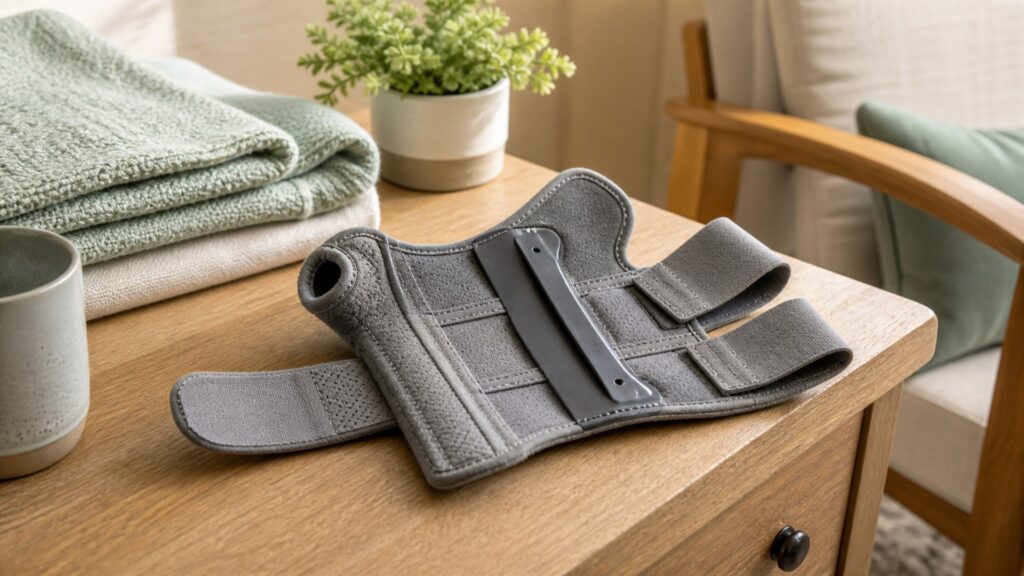
Wrist braces for caregiver assistance should be judged by where the stay, cuff, thumb opening, and straps land during seated setup, bedside dressing, transfers, and quick checks by another person. A brace can feel supportive in the package yet still rub the palm crease, block finger motion, or shift away from neutral wrist position.
This guide focuses on brace geometry, support level, dexterity, skin contact, and realistic care. It is shopping guidance, not medical advice; severe pain, numbness, weakness, recent injury, or clinician-directed recovery should be handled with qualified guidance.
Buying framework
Start with the hand task the brace must preserve
The best wrist brace for this scenario is not simply the stiffest one. Use the real wearing context as the central test, then compare how each design affects normal hand use.
Map the motion problem: Decide whether the wrist needs compression, neutral-position support, thumb control, or rest positioning. Those goals lead to different brace shapes and different compromises.
Check stay alignment: A palmar or volar stay should support the wrist without digging into the heel of the hand. If the stay sits off center, tighter straps will not fix the geometry.
Protect useful dexterity: Finger clearance, thumb-web space, and cuff length determine whether typing, gripping, dressing, or packing remains practical. A brace that blocks every task is unlikely to stay in use.
Respect symptom limits: Braces can support position and comfort, but they do not explain why symptoms exist. New tingling, spreading pain, weakness, or swelling should pause ordinary product selection.
Who this is for
Choose by wearer situation, not only support level
Wrist-brace buyers often need different compromises even within the same category. These profiles separate the practical wearing problem before product features are compared.
Assisted-fit wearer: This person benefits from obvious orientation, wide pull tabs, and straps another person can tension evenly. A brace that requires fine one-handed threading can turn help into inconsistent support.
Workday user: Keyboard reach, light lifting, writing, and repeated removal make low profile and metacarpal clearance important. The brace should steady the wrist without turning every small task into a workaround.
Night-support buyer: Sleep use favors stable neutral positioning and soft edges over sleek appearance. The buyer should check whether straps stay comfortable when the wrist rests against bedding.
Thumb-involved shopper: A thumb spica can be useful when thumb motion needs support, but it changes grip and device use sharply. Buyers should choose it for a real thumb-related need, not just a stronger-looking brace.
What to pay attention to
The brace details that change comfort and control
Specifications matter when they predict what the wearer feels after the first few minutes. Focus on structure, contact points, and how the brace behaves during the angle named in the title.
Positioning and Clearance
Stay placement, thumb space, and cuff length decide whether support lands on the wrist rather than the hand.
Wear Time and Skin Contact
Material heat, seam height, and strap pressure matter more as the brace is worn longer or reapplied often.
Palmar stay contour: The stay should follow the palm side without creating a hard ridge at the wrist crease. Poor contouring often feels fine at rest and irritating during repeated finger motion.
Thumb opening shape: Thumb-hole size and seam placement affect pinching, web-space pressure, and grip. This is especially important when the brace is worn while handling bags, utensils, or devices.
Forearm cuff length: A longer cuff can improve leverage but may conflict with sleeves, desks, bedding, or caregiver access. Short cuffs preserve movement but may feel less controlling.
Strap overlap: Useful adjustability means the closures still overlap securely at the correct size. Straps that barely meet tend to loosen or require uncomfortable overtightening.
Liner and seam behavior: Breathable liners, soft binding, and low seams help with heat and rubbing. Comfort should be checked after movement because warm skin magnifies small pressure points.
Avoid these traps
Bad assumptions that lead to unused wrist braces
The most common buying errors come from chasing support without proving that the brace works in the intended setting. These mistakes are easier to catch before the package is opened.
Choosing bulk as proof: A larger splint may look more protective but can make daily hand tasks harder. Match rigidity to the motion that needs control, not to visual confidence.
Ignoring the thumb: Thumb openings and spica sections change grip more than many shoppers expect. A wrist-only problem and a thumb-involved problem deserve different brace designs.
Skipping movement checks: A brace that is comfortable while still can pinch once the fingers flex or the wrist rests on a desk. Test the posture that matters for the title angle.
Normalizing numbness: Tingling, swelling, or lasting marks are not break-in milestones. They suggest tension, sizing, seam, or support-placement problems that should be corrected.
Decision guidance
Use the support need to narrow the brace
After poor fits are removed, choose by how much motion should remain available. The right branch changes with dexterity needs, rest use, and whether the thumb is part of the concern.
If dexterity matters most: Start with a soft wrap or low-profile splint that leaves the fingers and thumb more available. Move to firmer structure only if the wrist still drifts or aches during the target task.
If neutral position matters: Choose a rigid splint with a stay that holds the wrist comfortably near straight. Check that the palm edge and forearm cuff do not create new pressure.
If thumb motion is part of the issue: Consider a thumb spica, then accept the tradeoff in grip, writing, and device use. Avoid it when the thumb does not need support.
If symptoms are severe: Stop treating the choice as a simple purchase. Recent trauma, weakness, spreading numbness, major swelling, or prescribed recovery should be guided by a clinician.
Ownership & compatibility
Keep the brace wearable after repeated use
Wrist braces collect skin oil, lint, and pressure history quickly because they sit on a busy joint. The maintenance burden is modest, but it affects comfort and closure security.
Clean the liner: Follow the care label and let the brace dry fully before long wear. Damp padding can irritate skin and make straps feel tighter than they are.
Clear the closures: Hook-and-loop areas lose grip when lint builds up. Weak closure bite causes shifting, which often leads users to overtighten the remaining straps.
Inspect contact marks: Check the palm crease, thumb web, and forearm edge after longer sessions. Lingering marks or tingling mean the fit or wear schedule needs adjustment.
FAQ
Questions buyers ask about wrist braces
These answers address support, sizing, comfort, and safe expectations before purchase.
Should a wrist brace include the thumb?
How tight should the straps feel?
Is a soft wrist wrap enough?
Can I sleep in a wrist brace?
What measurements matter most?
Why does finger clearance matter?
How do I spot poor fit?
Does material choice matter?
Can a brace replace medical care?
Bottom line
Choose support that still lets the hand function
For caregiver assistance, the best wrist brace balances alignment, contact comfort, and usable movement. Stronger support is not better if it creates pressure or makes the wearer remove it constantly.
Start with the motion: Name what the wrist or thumb must stop doing before choosing brace type. That keeps the decision practical instead of purely visual.
Let fit prove itself: Stay alignment, strap overlap, and skin comfort should remain acceptable during the real task. A good first impression is only the beginning.
Escalate when symptoms require it: Severe, changing, or injury-related symptoms should be handled with professional guidance rather than a stronger retail brace.
Reading Shortcuts
Jump to the checks that matter most for assisted fitting.
Decision Reminders
Use these checks before ordering.
- Name the task: Judge products against the real assisted fitting setting.
- Fit first: Confirm the contact points land where the design requires.
- Move carefully: Check the activity that will actually happen after purchase.
- Inspect pressure: Treat numbness, pinching, or lasting marks as warning signs.
- Plan care: Know what needs cleaning, drying, tightening, or replacement.
- Escalate symptoms: Clinical concerns deserve qualified guidance before relying on a product.
Glossary Snippets
Terms that make product listings easier to read.
When to Use a Top 10 Review
Use a ranked list after deciding what assisted fitting requires.
- Build a shortlist: Compare several designs after eliminating poor-fit categories.
- Filter by use: Prioritize models that match the setting in this guide.
- Scan fit notes: Look for comments about the same contact points.
- Watch durability: Repeated complaints about wear or slipping matter.
Already down to 2-3 options? A Comparison is usually the faster next step.
When to Use a Comparison
Use a direct comparison when two products seem close.
- Compare fit: Look at where each design contacts the body.
- Compare control: Decide which product handles the target movement better.
- Compare convenience: Check packing, removal, adjustment, or cleaning tradeoffs.
- Compare wear signs: Review tips, straps, pads, or liners for long-term concerns.
Still exploring? Start with a Top 10 to build a shortlist first.