How Travel Electronics Work

Follow the path through each device, from what reaches it to what you can observe. A solar panel turns light into electricity. A step-down converter lowers AC voltage. A headset picks a music stream, a router joins upstream Wi-Fi and you choose an iPhone’s data line.

By: Review Streets Research Lab
Updated: November 25, 2026
Explainer · 10–12 min read
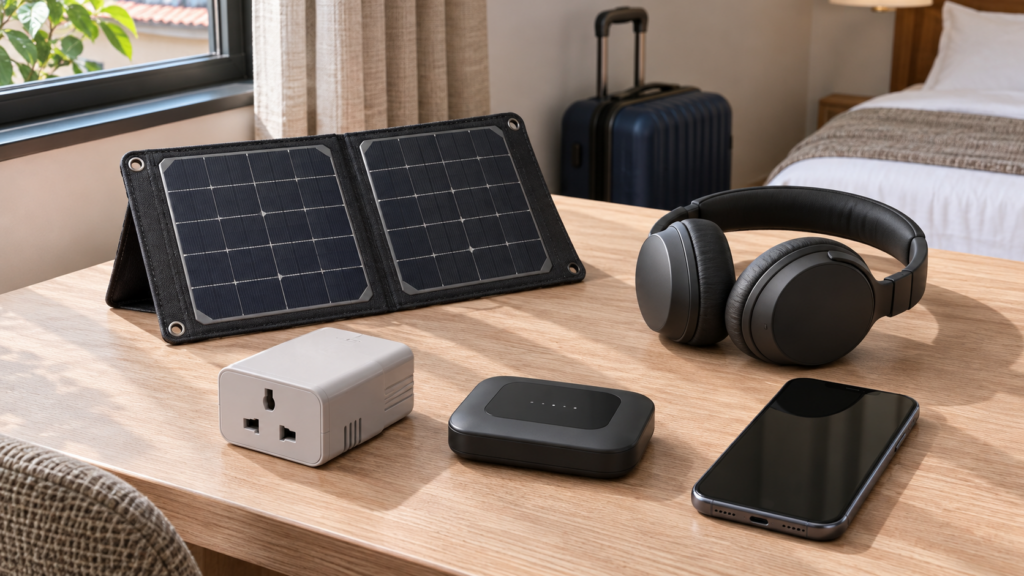
An open folding solar panel, power converter, headphones, pocket router and phone on a wooden hotel desk.
Reading guide

What to follow through each device

Read each example in the order the energy or information travels. When you reach the router’s upstream and local connections, start by identifying the devices or networks at the two ends. You’ll use the same approach with the other examples.

  • How light gets electrons moving inside a solar cell.
  • Which number belongs to a USB port and which describes the panel.
  • How to read the input and output ratings for AC.
  • How a headset chooses music with two linked devices.
  • What counts as local and upstream in Repeater mode.
  • What the iPhone’s cellular data-line setting changes.
  • How to interpret an upstream connection without internet access.

Tip: Name the source before interpreting the equipment’s settings. For solar charging, start with light reaching the cells. Then follow the electrical side of the explanation.

Vocabulary

Six terms for tracing the path

Start by putting the labels where they belong. Consider a headset’s saved registrations as one example. That label belongs in a different part of your notes from a term about what you hear in the headphones.

Photovoltaic cell

A semiconductor component that turns light energy into electrical energy.

  • Absorber: The semiconductor is the material that takes in the energy from light.
  • Contacts: Metal contacts collect the current from the cell.
  • Module: The larger panel brings multiple linked cells together.

AC step-down converter

A device whose rated alternating-current (AC) output voltage is lower than its rated input.

  • Input: Incoming supply voltage.
  • Output: Voltage on the appliance side.
  • Frequency: A separate rating in hertz (Hz).

Bluetooth multipoint

A mode for keeping multiple Bluetooth links live.

  • Pairing: Registration records a device that the Sony WH-1000XM6 can recognize.
  • Active links: The XM6 can keep two devices connected with multipoint enabled.
  • Music playback: One registered device supplies the audible music at a time.

Upstream Wi-Fi

Wi-Fi the router joins on its internet-facing side.

  • Repeater: GL.iNet’s name for this uplink.
  • Local Wi-Fi: The Beryl AX can also supply a wireless connection for your own device.
  • Upstream status: A connected uplink may lack internet access.

eSIM profile

A digital SIM provisioned for cellular service on a compatible phone.

  • Provider: The service comes from an eSIM-capable carrier.
  • Activation: A carrier-provided QR code is one activation method.
  • Secondary line: A travel profile can add a second line.

Cellular data line

The iPhone line assigned to mobile data.

  • Control: A role you can assign manually.
  • Network: The phone uses a single cellular network for data at any given moment.
  • Second line: Another line can stay active without carrying cellular data.

Tip: Put the quantity next to what it measures. For example, USB-C’s amperage belongs beside the port’s name rather than as a label for the whole panel.

Solar charging

From daylight at the cell to a USB charging port

In a photovoltaic cell, the semiconductor absorbs light and passes its energy to electrons already in the material.

  • With that extra energy, electrons can flow through the semiconductor as current.
  • Metal contacts collect the cell’s current. That’s the point where the explanation moves from what happens inside the material to what happens at its connections.
  • Linking cells builds up a panel. Its electrical output is direct current, or DC.
  • The Anker PS30’s A2426 V01 manual names USB-A and USB-C for phone or tablet charging, with an original or certified cable and the receiving device out of direct sun.
  • Each port has a rating of its own. USB-C is rated at 5 V and 3 A, and USB-A at 5 V and 2.4 A.

Anker ties the available output to the light on the panel.

AC conversion

Lower AC voltage within a selected mode

The AHOKU EEC-220 has a manual High or Low selection.

  • Both settings list 220/240 V AC in and 110/120 V AC out.
  • High is rated at 50 Hz on both sides and covers 26–1,875 W for appliances without electronic controls.
  • Low lists 50/60 Hz on both sides. AHOKU describes this class as loads below 25 W.

The voltage ratings stay the same in both modes. The frequency and load ratings depend on which mode you’re reading.

Bluetooth audio

Two live links and one music output

A useful way to read the Sony WH-1000XM6 guide is to keep two questions apart. Which devices have live links? Which one supplies the music you hear?

  • Pairing registers the devices. For two live Bluetooth links, Sony specifies enabling multipoint in the Sony Sound Connect app.
  • If one linked device is playing music and you start playback on the other, Sony describes the later source taking over. If the first device keeps sending a silent stream, the headset may stay on that stream and you may still hear nothing.
  • The audible music comes from one device.

A change of track tells you more if you know what played first and what started next. Sony’s later-source rule and the silent-stream exception depend on what each source is sending.

Travel routing

Local Wi-Fi, upstream Wi-Fi and internet access

The GL.iNet Beryl AX (GL-MT3000) connects to your device on the local side. Repeater runs on the upstream side. The difference shows up when you ask which two devices a particular Wi-Fi status is describing.

  • Your device can join the Beryl’s local Wi-Fi. On that hop, the Beryl is the network your device joins.
  • GL.iNet Router Docs 4 gives Repeater a default of WISP mode. It joins the existing Wi-Fi and creates a separate local subnet for its clients.
  • GL.iNet documents an upstream status in which the router has joined the network and still lacks internet access.

Joining the Beryl puts your device on its local network. For internet access, the Beryl still needs usable upstream service.

Cellular lines

Assigning cellular data to one iPhone line

Start with an iPhone that supports two active eSIMs. The carrier must support and provision the eSIM service.

  • Home and travel plans can run side by side. Apple requires an unlocked iPhone when the travel plan uses a different carrier.
  • Assigning cellular data to the travel line gives that line the data role.
  • For cellular data, the phone uses a single network at any given time.

The setting identifies the line you chose for cellular data.

In practice

Two moments where the output needs a closer look

These two hypothetical scenes start with an observation. A change such as less light reaching a panel gives you somewhere to look. The details in each scene clarify what the observation can tell you.

Sun on the panel, shade for the phone

Imagine a daytime rest stop with a bit of sun next to a sheltered bench. The unfolded PS30 sits in the sun. Its USB port connects to a shaded phone by an original or certified cable. The edge of the shade lies between the two devices.

Suppose a cloud passes over. Anker says light intensity affects the panel’s output. The scene includes no measurement of how much charge the phone gains.

Quiet headphones can still have a source

Picture a traveler between workshop sessions who wants to move from one playlist to another. Both phones already have live XM6 links with multipoint enabled. Starting music on the second ordinarily takes over from music already playing on the first. The change that matters to the listener is which track comes through.

Now suppose the first phone goes quiet but continues streaming silence. Sony says that, depending on the source device, this can keep the headset from switching its audio to the second phone. If you were describing this moment to somebody else, there would be a difference between saying you heard nothing and saying the first phone had stopped sending anything.

Common inferences

Where a label can lead you astray

Two counts can sound alike until you say what’s being counted. On the XM6, distinguish live Bluetooth links from records of past pairings. Ask the same kind of question when you read a rating or connection status.

Does the PS30’s 30 W figure describe what one USB device receives?

Anker lists 30 W as the panel’s peak rating. For USB-C, the rated 5 V and 3 A multiply to 15 W. A panel peak and a port rating describe different points.

Is High just a wattage limit?

AHOKU specifies appliances without electronic controls for High. That description answers a question about the appliance as well as a question about the number on its label.

Does the XM6 mix music streams?

Sony specifies music from one device at a time. Think of it as a question of which recording you’re hearing. You’re following the soundtrack here.

Does joining the Beryl’s Wi-Fi mean the internet is available?

That identifies the local link to the router. A local connection can exist before internet access is available. You’d record those as two observations if you were trying to describe what you saw.

Do two active iPhone lines pool their data networks?

With both lines enabled, the iPhone uses one cellular data network at a time.

Tip: Finish the sentence that goes with a label. A rating for which part? A connection between which two points? Apply it to the router’s upstream status. Naming the endpoints tells you which part of the example to read again.

Follow-up questions

What the documentation means in specific cases

The follow-ups zoom in on details that are easy to miss in a table or a model guide, such as a headset’s record of past pairings. Use the question closest to the detail you’re trying to interpret.

Which cable does Anker specify?

A2426 V01 specifies an original or certified cable. Keep phones and tablets out of direct sun.

Does the EEC-220 change frequency?

In each mode the input and output frequency ratings match.

What happens on the WH-1000XM5 when the second device starts its music?

The XM5 guide describes the first device’s music continuing if the second starts while the first is still playing. The documented changeover to the second device requires stopping playback on the first.

What happens if you pair a ninth device with the XM6?

The XM6 retains up to eight registrations. Adding a ninth replaces the record for the device whose most recent connection was longest ago.

Can the Beryl use wired LAN with a wireless uplink?

The Beryl’s local device can connect by wired LAN, or local area network. Repeater supplies the separate wireless uplink. The word wired describes just the first part of this arrangement.

What is a captive portal on a public hotspot?

A public hotspot may present a captive portal, a sign-in page on the hotspot’s side of the connection.

Can the home line incur roaming fees when the travel line carries data?

Yes. Apple says home-eSIM roaming fees can still apply with both lines on. For a particular bill, the home carrier’s plan is the place to look.

Does an iPhone eSIM always come with a QR code?

A QR code is one way a carrier can deliver setup. A carrier can also assign an eSIM to the phone and send it digitally for activation.

Tip: When instructions seem to disagree, look for the model name. In the two Sony models’ playback descriptions, that’s the detail that tells you which answer you’re reading.

Takeaway

Trace the path before you interpret the result. Name what reaches the equipment, what it changes or selects and where you observe the result. A particular point like the solar cell’s current-collecting contacts helps you keep each step in order instead of jumping straight from the source to what you hoped would happen.

If the result is unexpected, find the last step you can describe with confidence. For example, you might have joined the Beryl’s local network. The gap between there and the result you wanted tells you where to look next.

Related reading

Keep exploring travel electronics

Choose the format that fits what you’d like to read next.