
Jigsaws Buying Guide for Beginners
Jigsaws are among the most versatile cutting tools, capable of handling curved cuts, intricate shapes, and straight-line work across a wide range of materials. What appears to be a simple handheld saw is shaped by multiple variables—blade selection, orbital action, stroke control, and base stability—all of which influence cut quality and control. Matching these elements to the intended use is less straightforward than it initially seems.
This guide clarifies the factors that define how a jigsaw performs in real-world use, including blade types, power characteristics, ergonomics, and adjustment features. It explains key tradeoffs between speed and precision, control and efficiency, and versatility versus specialization. By the end, readers will understand how to evaluate core specifications and align tool behavior with the demands of their projects.
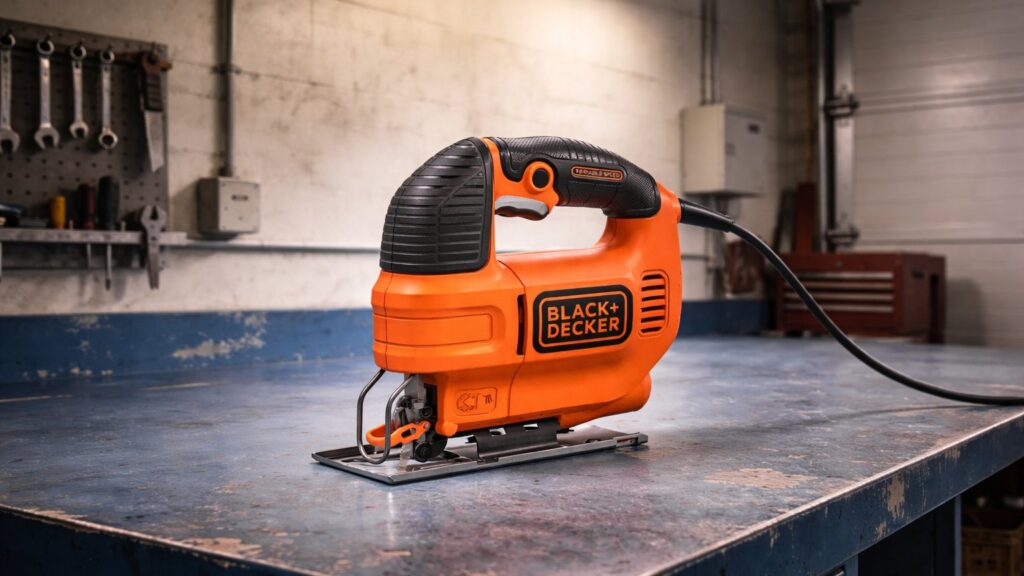
Buying framework
How to think about buying a jigsaw
Most jigsaws are capable of basic cutting, but the differences that shape ownership show up in control, cut quality, visibility, and how confidently the tool handles different materials and shapes. What matters most is not maximum output on paper, but how well the saw supports the kind of cutting you actually plan to do. Use this framework to identify the factors that deserve attention before narrowing the field.
Control shapes the result: A jigsaw is only as useful as its ability to track a line cleanly. Smooth trigger response, stable handling, and predictable blade movement matter more than raw cutting speed.
Blade support affects accuracy: Clean curves and straighter cuts depend heavily on how well the tool keeps the blade from wandering or deflecting. This becomes more important in thicker stock and tighter turns.
Match features to your materials: Wood, laminate, metal, and plastics place different demands on a jigsaw. Speed adjustment, orbital settings, and shoe stability all influence how adaptable the tool feels in use.
Comfort matters over time: Grip shape, weight distribution, and line-of-sight to the cut path affect how steady and precise the saw feels. Those details become more noticeable during longer sessions or finer work.
Begin with your likely projects: Decorative curves, rough cutouts, and finish-sensitive work do not demand the same priorities. Choosing around expected use leads to clearer decisions than focusing on broad specs alone.
Who this is for
Pick the jigsaw that matches how you actually work
The right jigsaw depends on the type of cuts you make, how often you use it, and how much precision your projects demand. Use these profiles to match control, features, and handling to the way you actually approach your work.
First-time users & light DIY: prioritize ease of control, clear visibility of the cut line, and straightforward adjustments. For occasional tasks like simple cutouts and rough shaping, predictable handling matters more than advanced features.
Weekend woodworking projects: prioritize stable tracking, adjustable speed, and comfortable handling for longer sessions. As projects involve cleaner curves and more precise cuts, consistency and control become more noticeable.
Detail work & curved cuts: prioritize blade stability, fine control at low speeds, and good sightlines. Tight radii and intricate shapes depend on how accurately the tool follows a line without deflection.
Multi-material use (wood, laminate, light metal): prioritize versatility, variable speed control, and adaptable settings. Different materials respond differently, making flexibility more important than any single performance trait.
Frequent use & project-based workflows: prioritize durability, comfort, and consistent performance over time. Repeated cutting sessions highlight how well the tool maintains control and reduces fatigue during extended use.
What to pay attention to
Which jigsaw specs actually matter
Spec sheets can make jigsaws look similar, but real differences show up in control, cut quality, and how the tool behaves across materials. Many listed numbers don’t translate directly to better results. These are the factors that meaningfully affect real-world use—and the ones that often matter less than expected.
Specs that affect feel
Control, stability, sightlines, and ergonomics determine how confidently you can guide the cut.
Specs that affect capability
Stroke behavior, speed range, and material adaptability determine how the saw performs across different tasks.
Cutting control: Smooth speed modulation and stable tracking determine how accurately the blade follows a line. This matters most when starting cuts or working through curves.
Weight and balance: How the saw feels in hand affects steadiness and fatigue over time. A well-balanced tool is easier to guide precisely, especially on longer or more detailed cuts.
Blade stability: The way the tool supports the blade influences deflection and cut quality. Better support keeps cuts cleaner and more predictable, particularly in thicker materials.
Stroke length and speed: Longer strokes and higher speeds increase cutting efficiency, while shorter, slower settings improve control and finish quality depending on the material.
Orbital settings: Adjustable orbital action changes how aggressively the blade cuts. Higher settings remove material faster but reduce precision, while lower settings favor cleaner results.
Often overhyped: maximum strokes per minute and headline cutting capacity numbers, which rarely reflect how controlled or clean the cut feels in actual use.
Avoid these traps
Common mistakes people make when buying a jigsaw
Most dissatisfaction with a jigsaw comes from mismatched expectations around control, cut quality, and how the tool behaves across materials. These are the most common mistakes we see—and how to avoid them before you choose.
Chasing speed over control: Higher cutting speeds can seem more capable, but they often reduce accuracy and increase tear-out. For many tasks, a jigsaw that responds smoothly at lower speeds delivers cleaner, more predictable results.
Assuming all blades behave the same: The blade has a major influence on cut quality and tracking, yet it’s often overlooked. Treat blade selection as part of the system, not an afterthought, especially when switching between materials.
Ignoring blade deflection: Thin blades can wander under load, leading to cuts that drift off line or bevel unintentionally. Stability and support matter more than expected, particularly in thicker stock or tighter curves.
Using aggressive settings for all cuts: Higher orbital action removes material faster but sacrifices precision and finish quality. Adjusting settings to match the material and desired finish leads to better overall results.
Overlooking visibility and sightlines: A clear view of the cut path is critical for accuracy, yet often undervalued. Features that improve line visibility can make a noticeable difference in real-world control.
Expecting straight cuts without guidance: Jigsaws are designed for flexibility, not long, perfectly straight cuts. Understanding their strengths in curves and irregular shapes helps set more realistic expectations for performance.
Decision guidance
Which type of jigsaw is right for you
The right jigsaw depends more on how you cut than on headline specs. Use this to match tool behavior to your typical projects, materials, and working conditions.
Choose a lighter, control-focused jigsaw if: your work centers on curves, cutouts, and general DIY tasks where accuracy matters more than speed. Lighter tools are easier to guide and less fatiguing, especially in tight spaces or when following detailed lines. This approach favors steadiness and visibility over aggressive cutting.
Choose a more powerful, feature-rich jigsaw if: you regularly cut thicker materials or switch between different surfaces. Added stroke control, adjustable settings, and stronger motors help maintain cutting consistency, but often come with increased weight and reduced maneuverability during finer work.
If you’re on the fence: prioritize how stable and predictable the saw feels during slower, controlled cuts. A tool that tracks cleanly at moderate speeds will usually produce better results across a wider range of tasks than one optimized for maximum output alone.
Match the jigsaw to your 80% tasks: most use centers on shaping, trimming, and making controlled cuts rather than heavy stock removal. Choosing for the type of cuts you make most often leads to better long-term satisfaction than planning for occasional demanding scenarios.
When a jigsaw isn’t the best tool: if your primary need is long, straight cuts or consistent edge accuracy, a circular saw or track-guided system may be more appropriate. Jigsaws excel in flexibility and curves, not in maintaining perfectly straight lines over distance.
Ownership & compatibility
What you’re really buying into long term
A jigsaw isn’t just a one-time purchase. Long-term satisfaction comes from how easily it integrates into your workflow, how simple it is to maintain, and how consistently it performs as materials, blades, and usage patterns change over time.
Blade compatibility and availability: Most jigsaws rely on standardized blade types, but quality and selection vary. Easy access to a wide range of blades—and replacing them frequently—has a greater impact on performance than the tool itself.
Blade changes and adjustment systems: Tool-free blade changes and simple adjustment controls reduce friction during use. Over time, small conveniences like quick swaps and reliable locking mechanisms make the tool feel more practical and efficient.
Fit, accessories, and maintenance: Shoe alignment, bevel adjustments, and dust management affect everyday usability. Components that stay aligned and are easy to clean or adjust tend to hold performance more consistently over extended use.
Durability and serviceability: Moving parts, switches, and internal supports experience regular stress during cutting. Tools that allow access to replacement parts or straightforward servicing tend to remain usable longer.
Total cost of ownership: Ongoing costs are driven more by consumables than the tool itself. Blade replacement, maintenance, and occasional part wear typically shape long-term cost more than the initial purchase.
FAQ
Jigsaw buying guide FAQ
Quick answers to the questions people ask most when choosing a jigsaw—focused on real use, not spec-sheet confusion.
Do I need a powerful jigsaw, or will a basic one work?
What’s the difference between orbital settings?
How important is blade choice for a jigsaw?
What speed settings should I look for?
Can a jigsaw make straight cuts accurately?
Do I need a jigsaw with a lot of features?
What affects how clean a cut looks?
What features actually matter day to day?
How long should a jigsaw last?
Bottom line
The simplest way to pick the right jigsaw
Most jigsaws can handle basic cutting tasks. The right one is the tool that feels stable, predictable, and easy to guide for the types of cuts you make most often.
If you want the easiest ownership experience: focus on a tool that works with widely available blades and simple adjustment systems, so changes and maintenance stay straightforward over time.
If control and cut quality matter most: prioritize smooth speed control, good sightlines, and stable handling, since these factors shape accuracy on every cut.
If you work across different materials: look for adaptable speed and orbital settings that let you shift between faster cuts and cleaner finishes without frustration.
If your use is occasional or light-duty: avoid overcomplicating the decision and focus on ease of use and comfort rather than maximum capability you may not need.
Final check: consider the cuts you make most—curves, cutouts, or rough shaping—and choose the jigsaw that feels easiest to control in that scenario.
Reading Shortcuts
Jump to the sections that matter most for choosing the right jigsaw.
Decision Reminders
A quick checklist before you commit to a jigsaw.
- Prioritize control over speed: smoother, slower cutting keeps lines cleaner and easier to follow.
- Match the tool to your cuts: jigsaws excel at curves and cutouts, not long, perfectly straight lines.
- Blade choice drives results: the wrong blade can reduce accuracy and finish quality regardless of the tool.
- Stability matters more than power: a saw that tracks predictably produces better results than one that cuts aggressively.
- Adjust settings to the material: speed and orbital action should change depending on whether you want speed or a clean finish.
- Don’t rely on headline specs: maximum speed and capacity numbers rarely reflect how the tool feels in real use.
Glossary Snippets
Quick translations for the terms that confuse buyers most.
When to Use a Top 10 Review
If you want the fastest shortlist, this is the format that gets you to a confident pick.
- You’re not sure what matters yet: It translates features like blade control, speed settings, and handling into real-world cutting behavior.
- You want a structured shortlist: The format groups tools by use cases such as precision work, general DIY, or heavier material cutting.
- You want quick “best for” clarity: Categories like Best Overall or Best for Detail Work help narrow options without deep research.
- You want to compare tool types at a glance: It shows how different jigsaw styles and feature sets align with common workloads.
Already down to 2–3 models? A Comparison is usually faster than reading full reviews.
When to Use a Comparison
Best when you’re choosing between specific models and want the clearest tradeoffs.
- You’re down to 2–3 finalists: side-by-side differences clarify how each tool behaves in real cutting situations.
- You care about control and cut quality: stability, blade tracking, and handling differences show up clearly in head-to-head views.
- You want a winner by category: comparisons highlight tradeoffs across control, versatility, ergonomics, and overall feel.
- You need the fastest decision: a Comparison acts as a focused decision lens once your shortlist is already defined.
Still exploring? Start with a Top 10 to find the right “type” of jigsaw first.