
Jigsaws Buying Guide: How to Choose the Right One
Jigsaws occupy a unique role among cutting tools, bridging rough material removal and controlled, intricate shaping. Their apparent simplicity often masks meaningful differences in how they handle curves, maintain line accuracy, and behave across materials. Variations in stroke mechanics, blade interaction, and user control create a wide spectrum of performance outcomes, making selection more nuanced than it initially appears.
This guide clarifies the factors that determine how a jigsaw performs in real use. It breaks down blade types, orbital action, power delivery, ergonomics, and stability, along with the tradeoffs between speed and precision. By the end, readers will understand the terminology and decision criteria needed to match tool characteristics to specific cutting demands with confidence.
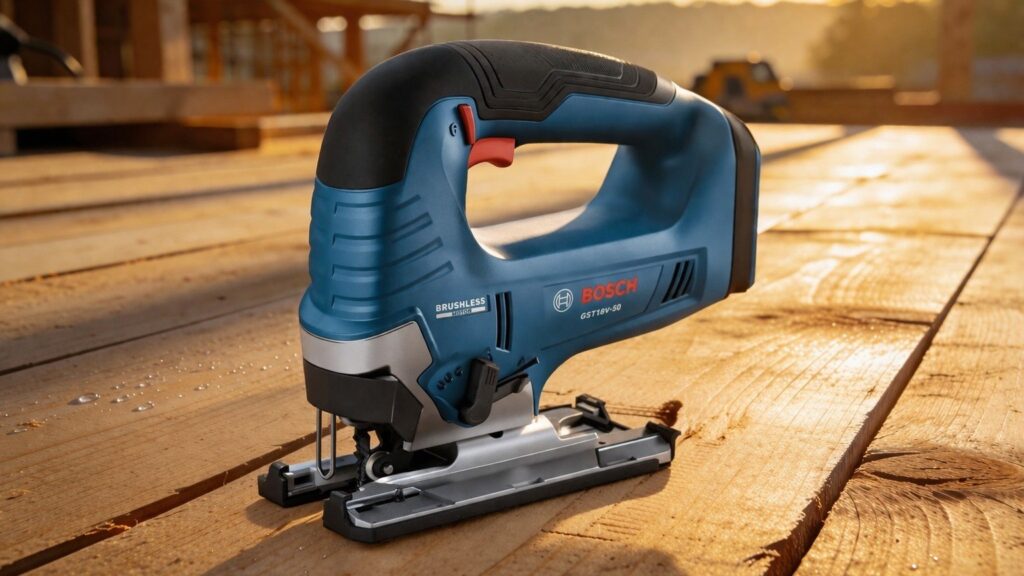
Buying framework
How to think about buying a jigsaw
Most modern jigsaws are capable of making a cut, but the differences that shape real ownership show up in control, stability, visibility, and how confidently the tool follows a line through different materials. What matters most depends on the kinds of cuts you make, the materials you use, and whether speed or finish quality matters more.
Control matters more than raw speed: A jigsaw that starts smoothly and tracks predictably makes it easier to follow layout lines, manage tighter curves, and reduce wandering at the beginning of the cut.
Stability is a “hidden spec”: Base design, tool balance, and vibration control all affect how steady the saw feels. That becomes more important in long cuts, detailed work, and materials that punish small errors.
Match the tool to the cut type: Some jigsaws are better suited to fast rough work, while others favor cleaner edges and more deliberate control. Your typical material and cut shape should guide that decision.
Blade compatibility shapes results: Blade type, change mechanism, and support around the blade influence cut quality and ease of use. The tool and blade need to work together, not as separate decisions.
Ergonomics influences accuracy: Grip shape, sightlines, switch placement, and overall comfort affect how naturally the saw moves in your hand. A jigsaw that feels composed is easier to guide with confidence.
Who this is for
Pick the jigsaw that matches how you actually work
The right jigsaw depends on the materials you cut, how often you use it, and whether your work prioritizes speed or finish quality. Use these profiles to match control, stability, and handling to the kinds of cuts you actually make.
Homeowners & light DIY: prioritize ease of control, low vibration, and simple blade changes. For occasional tasks like trimming boards or cutting basic shapes, predictable handling and clear sightlines matter most.
Weekend projects (furniture, trim, small builds): prioritize cut accuracy, comfortable ergonomics, and adjustable speed or orbital settings. Consistent tracking and manageable vibration become more important as project complexity increases.
Detail work (curves, patterns, tight cuts): prioritize precision, visibility, and fine control at lower speeds. Stability and blade guidance matter most when following tight lines or working with delicate materials.
Heavy use & thicker materials: prioritize durability, steady power delivery, and controlled cutting through resistance. A tool that remains composed under load matters more than peak speed when working regularly with dense stock.
General-purpose use: prioritize versatility, balanced ergonomics, and adaptability across materials. A jigsaw that transitions cleanly between rough cuts and more controlled work provides the most consistent everyday performance.
What to pay attention to
Which jigsaw specs actually matter
Spec sheets can make jigsaws look similar, but the details that shape real-world use are often buried or poorly explained. These are the specifications that affect control, cut quality, and consistency — and the ones that matter far less once you’re actually guiding the saw through a cut.
Specs that affect feel
Grip design, vibration control, sightlines, and trigger response determine how confidently the saw tracks a line.
Specs that affect capability
Stroke length, orbital settings, and blade support determine how the tool handles different materials and cut types.
Speed control and trigger response: Smooth low-speed control makes it easier to start cuts cleanly and follow tighter curves without wandering.
Vibration and stability: Excess vibration reduces accuracy and control, especially in longer cuts or detailed work where small deviations compound quickly.
Orbital action settings: Higher orbital settings increase cutting speed but reduce finish quality, while lower settings favor cleaner edges and better control.
Blade support and guidance: How the tool stabilizes the blade affects straightness and edge quality, particularly in thicker materials or aggressive cuts.
Stroke length and cutting behavior: Longer strokes remove material faster but can feel less controlled, while shorter strokes improve precision at the cost of speed.
Often overhyped: maximum strokes per minute ratings and peak cutting speed claims that don’t reflect control, finish quality, or real cutting conditions.
Avoid these traps
Common mistakes people make when buying a jigsaw
Most dissatisfaction with a jigsaw comes from mismatching the tool’s behavior to the type of cuts being made. These are the most common mistakes we see—and how to avoid them before you buy.
Chasing speed over control: Faster cutting settings can seem more productive, but they often reduce accuracy and increase tear-out. In practice, controlled movement and predictable tracking lead to better results than maximum cutting speed.
Assuming all jigsaws cut straight equally well: Not all tools manage blade deflection the same way, especially in thicker materials. Without adequate stability and support, cuts can drift even when following a marked line.
Ignoring how the tool feels in use: Ergonomics, vibration, and sightlines are rarely emphasized on spec sheets but strongly affect accuracy. A tool that feels unsettled or difficult to guide will show its limitations in every cut.
Overlooking blade and setup interaction: The blade and tool work together as a system, not as separate choices. Mismatched blade types or poor support can limit performance even if the tool itself is capable.
Expecting one setup to handle every cut: Different materials and cut types require adjustments in speed, orbital action, and technique. Treating the tool as a fixed setup often leads to inconsistent results.
Focusing on headline specs alone: Numbers like strokes per minute or motor output don’t reflect how the tool behaves in real use. Control, stability, and cut quality are shaped more by design and handling than by peak figures.
Decision guidance
Which type of jigsaw is right for you
The right jigsaw depends more on the types of cuts you make most often than on any single specification. Use this to match control, stability, and cutting behavior to your real workload—not occasional edge cases.
Choose a precision-focused setup if: your work involves curves, patterns, or visible edges where cut quality matters. Prioritize smooth speed control, low vibration, and clear sightlines so the tool tracks accurately and remains easy to guide through tighter shapes.
Choose a speed-focused setup if: you’re cutting thicker materials or doing rough shaping where finish quality is secondary. Higher orbital settings and longer strokes remove material faster, but they trade off edge cleanliness and control in finer work.
If you work across multiple materials: look for a tool that transitions easily between settings without feeling unpredictable. A balanced setup that handles both controlled cuts and moderate material removal usually performs better than one tuned for extremes.
Match the tool to your typical working conditions: for tight spaces, overhead work, or extended sessions, prioritize ergonomics and stability. A jigsaw that feels composed and easy to maneuver will maintain accuracy longer than one that relies on higher output alone.
When a jigsaw isn’t the right tool: for long straight cuts, repeated rip work, or heavy material removal, a different saw type provides better guidance and consistency. Jigsaws excel in flexibility and shape cutting, but they are not designed for precision straight-line work over distance.
Ownership & compatibility
What you’re really buying into long term
A jigsaw isn’t just a one-time purchase. Long-term ownership is shaped by blade compatibility, maintenance needs, parts availability, and how easily the tool fits into your workflow over time.
Blade systems and availability: Jigsaws rely on readily available blades, and compatibility with common shank types affects long-term convenience. Easy access to a wide range of blade styles makes it simpler to adapt to different materials and cut types without friction.
Corded vs cordless workflow: Cordless tools add flexibility but introduce battery management, charging cycles, and eventual replacement. Corded options remove that complexity but require consistent access to power and cable management in your workspace.
Blade changes and everyday use: Tool-free blade changes and secure clamping reduce downtime and frustration during frequent swaps. Over time, small usability details like this have a noticeable impact on workflow efficiency.
Wear items and maintenance: Blades are consumables, but components like base plates, guides, and switches also experience wear. Access to replacement parts and straightforward maintenance supports longer tool life.
Total cost of ownership: Ongoing costs come from blades, batteries for cordless tools, and occasional part replacement. Over time, these recurring expenses often outweigh small differences in initial purchase cost.
FAQ
Jigsaw buying guide FAQ
Quick answers to the questions people ask most when choosing a jigsaw—focused on real use, not spec-sheet hype.
Do I need a cordless jigsaw, or is corded enough?
What’s the difference between orbital and straight cutting?
How important is speed control on a jigsaw?
Do all jigsaws cut straight lines well?
How important is blade choice?
Can a jigsaw replace other saws?
What features actually matter day to day?
How long should a jigsaw last?
Bottom line
The simplest way to pick the right jigsaw
Most jigsaws can make a cut, but the right one is the tool that stays controlled, stable, and easy to guide. Focus on how it behaves in your typical work, not how it performs in edge cases.
If you want the easiest ownership experience: choose a setup that uses widely available blades and fits your workflow, whether that means cordless flexibility or corded consistency.
If control and precision matter most: prioritize smooth speed control, low vibration, and clear sightlines, as these directly affect accuracy and cut quality.
If you work with thicker materials or rough cuts: focus on stability and cutting behavior under load, but avoid over-prioritizing speed if finish still matters.
If your work varies: choose a balanced setup that transitions cleanly between controlled cuts and faster material removal without feeling unpredictable.
Final check: think about your most common cuts—curves, straight lines, or rough shaping—and choose the tool that feels most composed in that scenario.
Reading Shortcuts
Jump to the sections that matter most for choosing the right jigsaw.
Decision Reminders
A quick checklist before you commit to a jigsaw setup.
- Choose control over speed: smooth, predictable movement keeps cuts on line and improves finish quality.
- Match the tool to your cut type: detailed curves and visible edges require stability, while rough work favors faster cutting behavior.
- Blade choice shapes the result: the wrong blade can reduce accuracy and finish quality even with a capable tool.
- Pay attention to feel in use: vibration, balance, and sightlines directly affect how confidently you can guide the saw.
- Adjust settings for the task: speed and orbital action should change with material and cut type, not stay fixed.
- Don’t rely on headline specs: stroke speed and output numbers matter less than how stable and controlled the tool feels.
Glossary Snippets
Quick translations for the terms that confuse buyers most.
When to Use a Top 10 Review
If you want the fastest shortlist, this is the format that gets you to a confident pick.
- You’re not sure what matters yet: It frames key differences in control, stability, and cutting behavior in practical terms.
- You want a structured shortlist: The format groups options by use case so you can narrow choices without overthinking specs.
- You want quick “best for” context: Categories like precision, general use, or heavy cutting help you match tools to tasks.
- You’re comparing ownership tradeoffs: It highlights workflow differences like portability, setup, and long-term use patterns.
Already down to 2–3 models? A Comparison is usually faster than reading full reviews.
When to Use a Comparison
Best when you’re choosing between specific options and want the clearest tradeoffs.
- You’re down to 2–3 finalists: direct differences in control, stability, and cut behavior are easier to see side by side.
- You care about real-world feel: vibration, balance, and tracking become clearer when tools are evaluated head to head.
- You want structured tradeoffs: categories like precision, cutting speed, and usability highlight where each option stands.
- You need a clear final call: a Comparison helps you resolve small differences once your shortlist is already defined.
Still exploring? Start with a Top 10 to find the right “type” of jigsaw first.