
OBD Diagnostic Tools Buying Guide for Fleet and Commuter Vehicles
A commuter car and a ten-vehicle service roster create the same basic demand: capture a fault accurately without adding avoidable downtime. The difference is repetition. Once several vehicles, drivers, model years, and warning types are involved, vehicle identification and consistent records become as important as code coverage.
An effective fleet-oriented OBD tool should match the actual roster, scan the systems that sideline those vehicles, and produce reports another person can understand. It also needs a manageable software and account model. This guide separates personal commuter needs from small-fleet and mixed-vehicle workflows, including the point where light-duty OBD-II assumptions no longer cover heavier equipment.
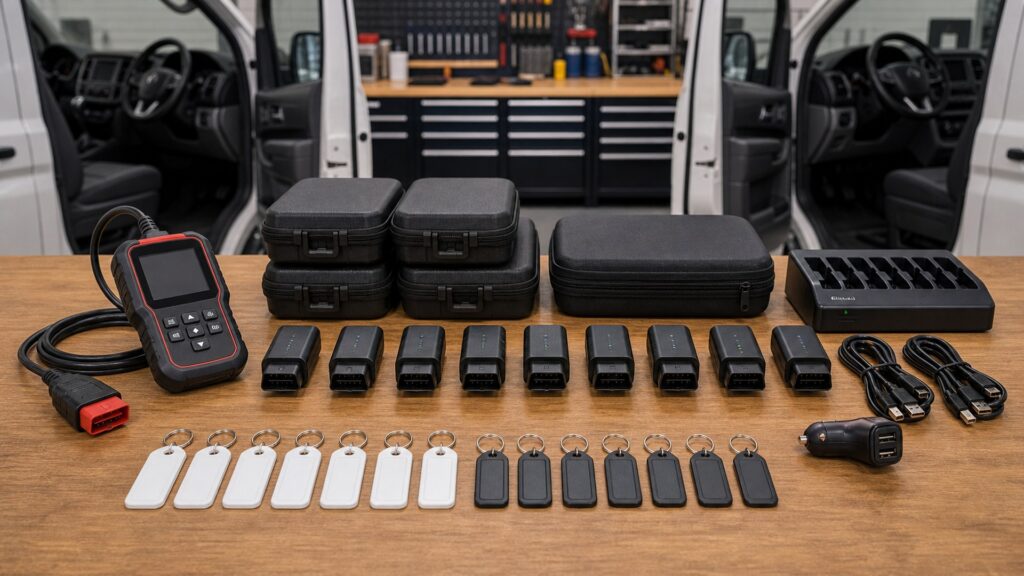
Buying framework
Standardize the record before scaling the scanner
A repeatable process makes vehicle data comparable across drivers and service events. Define the unit identity, scan scope, saved evidence, and command permissions before evaluating tool speed or coverage totals.
Build a roster matrix: List every year, make, model, powertrain, vehicle class, and critical module, then mark the functions required for each. Test the oldest, newest, and least common units rather than assuming one successful connection represents the fleet.
Define the report: Require VIN, date, odometer, module inventory, DTC status, and space for the complaint or operator note. Use the same pre-scan and post-scan structure so changes are visible without reconstructing the visit.
Assign authority: Drivers may record warnings and read a report; trained staff may clear codes, run active tests, or perform resets. Keep command access aligned with procedures instead of making every feature available to every user.
Price continued coverage: Measure cost across hardware, vehicle packages, annual updates, gateway access, report storage, and device replacement. A low purchase price can be expensive if routine vehicles lose current support.
Who this is for
Match diagnostic depth to the operating group
Vehicle count alone does not define the tool. Diversity, reporting responsibility, module access, and the people allowed to send commands determine the practical tier.
The single high-mileage commuter: You want fast check-engine triage, freeze frame, readiness, and a saved report for the shop. A simple reader works when the concern stays within generic emissions and powertrain information.
The family or shared-car household: Several vehicles and occasional users favor automatic identification, saved profiles, clear report names, and uncomplicated navigation. Enhanced coverage should follow the specific non-engine warnings common to those cars.
The small light-duty fleet: Repeated scans, odometer records, full-system coverage, exports, service resets, and gateway administration justify an enhanced handheld or tablet. A coverage matrix should replace informal claims that a brand is supported.
The mixed professional operation: Passenger vehicles, vans, heavier trucks, and equipment may cross protocol families. Choose a platform with documented light-duty and J1939 boundaries—or separate tools—rather than expecting one OBD-II cable to cover every asset.
What to pay attention to
Specifications that make repeated scans dependable
Fleet value appears in fewer selection errors, faster evidence capture, and cleaner records. Test the workflow with real units instead of comparing processor, screen, or brand counts in isolation.
Roster Coverage & Workflow
Combine exact module support with VIN handling, batch scan speed, report consistency, exports, and manageable vehicle profiles.
Access Governance & Lifecycle
Examine user accounts, protected commands, renewals, cloud retention, telematics coexistence, and protocol boundaries over the planned ownership period.
VIN and unit identity: Automatic VIN capture reduces manual errors, but reports should also allow a fleet number and odometer entry. Confirm the tool handles duplicate models without overwriting or mislabeling history.
Scan scope and timing: Measure the time to inventory the modules that matter, not merely engine-code speed. A configurable quick scan can suit daily triage, while a complete pre-scan supports repair documentation.
Report structure: Look for code status, module name, timestamp, vehicle identity, and a stable export such as PDF or CSV. Cloud sharing is useful only when retention and account access match fleet policy.
Data capture by complaint: Saved freeze frame and focused PID recordings can document intermittent commuter symptoms. The tool should attach evidence to the correct unit and let technicians review it without the driver's phone.
Platform boundaries: Verify CAN FD, DoIP, secure-gateway, hybrid or EV system, and any J1939 needs separately. Marketing coverage for passenger brands does not establish support for heavier chassis or specialty equipment.
Avoid these traps
Fleet shortcuts that corrupt the service record
A fast scan is valuable only when it belongs to the right vehicle and preserves the condition accurately. Standardization prevents small handling errors from multiplying across the roster.
Testing only the easiest unit: One recent model cannot validate an older platform, different engine, or secure-gateway function. Sample the roster's coverage edges before committing to hardware and subscriptions.
Letting drivers erase codes: Clearing can remove freeze frame, reset readiness, and hide the event from maintenance staff. Give drivers a read-and-report procedure and reserve erase commands for documented service work.
Treating telematics as shop diagnostics: An installed dongle may report selected faults or operating data but lack full-system access, active tests, service routines, or detailed freeze frame. Define its handoff to the service scanner.
Mixing unlabeled reports: A screenshot without VIN, unit number, date, and odometer can send technicians toward the wrong vehicle history. Make complete identity fields part of the scan, not an optional note.
Decision guidance
Select the platform by roster and record duty
Choose the least complex system that supports every required unit and produces the documentation your operation will retain. Broader command authority should follow trained use, not fleet size alone.
If one commuter needs shop-ready evidence: Use a clear generic reader with freeze frame, readiness, voltage, and an export or printable record. Add enhanced access only for known non-powertrain systems.
If several household vehicles share a tool: Favor automatic identification, durable saved profiles, simple updates, and reports labeled by vehicle. A phone adapter works when account ownership and file sharing are unambiguous.
If a light fleet performs maintenance internally: Choose an all-system platform with verified service routines, pre- and post-scan reports, role discipline, and manageable gateway access. Price renewals against avoided outside scans and downtime.
If the roster crosses vehicle classes: Use documented support for each protocol family or divide the work between light-duty and heavy-duty tools. Do not let a shared connector shape substitute for verified module coverage.
Ownership & compatibility
Run the diagnostic platform like shared equipment
Fleet usefulness depends on records, access control, and hardware readiness after the purchase. Assign responsibility so updates and reports do not live on one employee's device.
Maintain the coverage ledger: Record software version, confirmed functions, adapters, and unresolved gaps for each unit. Recheck the matrix before renewals or when new vehicles enter service.
Govern accounts and data: Use organization-owned credentials where possible, register tool serials, define gateway roles, and set report retention. Review consent and privacy obligations for installed or cloud-connected devices.
Keep shared hardware ready: Inspect the VCI and cable, charge tablets, label adapters, and keep a sign-out location. A diagnostic tool that cannot be found or connected is not reducing downtime.
FAQ
Fleet and commuter questions to answer before purchase
Apply each answer to the real roster, reporting policy, and people who will operate the tool.
How many vehicles justify an enhanced scanner?
Why should scan reports include the VIN and odometer?
Can drivers use the fleet scan tool themselves?
Does a full-system scan replace inspection and diagnosis?
How should readiness information be used for commuters?
What is the value of pre-scan and post-scan reports?
Can an installed telematics dongle replace a service scanner?
Will a light-duty OBD scanner work on heavy trucks?
What should a fleet budget for after buying hardware?
Bottom line
Buy a repeatable record, not just a reader
The right platform covers the real roster, identifies each unit reliably, preserves comparable evidence, and restricts commands to appropriate users. Its long-term value is measured in clearer handoffs and shorter downtime.
Map the roster: Verify edge vehicles, critical modules, protocols, and protected functions.
Standardize evidence: Save VIN-, date-, and odometer-linked pre-scan and post-scan reports.
Own the lifecycle: Budget renewals, accounts, hardware care, data retention, and new-unit validation.
Reading Shortcuts
Move from roster mapping to operating policy.
Decision Reminders
Keep shared diagnostics consistent.
- Roster: Validate the oldest, newest, and least common units.
- Identity: Attach VIN, unit number, date, and odometer.
- Scope: Separate generic and all-system access.
- Roles: Limit erase and command authority.
- Reports: Export records outside personal devices.
- Lifecycle: Price renewals and gateway administration.
Glossary Snippets
Terms used in a repeatable scan record.
When to Use a Top 10 Review
Use rankings only after the roster and report standard are written.
- Filter: By confirmed roster and module support.
- Value: Fast identification and consistent exports.
- Check: Gateway, renewal, and role requirements.
- Exclude: Platforms that blur light- and heavy-duty coverage.
Already down to 2–3 options? A Comparison is usually the faster next step.
When to Use a Comparison
Compare finalists with the same edge vehicles and report task.
- Identify: Time VIN and unit selection.
- Scan: Measure the required module inventory.
- Export: Compare report clarity and ownership.
- Renew: Model three years of access cost.
Still exploring? Start with a Top 10 to build a shortlist first.