
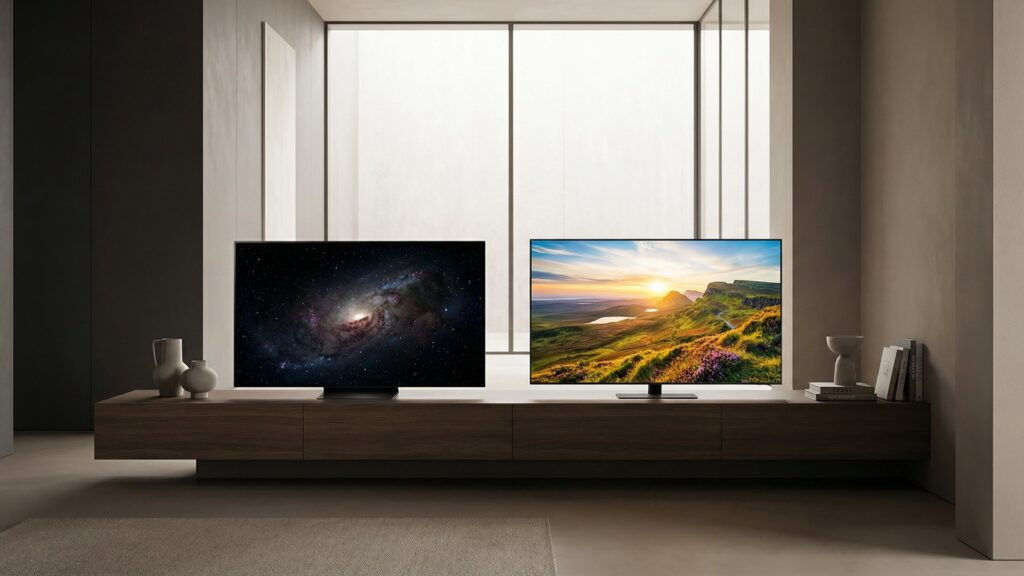
OLED vs QLED

OLED and QLED are often treated as competing display technologies, yet the distinction is rooted in fundamentally different approaches to how light and color are produced on screen. The terminology itself contributes to confusion, as both names emphasize light-emitting concepts while only one relies on self-emissive pixels, and the other builds upon a layered backlighting system enhanced by quantum materials.

This explainer outlines how each technology functions at the panel level, including pixel behavior, light generation, and color filtering. It clarifies the structural differences between self-emissive and backlit displays, along with the role of quantum dots in image formation. By the end, readers will understand the underlying mechanisms that define OLED and QLED and how these systems operate in modern televisions.

By: Review Streets Research Lab
Updated: April 19, 2026
Explainer · 8–12 min read
What You’ll Learn

How OLED and QLED Displays Function

A focused explanation of how these display systems generate light, shape color, and produce image structure through different panel architectures.

  • How self-emissive pixels generate light independently across an OLED display surface
  • How QLED panels use backlights, layers, and quantum dots
  • What separates pixel-level illumination from zone-based light control systems
  • How light passes through filters, subpixels, and emission materials
  • Why black levels, blooming, and uniformity emerge from panel design
  • How quantum dots alter spectral output and perceived color purity
  • What panel structure reveals about brightness behavior and image formation

Tip: Think of OLED as pixels creating their own light, while QLED shapes light supplied from behind the panel.

Definitions

Key Display Systems Behind OLED and QLED

Before the image on screen makes sense, it helps to understand how each layer, light source, and control system contributes to the final picture.

Self-Emissive Pixels

In an OLED panel, each pixel produces its own light when current passes through organic material. That means brightness and darkness are controlled at the pixel itself rather than by a separate light source behind the screen.

  • Control: Each pixel can brighten, dim, or shut off independently
  • Black level: Dark areas appear when individual pixels stop emitting light
  • Precision: Light is created exactly where the image information exists

Backlight System

In a QLED display, the panel depends on a separate light source behind the screen. That backlight supplies illumination, while the layers in front of it shape how much light passes through different parts of the image.

  • Source: Light begins behind the panel instead of inside each pixel
  • Zones: Brightness is often managed across grouped backlight areas
  • Spill: Light can extend beyond object edges in dark scenes

Quantum Dot Layer

Quantum dots are tiny semiconductor particles that convert blue light into highly specific red and green wavelengths. In a QLED structure, this layer refines the light before it passes through the rest of the display stack.

  • Spectral control: Narrow wavelengths help create more defined color output
  • Conversion: Blue backlight energy is transformed into other color components
  • Role: The layer modifies light rather than generating the image alone

Liquid Crystal Layer

Liquid crystals do not emit light themselves. Their function is to open, restrict, or redirect light passing from the backlight through the panel, which is how an LCD-based QLED structure forms brightness patterns on screen.

  • Modulation: Crystals control how much backlight reaches each subpixel area
  • Timing: Their response affects how quickly image states can change
  • Dependence: They require an external light source to remain visible

Color Filter Structure

Color filters separate light into red, green, and blue subpixel channels. These filtered channels determine the visible color at each image location by allowing only specific wavelengths to pass forward.

  • Selection: Filters isolate which portion of light reaches the viewer
  • Subpixels: Red, green, and blue elements combine into full-color images
  • Loss: Some light is absorbed as part of the filtering process

Local Dimming Control

Local dimming is the system that adjusts brightness across sections of a backlight. It helps align overall illumination with the image, but it works by zones rather than with the pixel-level independence found in self-emissive displays.

  • Grouping: One zone may illuminate many pixels at the same time
  • Coordination: The system balances scene brightness against dark-area control
  • Limits: Zone boundaries can shape visible halos around bright objects

Tip: The core difference is simple: OLED creates light at the pixel, while QLED manages light that originates behind the panel.

Light Path

How Light Is Generated and Directed Across the Panel

Image formation begins with how light is created and guided through the display stack. The path light takes determines how precisely brightness and darkness can be controlled.

  • In OLED, each pixel emits its own light directly at the image location
  • In QLED, a backlight generates illumination that passes through multiple layers
  • Light in QLED panels must be shaped and filtered before reaching the viewer
  • Self-emissive systems eliminate the need for a separate illumination source
  • Layered systems rely on coordination between light source and panel structure

The structure of this light path defines how accurately brightness aligns with the image itself.

Emission System

Self-Emissive Pixels and Backlit Modulation

Displays differ in whether light is created at each pixel or controlled after being produced elsewhere. This distinction shapes how images are built at the smallest level.

  • Self-emissive pixels generate light only where the image requires illumination
  • Backlit systems depend on liquid crystals to regulate transmitted light
  • Pixel-level emission allows complete shutdown of light in dark regions
  • Backlit designs require coordination between illumination zones and pixel structure

These emission methods determine how precisely the display can represent contrast and detail.

Color Formation

How Displays Create and Refine Color

Color is produced through a combination of light generation and filtering. Each system uses different mechanisms to shape the wavelengths that reach the viewer.

  • OLED panels generate color through emissive subpixels with organic materials
  • QLED panels use quantum dots to convert light into precise color wavelengths
  • Color filters isolate red, green, and blue channels at each pixel location
  • Layer interactions influence how much light is preserved or absorbed

The way color is formed affects how consistently hues are produced across varying brightness levels.

Brightness Control

How Displays Manage Light Intensity Across the Screen

Brightness is controlled either at the individual pixel level or across groups of pixels. This control system determines how light responds to changing image content.

  • OLED adjusts brightness independently for each pixel without shared illumination
  • QLED relies on zones of backlight that brighten or dim together
  • Zone-based systems must balance bright and dark areas within the same region
  • Pixel-level control allows light to match image boundaries more closely

The method of brightness control influences how accurately light follows the structure of the scene.

Image Behavior

How Panel Structure Shapes On-Screen Visual Effects

The internal design of a display influences how images behave during real content. These behaviors emerge from how light, layers, and timing interact across the panel.

  • Pixel-level emission can eliminate unintended light in dark regions
  • Backlight zones may produce visible transitions around bright objects
  • Layered structures can affect uniformity across large areas of the screen
  • Response characteristics influence how quickly images transition between states

These visible effects are direct results of how each system manages light and structure internally.

Quick Reality Check

Where OLED and QLED Differ in Practice

A quick reality check on how each display system behaves once panel structure, light control, and image formation start shaping what appears on screen.

Pixel-Level Light Precision

OLED controls light at the individual pixel, so illuminated areas and dark areas can remain tightly separated within the same scene.

When a small bright object appears against black, only the relevant pixels emit light, which keeps surrounding areas from being lit unnecessarily.

Layered Brightness Management

QLED depends on a backlight and multiple panel layers, so brightness is managed across zones rather than generated independently by each pixel.

In scenes with both intense highlights and deep shadows, shared backlight regions may illuminate adjacent dark areas as the system balances overall output.

Common Myths

Misunderstandings About How OLED and QLED Work

These displays are often reduced to labels, when their real differences come from how light, layers, and pixel control operate inside the panel.

OLED and QLED are basically the same

They are built on different lighting systems. OLED uses self-emissive pixels, while QLED relies on a backlight, liquid crystal modulation, and a quantum dot layer to shape the image.

QLED pixels make their own light

QLED is still an LCD-based structure, which means the visible image depends on light coming from behind the panel. Quantum dots refine that light, but they do not replace the backlight system.

OLED has no layered panel structure

OLED panels still contain multiple functional layers, including emissive materials, electrodes, and control structures. The difference is that light originates at the pixel rather than being supplied from a separate rear illumination layer.

Quantum dots create the whole image

Quantum dots help convert light into more precise color wavelengths, but they are only one part of the display stack. The final image still depends on backlighting, panel control, filtering, and subpixel structure working together.

Black levels come only from brightness settings

Black depth is mainly determined by how completely a display can restrict or eliminate light. Pixel shutoff and backlight control are structural behaviors, not simply matters of how bright the screen is set overall.

Tip: Think of the difference as a lighting architecture problem: where light starts, and how precisely the panel can control it afterward.

FAQ

Frequently Asked Questions About OLED and QLED Displays

Quick answers to the most common questions that come up once the underlying light systems, panel layers, and image behavior are clearer.

What is the core difference between OLED and QLED?

The main difference is where light comes from. OLED creates light at each pixel through self-emissive materials, while QLED uses a backlight behind an LCD panel and quantum dot layer to shape the final image.

Why do dark scenes behave differently on these displays?

Dark-scene behavior depends on how completely the display can control or remove light. OLED can turn individual pixels off, while QLED must manage darkness by reducing backlight output and restricting transmitted light through the LCD layer.

What exactly do quantum dots do inside a QLED panel?

Quantum dots convert blue light into highly specific red and green wavelengths. This helps the display produce more defined color signals before the light passes through the rest of the panel structure.

Does OLED have a backlight behind the screen?

No. OLED does not rely on a separate rear illumination system because each pixel produces its own light directly within the panel. That is why its light control happens at the pixel level rather than by zones.

Why can bright objects affect nearby dark areas on screen?

This usually happens when a display uses grouped backlight zones instead of fully independent pixels. If one zone must brighten for a highlight, nearby dark areas within that same zone can also receive some of that light.

Are OLED and QLED both forms of LCD technology?

Only QLED is part of an LCD-based structure. OLED works through self-emissive organic materials, while QLED remains an LCD system enhanced by quantum dots and driven by a separate backlight.

What determines how color is formed on each display?

Color formation depends on how light is generated and then separated into red, green, and blue components. OLED uses emissive subpixels, while QLED refines backlight output with quantum dots and then filters it through the LCD stack.

Why does panel structure matter more than the name?

The name is only a label, but the structure determines how light, color, and contrast are actually produced. Once the lighting architecture is clear, most visible differences follow directly from that internal design.

Tip: When a display behaves a certain way, trace the cause back to its lighting architecture: where light begins, how it is controlled, and whether that control happens by pixel or by zone.

Bottom Line

OLED creates light at the pixel, while QLED controls light from behind. This difference in light origin determines how precisely brightness, darkness, and color can be formed across the screen through either pixel-level emission or layered modulation.

Once the lighting architecture is clear, it becomes easier to interpret how each display behaves in different scenes and why certain visual effects appear under specific conditions.

Next Steps

Go Further With Related Television Guides

With the display fundamentals in place, these pages extend that understanding into broader television roundups, focused comparisons, and specification-driven guidance.

Television Lists

Curated list pages organize televisions by use case, screen priorities, and display characteristics so broader patterns are easier to understand.

Television Comparisons

Focused comparison pages examine how specific television categories differ in panel behavior, image structure, and real-world viewing characteristics.

Television Buying Guides

Detailed buying guides explain which television specifications change picture behavior, which ones need context, and how display terminology fits together.