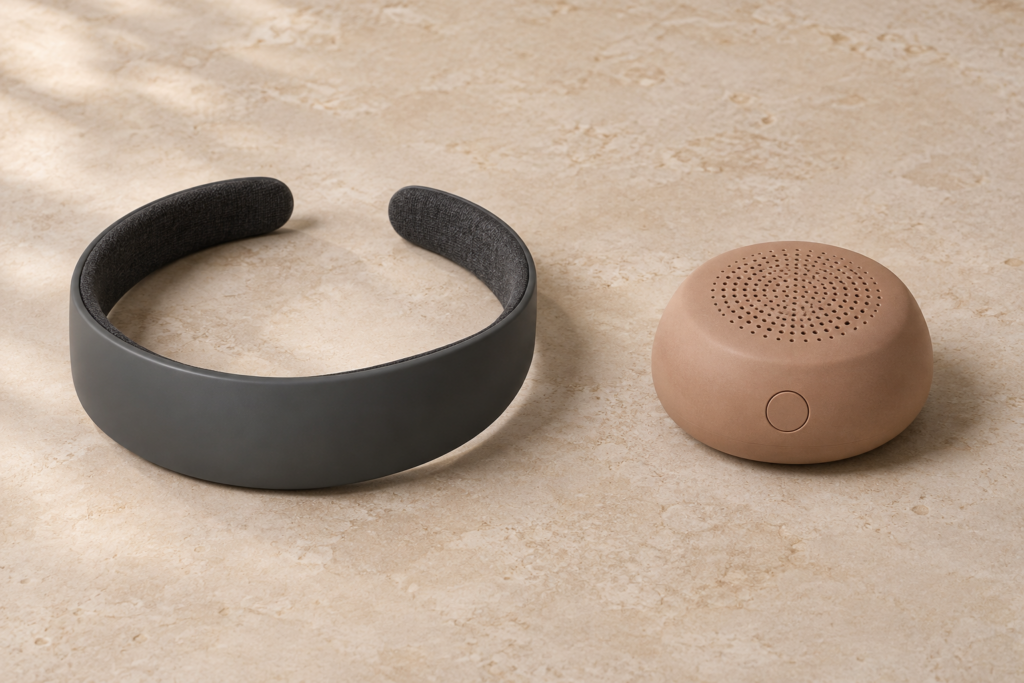
What Makes Meditation Headbands Different from Mindfulness Audio Devices

A meditation headband describes what you wear. In Muse Mind, a signal from the wearer changes the weather sound. On a mindfulness audio device such as the original Morphée, pressing Play starts a chosen session. The two functions can meet when an app adds a live cue over a recording.

By: Review Streets Research Lab
Updated: November 27, 2026
Explainer · 8–10 min read
An open graphite meditation headband next to a compact clay-colored audio player on a pale stone tabletop.
The comparison

Listen for what changes the sound

An app can add an audible cue over a recording. Start with the sound you want to understand, such as a voice, a chime or a change in the background.

  • Identify the measurement behind EEG-based feedback.
  • Recognize what an app's focus estimate represents.
  • Recognize audio that begins when you select and start a session.
  • Identify a chime tied to elapsed time.
  • Distinguish a cue over a recording from the recording itself.
  • Separate listening during a session from seeing a graph afterward.
  • Identify what a sound can tell you about the feature and what an improvement claim would require.

Tip: A graph shown after practice is easier to place if you ask when the session collected the information and when you received it.

Terms to know

Hardware, recordings and cues

A headband setup may include an app that handles sound. These terms give you ways to describe the separate jobs in that setup.

Form factor

The physical shape and arrangement of a device. An EEG headset is one example.

  • Wear location: The Muse setup documented in an earlier study used a headset to collect EEG.
  • Separate jobs: That headset was paired with an app on a mobile device.
  • Where the audio plays: In that study, the paired player delivered spoken directions.

Audio content

The listening material itself, such as a narrated meditation or nature audio.

  • Words: A spoken exercise can tell you where to place your attention.
  • Atmosphere: Original Morphée offers nature audio as a choice in its own right.
  • Collection: Geode is Zenimal's name for a specific set of recordings.

Playback

Presenting prepared audio when a listener starts a selection.

  • Starting point: On Zenimal+, a button starts the selected audio.
  • Repeat: The original Morphée lets you play a session again.
  • Storage: Zenimal+ can read audio from a physical card.

Measured-input cue

Here, a sound that gets louder or softer in response to a reading from the person.

  • Input: In the earlier Muse study, the headset supplied the EEG readings.
  • Cue: A change in weather intensity can carry the message.
  • Other trigger: A session timer can also cause a sound.

Feedback channel

The way the system conveys information from a measurement.

  • During practice: The feedback sound can have a volume control of its own.
  • After practice: A session graph can show what the system tracked earlier.
  • Brain signals: Feedback based on EEG is a type of biofeedback called neurofeedback.

Category overlap

One setup can serve more than one function.

  • Playback option: The Muse 2 guide describes an audio mode usable without the wearable.
  • Two layers: An app can combine feedback and selected music.
  • Parallel jobs: Listening and background tracking can happen at the same time.

Tip: Where Muse lists separate controls for the background and feedback, use those names to identify the parts of the mix.

The headband session

What Muse Mind changes as you listen

Muse Mind provides the measured example.

  • Start with a single sound from the session.
  • The sensors collect EEG during listening.
  • The app estimates a state from features in those readings.
  • As the app estimates more distraction, the wind can grow louder.
  • Ask what would have to change for that gust to get louder.

A rising sound gives you a concrete question to ask. Which input can make that sound rise here?

The audio session

What choosing a track sets in motion

On the original Morphée, nature audio is among the sessions a listener can select.

  • The listener chooses a session length and starts it with the play button.
  • Zenimal+ also has meditations already on the device, so a listener can start with prepared material.
  • Replaying a Morphée selection is another way to hear the chosen material.

Imagine a recording in which a stream gets louder halfway through. For that recording, replay would put the swell at the same point.

The trigger

Why a change in sound can have several causes

Muse's ending bell is an example of a sound triggered by the session timer.

  • Turning up the background on a supported Muse soundscape changes its volume by request.
  • A feedback-volume setting adjusts the loudness of the live cue itself.
  • In Mind, the app’s estimate can change the wind sound.

Available volume controls depend on the soundscape. The instructions for the one you are listening to are the place to look for which component a control affects.

The overlap

How two functions can share a session

The Muse 2 guide describes Timed Meditation with background audio and occasional guidance. It can run without the wearable.

  • Its Tracking Only setup records data alongside outside audio for a later report.
  • In its External Audio announcement, Muse describes adding live feedback over selected music or a meditation.
  • Muse also describes guided sessions that show EEG-derived information as a graph afterward.

A cue can ride over the selected audio. Even when the recording plays from the same point, ask whether a new reading could change the added sound.

The limits

What the sound can tell you

Muse assigns names to the states it estimates, including calm and active.

  • The EEG reading is the signal the estimate draws on.
  • A graph can show time in each estimated state after a guided session.
  • Bhayee and colleagues could not separate what the cue added from the effects of the practice or participant expectations.

Muse describes how it labels the estimate. Whether that label matches your experience is a separate question.

Two listening cases

Follow each sound to its source

Compare the two imagined sessions below.

The voice arrives on schedule

Imagine playing a recording in the guide’s Tracking Only setup. The recorded voice says “begin” just after the opening tone each time.

This setup gathers data for later and leaves the live Muse cues out. The voice keeps the recording’s timing.

A different source for the wind

Imagine hearing a wind swell partway through a session.

A wind swell in a recording could sound much the same. In Mind, the live wind cue reflects the app’s estimate.

Common inferences

What the labels leave open

After a guide plays, a report can summarize what the system tracked during it. That kind of session shows why it helps to separate the label on the box from what a particular sound is doing.

Does every session sound count as biofeedback?

A spoken meditation can tell you where to place your attention. For biofeedback, the sound needs to convey information from a measurement.

Can a headband setup play a recorded guide too?

Yes. Muse's External Audio description includes a meditation as listening material alongside the app's feedback.

Does an audio feature tell you whether there is a sensor?

The audio description leaves that question open. For example, HeartMath documents ear-pulse sensing for Inner Balance and optional tones you can hear alongside music in its app.

Does hearing a change tell me whether the cue helped me practice?

A change tells you something about what played. To know what the cue added to your practice, look for evidence about the cue’s contribution.

Do headband and mindfulness audio always describe different products?

The Muse 2 guide describes a Timed mode without the cues heard in Mind.

Tip: If a guide mentions session results, look for when those results appear and whether the same write-up describes an audible cue during practice.

Follow-up questions

Reading the session details

Muse calls its former Biofeedback+ feature External Audio in the announcement describing the change.

If I hear only my recording, could something still be measured?

In the older guide’s Tracking Only setup, you can hear your recording while Muse measures in the background.

Does the title Guided Course tell me whether I’ll hear a sensor cue?

The Muse 2 guide says a Guided Course can play with the band off. For any cue you hear, check what that mode says drives it.

Is offline listening a clue to what triggers a sound?

Imagine hearing a swell while a saved track plays offline. Play that passage again with the track by itself. If you hear the swell there, the track can produce it without a new reading from the wearer.

Does a graph mean the guide's voice reacted?

Muse describes guided sessions with a later graph summarizing states estimated from EEG. Look for a separate description of the voice if its behavior is the question.

What details give the word adaptive a specific meaning?

Look for a description that connects that sound to a reading from the wearer. What would have to change for that exact sound to change?

Can I use a bell by itself to identify the trigger?

Muse documents an ending bell for the chosen interval. The mode description supplies its trigger.

Can the background and the cue have separate controls?

Muse documents separate controls for ambient sound and feedback where the soundscape supports them. Read the description of the individual layer to learn its role.

Does a recording's title tell me if the session adds cues?

A collection name such as Zenimal's Geode identifies the listening material. Whether a session adds a cue is a separate question about that session.

Tip: To make sense of volume instructions, start with the soundscape name. Muse says the controls available depend on that choice.

The takeaway

Picture the recording at the same point with the same volume settings. Could a new reading from the wearer change this particular sound? A recording and a cue driven by a reading can be audible at the same time.

For a headband session, check whether the description connects a reading to the sound you’re asking about. A description of the graph after a session answers a question about reporting.

Related reading

Meditation Headbands archives

Go to the Review Streets section you want to explore.