When to Use Travel Navigation & Trackings

Use travel navigation and tracking when you need to retrace the path you took, get a prompt about a bag left behind, give an airline a clue for an open baggage report, receive agreed alerts about arrivals and departures, or have a live conversation beyond ordinary phone service.

By: Review Streets Research Lab
Updated: November 27, 2026
Explainer · 11–14 min read
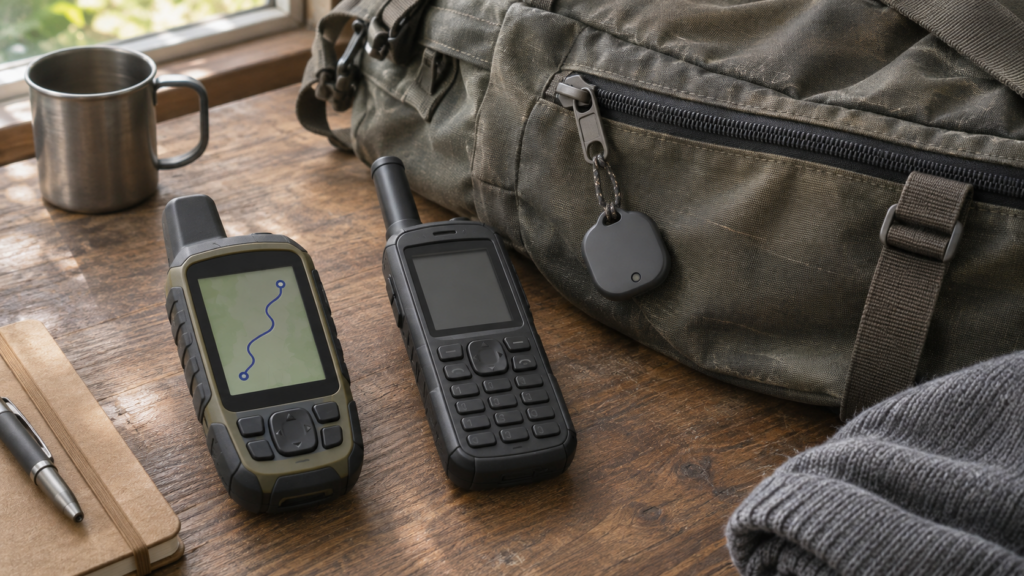
A handheld GPS and a satellite phone beside a travel bag with a small tracker clipped to its zipper.
What you’ll learn

Five moments when the tools have a job

On a return walk, the bends you took can be the information you need. At a checkout or baggage carousel, who can act on the information matters just as much. These five situations help you spot the moment a particular feature becomes relevant.

  • Recognize when you need the bends from the outward walk.
  • Identify the departure point where you want recording to start.
  • Distinguish a hotel departure prompt from a search for a bag you already know is missing.
  • Identify the point when a locator clue belongs with an open baggage report.
  • Decide when two people have a recurring reason to agree on an arrival or departure notice.
  • Interpret why an area alert can appear after the event it describes.
  • Recognize a conversation that calls for live satellite voice.

Tip: Name the information you’ll want later. An activity log stores points along the path you travel. If those are the points you’ll use on the way back, think about which part of the walk needs to go into that log.

Key terms

What each tool gives you

You’ll see the word “location” used for different things. A recorded activity contains the points that make up a traveled path. A geofence marks an area. It helps to be clear which one you mean when planning what you’ll do with the information.

Recorded activity

The traveled line that an eTrex SE or Solar logs.

  • Contents: The device stores points along the path.
  • Start: With default settings, it starts recording once it’s on and has picked up satellite signals.
  • Pause: The same activity can be paused and resumed.

TracBack

Garmin’s option for retracing the current eTrex SE/Solar activity.

  • Destination: It leads back to the activity’s origin.
  • Reference: The reference comes from the route you walked.
  • Same start: Straight Line points directly to the same start.

Separation alert

Tile’s location alert can flag a departure without your tagged item.

  • Item: The tag accompanied your phone on arrival.
  • Place: You choose the place to cover.
  • Recipient: The Tile app delivers the prompt.

Carrier-facing locator link

An item-location link for an existing Qantas delayed-bag report.

  • Owner: The AirTag owner makes the link in Apple’s Find My app on supported software.
  • Recipient: The baggage team uses it as an additional clue.
  • File: The report reference identifies the file it belongs with.

Geofence

A virtual boundary drawn around a place in the tracking app.

  • Area: AngelSense lets you name the place and adjust the boundary.
  • Events: Arrival and departure are separate notices.
  • Delivery: The Watch specifications list push notifications, email or both.

Live satellite voice

A two-way call placed from a handset that connects by satellite.

  • Handset: The Iridium 9555 supports voice calls.
  • Account: The caller needs active satellite voice service.
  • Other end: A regular mobile number can be the destination.

Tip: Describe what the other person would actually receive. An AngelSense area notice can say that the wearer arrived or left. Think about whether that is specific enough for the plan you both have in mind.

Travel GPS devices

Record the walk you want to retrace

Imagine an afternoon walk along a marked promenade. The path bends around two courtyards before opening onto a broad terrace. You plan to come back to the meeting point by those same bends. TracBack on the eTrex SE/Solar uses that outing’s recorded path.

  • Choose the original point before setting off. Suppose two entrances lead onto the promenade and only one is your rendezvous. Start the activity at that entrance so it’ll be the point the return refers to.
  • At the entrance, let the powered eTrex acquire satellites and verify that the activity is recording before you walk. For this outing, you want the very first bend captured.
  • If you pause while the group stops for a sketch, resume before moving on. In this example the whole group is standing still. The part you want to capture starts as soon as everyone sets off again.
  • At the terrace, consult the recorded bends with TracBack. Say two paths lead into the second courtyard. The piece of information you want is which one you took on the way out.
  • The separate Straight Line option points directly to the same start. At the terrace you may already know the entrance is behind you. The useful detail in this example is the sequence of turns that leads back there.

By the time you turn around, what you have is the path you recorded. If a gate has closed since you passed it, the line still describes your earlier walk. Assess the passage in front of you on its own terms.

Luggage tracking devices

A departure prompt for hotel checkout

Suppose you stay two nights at a hotel and use your own tagged bag for supplies. At checkout, a companion takes some of the group’s things to the car while you handle the room keys. That’s when a Tile departure prompt has a job.

  • You’ve selected the hotel in Tile Smart Alerts. Your phone and tagged bag arrived together and stayed long enough for the app to register the stop.
  • The location alert needs Tile Premium or Premium Protect and the necessary app permissions. If those conditions don’t hold on your phone, an alert is a poor basis for your checkout plan.
  • When your phone leaves the area, the app checks for the tag. Say the bag is still upstairs. A prompt can flag it as left behind while you’re sorting out what made it into the car.

The prompt can come after you leave. If your companion packs the car while you drop off the keys, count the bags together before you go.

Luggage tracking devices

A locator clue for an open bag report

Suppose you’re following Qantas’s U.S. baggage guidance. The airline operated your final flight, your checked suitcase didn’t arrive and you already have a delayed-bag report. There’s a compatible AirTag in the bag. You’re deciding whether to pass on information from the tag.

  • Once the report is open, Qantas accepts a supported tracker link as an optional addition.
  • As the AirTag owner, you can create its item-location link in Apple’s Find My app on supported software. You already use the app for the tag in this example. Sharing has a purpose here because you know who would receive the clue.
  • The baggage team can use the link alongside its own records. In the example, the traveler’s part ends after handing over that extra clue.

If all you want is an update, the Qantas app can show checked-baggage status on eligible flights. With an open case, you can send the baggage team an extra clue.

Personal GPS trackers

Agree on an area alert when the same question comes up repeatedly

Imagine a multi-day reunion in the U.S. where a garden pavilion serves as the organizers’ base. An adult who already wears an AngelSense GPS Watch agrees to let one fellow organizer receive notices about arrivals and departures at the base. The wearer expects to come and go while hosting activities elsewhere.

  • Give the notice a specific job. The fellow organizer wants to know when the wearer is back in the agreed area so they can bring over the sign-in folder. The reason for sharing is the same each afternoon.
  • Agree on who receives it and how long they need it. In this case, the other organizer is an authorized recipient on the account and the wearer has chosen to share for the gathering.
  • The Watch needs an active plan for U.S. use and usable GPS and cellular reception at the gathering. The recipient needs access to the agreed alerts each day they plan to act on them.

An arrival notice for the agreed area can serve as the cue to bring over the folder. If the organizer needs to hand it to the wearer in person at an exact time, that takes a separate arrangement.

Satellite communication devices

Use live voice when the answer determines what you ask next

Imagine an arts workshop at a site without ordinary mobile service. The job for live satellite voice is to settle the schedule while it’s still open. A co-organizer needs to tell you when the rehearsal room is free. One answer opens a discussion about moving soundcheck. Another prompts a question about swapping rehearsal slots.

  • This is a job for a live call because you need to hear the first answer before you can ask the next question. In the example, the caller uses an Iridium 9555 with an active provider SIM and voice service.
  • The caller needs an open view of the sky and an extended antenna. The handset must have a usable signal and be registered on the satellite network before attempting the call.
  • The co-organizer has an ordinary mobile phone at the other end. It has to be reachable, the call has to connect, and the co-organizer needs to answer. The co-organizer might be busy running an earlier session, so their availability is part of this plan, too.

The value of live voice here is keeping the two decisions in one conversation. If the room is free late, you can ask about moving soundcheck and hear whether that works before you settle the schedule.

Reality check

Read the event the alert describes

Compare the timing you need with the event the app can detect. At the reunion, the chosen boundary defines what counts as arrival. At the hotel, a quick visit presents a different timing question.

A quick stop can be too brief

Imagine meeting that same companion in a hotel lobby for a brief stop on another day. The app needs time to register the stop and the tags that came with you. That possibility matters when you stop just to pick up a room key or drop something at reception.

Suppose your companion takes the tagged bag to the car while you stay inside with your phone. With the phone still inside, the tag’s exit alone won’t trigger the alert.

An area notice can lag the crossing

The reunion organizers chose the pavilion’s grounds as the named area. An AngelSense arrival notice refers to that configured area. For a handoff at the pavilion door, the organizers can agree on how they’ll confirm they’re both there.

AngelSense uses multiple GPS readings and looks for sufficient separation from the boundary. An alert may arrive later while the system works to avoid a false notice. Weak GPS or cellular reception can affect service. Keep those limits in mind when interpreting the time on a notice.

Common assumptions

What the tools can tell you

It’s easy to expect the device to fill a gap. The 9555 example depends on an ordinary mobile phone at the receiving end. In the same way, each of these questions tests a specific assumption about what a feature requires or what its output means.

Can the eTrex fill in the part I walked while recording was paused?

The pause leaves that stretch unrecorded. If that’s the part you need to retrace, look for an independent reference for it.

Does a quiet phone mean I took the bag?

A quiet phone leaves that question open. An app permission can be the reason a Tile alert never appeared. Check the bag itself if you’re unsure.

Will Qantas accept a link from any tag?

The tag needs a supported link format. Qantas lists Apple AirTag and Google Find Hub–compatible devices.

Does the alert time give me the exact crossing time?

The crossing can precede the notice. A handoff that needs exact timing calls for a separate confirmation.

Does the other person need a satellite handset?

The Iridium 9555 can call a regular cellphone. A reachable number and someone there to answer are what the workshop example needs at the other end.

Tip: When someone is interpreting a notice, ask what information they’re missing. If the app is silent, an ordinary check of the bag can settle where you packed it. Tile permissions may explain why there was no notice.

Frequently asked questions

Details that can change the decision

An earlier walk can raise a different question about the route record. The eTrex SE/Solar handles a saved activity separately. Here are the details that matter when the trip departs from one of the examples.

Can I navigate using an activity from an earlier eTrex outing?

Yes. The eTrex SE/Solar has a separate navigation option for a saved activity. That’s the function to look for when you want the outing already on the device.

Can Tile cover only the stops I choose?

Tile’s location mode covers up to five chosen places. A traveler with a hotel and a conference venue in mind can pick just those stops.

Does basic Tile finding include the departure prompt?

Basic Tile finding works without a subscription. The Smart Alerts departure prompt is a feature of Tile Premium and Premium Protect.

Which reference belongs to my open Qantas case?

Use the ten-character report reference. The bag-tag number identifies the bag, and the report reference identifies the case you’re adding to.

Do airlines accept a locator link at the same point in the case?

Lufthansa offers a link-sharing option for compatible devices if it still hasn’t identified the bag after 48 hours. You need to consent to that notification.

Can access for the other reunion organizer end after the gathering?

Yes. The AngelSense account administrator can remove an ordinary authorized recipient. That lets the two organizers agree on when the access for this trip should end.

How can the AngelSense Watch notifications reach the organizer?

The Watch lists app notifications, email or both. Authorized recipients can set their contact information and preferences. Agree on which channel the recipient will pay attention to during the gathering.

Do I dial a U.S. number in the usual domestic format on the 9555?

For an outbound call to a U.S. number, BlueCosmo specifies international format, with a plus sign and the U.S. country code before the number.

Tip: Look up the rule for the organization handling your case. The window in Lufthansa’s guidance is a rule for that airline’s notification, so use the guidance for your own carrier.

Bottom line

Start with the decision you’ll face on the trip. Draw out the moment before you go. A path you want to follow back is something you’ll collect on the way out. A conversation that changes the workshop schedule needs an answer while there’s still a choice to make.

An area notice can help the reunion organizer decide when to bring the folder. That’s the level of detail to look for in your own plans. Name who needs the information, what they’ll do with it and what must already be true by then.

Related reading

Travel navigation and tracking archives

These archives can help you move from a travel task to a gear decision.

Lists

Browse grouped options by topic in the list archive.

Comparisons

Explore side-by-side coverage for a travel task you’ve identified.

Buying guides

Read about selection criteria once you know which job the gear needs to do.