Why Travel Navigation & Trackings Matter for Smoother Trips

Travel navigation and tracking matter because they help you make the next decision on a trip. That might mean picking a meeting level, finding where you parked, reading a bag event on the right clock, timing a meetup from an arrival estimate or getting a forecast for a later stop.

By: Review Streets Research Lab
Updated: November 27, 2026
Explainer · 10–12 min read
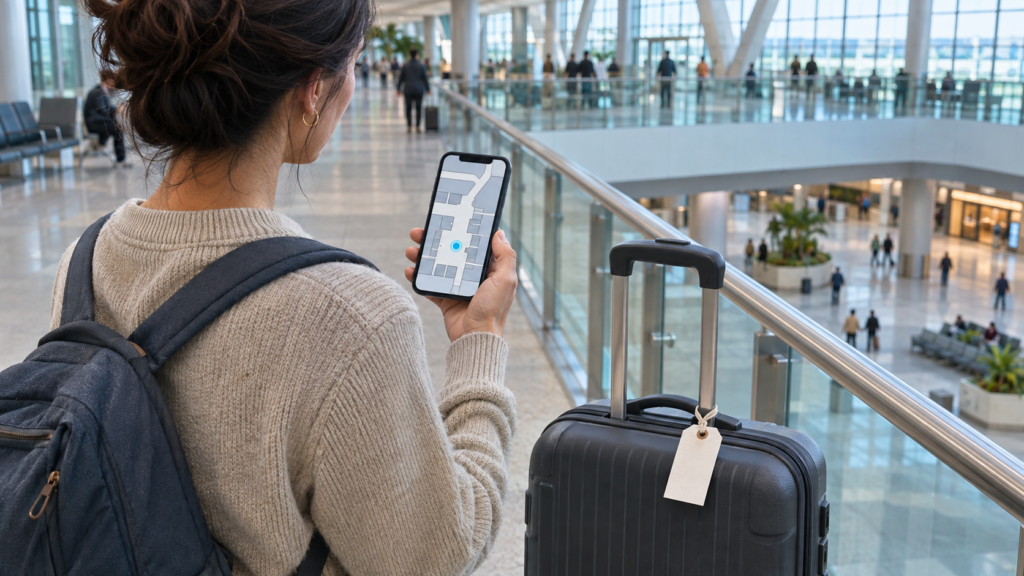
Traveler holding a phone with an indoor map beside a rolling suitcase in a two-level airport terminal.
What you’ll learn

The decisions behind the display

Start with the question you’re trying to answer. Which meeting point do you mean? A group text that says “See you there” is easy to send. “There” leaves room for confusion at a terminal with two meeting points.

  • What changing floors on a supported indoor map actually changes.
  • How the floor helps specify a meeting point.
  • What a garage note can record.
  • What counts as a baggage-handling event.
  • What the post-landing carousel field is for.
  • How to use a shared ETA.
  • How to request weather for a later stop.

Tip: For meeting points on different floors, include the level when you name the spot.

Key terms

What each reference describes

Some of the terms below describe places. In a building with several levels, a floor can be part of a place’s description. Other labels describe events or estimates.

Indoor floor plan

A map view of the inside of a building at a particular level.

  • Selected level: The floor you choose determines which plan you see.
  • Landmark: Something nearby that helps identify the meeting spot.
  • Airport overview: SFO’s overview puts terminals, gates and AirTrain stops on one map.

Saved parking location

A point you save in Android Google Maps to mark where you parked.

  • How to save: Start from the blue dot beside the parked car.
  • How long it stays: The point stays until you remove it.
  • What goes with it: You can add a photo or note.

Baggage milestone

A defined event in an airline’s handling of a bag.

  • Industry standard: The International Air Transport Association (IATA) calls for its member airlines to track bags at four or more key points.
  • Loading: One tracking point is loading the bag onto the aircraft.
  • Airport clock: Delta’s U.S. web lookup shows each activity in the corresponding airport’s time zone.

Estimated time of arrival (ETA)

The time a traveler is expected to reach their destination.

  • Endpoint: It refers to the navigation destination.
  • Position: A Google trip share can also include location.
  • Where to find sharing: Google Maps for Android lists trip sharing in the information card during navigation.

Waypoint

A saved place you can pick as a weather location on the Garmin inReach Mini 2.

  • Reuse: The weather location menu lets you select a waypoint you’ve used there before.
  • Current location: Your present position is another choice in that menu.
  • Existing saved place: You can add an already saved waypoint to the weather locations.

NWS point forecast

In the National Weather Service’s point-and-click forecast, the place you select sets the small area the forecast describes.

  • Map selection: The selected part of the map supplies the forecast location.
  • Hourly view: The NWS also offers an hourly breakdown. In the NWS view, choose the period closest to your plans when the broader forecast covers more of the day than you need.
  • Precipitation probability: The NWS defines that chance for a particular forecast location and period.

Tip: When you read an airport-local bag timestamp, keep the event name alongside the time.

Inside the terminal

Choose a meeting place and its floor

SFO lists two meeting points on different levels for this part of the airport. Imagine two adults arranging to meet on foot inside the airport after one of them lands.

  • At San Francisco International Airport (SFO), the operator’s overview shows the terminals, gates and AirTrain stops.
  • For a separate example, imagine you’re going to a shopping center. If that center has an indoor map in Google Maps on Android, find the venue and zoom until the plan appears. Use the floor control to look at the level you need.
  • At SFO, the airport lists a signed meeting point for E and F arrivals on the Arrivals/Baggage Claim Level, between carousels 3 and 4.
  • SFO lists another meeting point on the Departures Level by the E Gates exit.
  • In this hypothetical pickup, the first text is simply “I’m inside.” The pair makes the meeting place explicit in the reply: “The signed meeting point on the arrivals level.”

Naming the level settles which meeting spot they mean. They can also repeat that description if they ask for directions.

Back to the car

Give the parking pin a companion note

Imagine leaving a rental car in a garage before spending the afternoon downtown. You remember turning past a stairwell, but there were several. Save a recognizable detail while you’re beside the car.

  • Beside the parked car, the traveler saves the location in Google Maps for Android.
  • They add a deck and bay note. The signs read “Deck C, bay 18.” A photo is another way to record the sign.
  • On the way back, Maps can give directions to the saved point.

Back at the garage, the note gives the traveler a specific deck and bay to look for.

At baggage claim

Read the bag event and the carousel assignment

A handling milestone refers to a past event. A carousel assignment can give you a place to go after landing.

  • The industry standard from IATA treats loading a bag onto an aircraft and delivery to a transfer area as separate tracking events. Delta separately describes Fly Delta’s bag tracking map and its bag notifications.
  • Imagine a Delta trip with a connection across time zones. On Delta’s U.S. web lookup, use the clock for the airport tied to each activity entry. An earlier-looking clock reading could just reflect a difference in time zones. Put the times in the same zone before comparing them.
  • If a carousel appears on your lock screen after landing, that field names the belt to look for. Delta describes it for the latest Fly Delta app on supported iPhones with Live Activities enabled or select Android devices with Live Updates enabled.

For the walk to baggage claim, use the carousel assignment when it’s available.

Meeting on foot

Share an ETA

Imagine two adults agreeing to meet at a bench in a public square. One is a few blocks away. The other is finishing lunch nearby. One will share an ETA for the walk. Both adults have agreed to the share.

  • With walking directions underway in Google Maps for Android, the traveler opens trip sharing. Google also offers it for active car and bike directions.
  • They select the other adult’s profile and tap Share.
  • If the estimate comes through, the friend can decide whether there’s time to finish lunch before walking over.

Treat the ETA as a guide to when to leave.

Later in the day

Look up weather for the later stop

Imagine a group taking a drive with a picnic stop later in the day. Taking a group photo outdoors there is optional. The picnic spot is already saved as a waypoint on their Garmin inReach Mini 2.

  • The group uses that saved place as the target for the forecast request. They’re still at an earlier stop.
  • The feature requires an active satellite subscription. Garmin recommends making the request where you have a clear view of the sky. The response can take several minutes, so allow the download to finish before using it.
  • Once the forecast for the picnic spot has downloaded, the group can use it to decide whether to take the photo first or wait until after lunch.

The forecast is about the stop where the activity will happen. If the group skips the photo, they can still have lunch together.

Reality check

Where the reference stops

A map of the airport and a current gate assignment answer different questions. Bring the same care to any travel display that gives you one piece of a decision.

When a flight assignment changes

SFO directs travelers to its live Flight Status page for gate changes. If the gate changes, read the current assignment first, then use the airport’s interactive map to locate that gate. The overview gives you a sense of where that terminal sits in the airport. The interactive map is useful when you need to locate an individual gate.

In that situation, the assignment can change while the map continues to show the same places. Until you know the current gate, a terminal’s layout alone can’t tell you which part of it you need.

When a forecast is still coming in

A forecast request and a completed download are two separate moments. On the Mini 2, you can view the forecast once the download is complete.

Treat the forecast for the stop as a guide. Actual weather may differ. The group can make the final call about the photo once it gets there.

Common assumptions

What a label can lead you to assume

A bag’s status and the icon on a tracking map can be easy to read as one piece of information. Look for the event that the status actually describes.

Does every venue have an indoor map in Google Maps?

Indoor plans are venue-specific. Google’s Android instructions start with finding a place that has one.

Does my parking point follow the car?

The Android point records where you saved it. You can move it manually.

Does a bag tracking map mean I’m seeing the bag’s position continuously?

A map icon alone gives you no basis for assuming a continuous position. IATA’s milestones describe distinct events in handling.

Does an ended trip share confirm arrival?

On Android, Google ends the share on arrival or when navigation stops. The traveler can also stop sharing early.

Is Mini 2 weather limited to my current location?

You can select a different saved waypoint for the forecast.

Tip: Ask directly if you need to confirm arrival after a share ends.

FAQ

Questions that come up on the trip

Even on a single itinerary, who operates a flight can matter when you look up a bag. Each answer names the service it describes.

Can I look inside a venue before the visit?

Yes, for some places. Google Maps on Android offers previews of what the inside looks like. For an airport visit, the operator may also publish an overview. SFO’s map gives you a way to locate the terminal and see nearby AirTrain stops before you arrive.

Why did my iPhone show a parked-car marker on its own?

Apple Maps can place a marker after the iPhone disconnects from the vehicle’s Bluetooth or CarPlay and you get out. Apple specifies an iPhone 6 or newer with iOS 10 or newer. Bluetooth, Location Services, Significant Locations and Show Parked Location need to be enabled. On a trip in an unfamiliar rental, those settings and the phone’s connection to the vehicle are part of why the marker can appear when you leave the car.

Can I send someone my saved parking point?

Yes. Google Maps for Android lets you share that saved point.

What if my Delta itinerary includes another airline?

Delta’s U.S. lookup says tracking may be incomplete for trips that include airlines outside Delta or Delta Connection. It directs you to the operating carrier for bag status.

When can I see my Delta carousel on the lock screen?

Delta lists the carousel as a post-landing field for the latest Fly Delta app, with Live Activities enabled on a supported iPhone or Live Updates enabled on select Android devices.

Can a shared ETA change in Apple Maps?

Where the feature is offered, Maps on iPhone can share an ETA during driving, cycling or walking directions. Apple says the shared estimate updates automatically if there’s a major delay.

Can I reopen a downloaded forecast on the Mini 2?

Yes. Garmin says the forecast remains available to reopen until all its information expires. You can also request an update.

Does a National Weather Service rain chance give a start minute?

The probability is for the forecast location over a stated period. For example, an NWS chance of rain for an afternoon tells you about the chance of precipitation at that location within the afternoon period. It leaves the starting minute open.

Tip: Identify the carrier operating the flight before asking about its bag status.

Bottom line

Give each piece of travel information one job. With an airline status record, read the time alongside the event it describes. That’s a habit you can carry to the next display before you decide what, if anything, to do.

Before you pass on an update, think about what the other person needs to decide. Share the ETA if they’re timing their own departure.

Related reading

Explore Travel Navigation & Tracking

Continue with the format you want to read next.

Lists

Open the Travel Navigation & Tracking lists archive.

Comparisons

Go to the category archive for comparisons.