
Edge Router
A device that exchanges traffic between the organization's networks and provider or external paths.
- Route: selects a next hop
- Handoff: terminates carrier-facing links
- Resilience: may coordinate multiple circuits
Business internet and networking solutions work by moving addressed packets across a chain of local and external links. A provider circuit reaches customer equipment, an edge router selects paths, a firewall enforces connection policy, switches connect wired devices, and wireless access points bridge radio clients into controlled network segments.
Supporting services complete that path. DHCP supplies addresses and gateway settings; DNS translates names into destinations; routing tables choose next hops; NAT may map private addresses; VPNs encrypt traffic; and monitoring tests loss, latency, capacity, and device state. A fault at any layer can feel like “the internet is down,” so dependable networks preserve segmentation, observability, redundancy, configuration control, and structured troubleshooting.
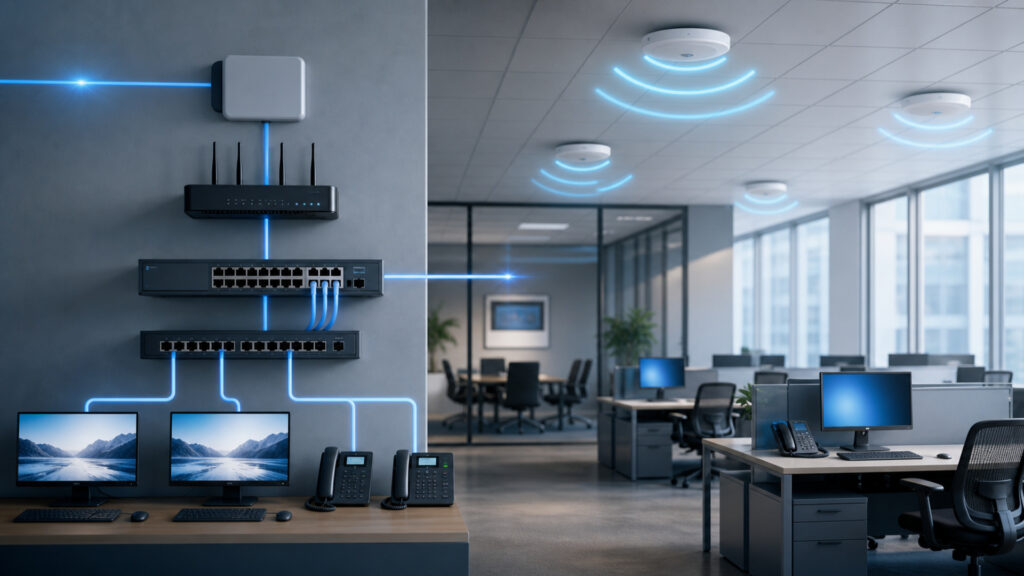
The network is a sequence of physical links, local switching, IP routing, policy checks, naming, and return-path state—not a single connection represented by a Wi-Fi icon.
Tip: Trace one application request by client address, VLAN, gateway, firewall session, translated address, DNS answer, provider path, destination, and return route; do not stop at a successful Wi-Fi association.
These terms identify the distinct delivery, addressing, naming, and policy jobs performed along a business packet path.
A device that exchanges traffic between the organization's networks and provider or external paths.
A policy device that tracks connection state and permits, rejects, inspects, or logs traffic according to configured rules.
A device that forwards local frames among ports using learned link-layer addresses.
A time-limited assignment of IP address, prefix, gateway, DNS, and related network settings to a client.
A service that obtains and caches address or other records for requested domain names.
An authenticated encrypted path carrying protected traffic across another network.
Tip: Link, IP, DNS, and application tests answer different questions: a device can have radio connectivity, an address, and a working gateway while the named service still fails.
Fiber, cable, fixed wireless, or another access service terminates at an optical network terminal, modem, or provider device and presents a handoff. Edge routing and firewalls connect that service to internal networks under policy.
The internet service is one upstream link; the usable business connection also depends on powered, configured, and adequately sized edge equipment.
Switch ports carry Ethernet frames within VLANs, while access points translate between Wi-Fi radio clients and wired segments. Authentication, channel design, coverage, capacity, roaming, and power influence reliable access.
Wi-Fi is an access method inside the local network; it neither defines the internet circuit nor removes switching, addressing, policy, and upstream dependencies.
DHCP gives the client an address, subnet, gateway, and DNS resolver. DNS returns an address for a service name. The client sends off-subnet packets to its gateway, and routers choose successive next hops.
Connectivity becomes usable when identity-by-name, source addressing, forward routing, and return routing all agree on the path.
Firewalls evaluate traffic at segment and internet boundaries. NAT can map internal private addresses to external addresses. Site and remote-access VPNs authenticate peers, encrypt selected traffic, and route protected networks through tunnels.
A network solution works by delivering permitted traffic and making disallowed paths fail predictably, visibly, and for an explainable reason.
Monitoring combines interface state, errors, utilization, Wi-Fi telemetry, route and tunnel status, DNS checks, synthetic transactions, configuration backups, logs, and provider evidence. Change control preserves known-good state.
Layered evidence turns “the network is slow” into a bounded access, addressing, naming, routing, policy, capacity, provider, or remote-service problem.
User experience depends on access, loss, latency, jitter, naming, policy, remote systems, and application behavior alongside raw circuit capacity.
It gives devices appropriate addresses and segments, resolves service names, selects valid paths, enforces required policy, and exposes the condition of each critical layer.
It can also shift to tested alternate links without merging every device into one trust zone.
Additional bandwidth does not repair interference, bad cabling, duplex errors, exhausted DHCP scopes, DNS failure, route loops, overloaded security inspection, or remote-service delay.
A redundant circuit may still share carrier facilities, edge hardware, power, configuration, or insufficient failover capacity.
These misconceptions collapse distinct local, edge, provider, naming, and application layers into one vague idea of connectivity.
Wi-Fi connects a client by radio to the local network. Internet service connects the organization's edge to external networks. Either can work while the other fails, and both depend on additional addressing and policy.
Circuit capacity helps only when that link is the constraint. Wireless contention, packet loss, latency, DNS, firewall processing, VPN paths, server response, browser behavior, and application design can dominate perceived performance.
VLANs separate local broadcast domains, but routers and firewalls determine permitted traffic between them. Misconfigured trunks, management access, shared services, identity, endpoints, and application permissions remain part of the security boundary.
Failover can fail because circuits share upstream facilities, routing or health checks are wrong, edge equipment or power is common, sessions cannot move, DNS stays stale, or the alternate lacks capacity under load.
Tip: Test the layers independently: power and link, local frame delivery, address configuration, gateway routing, DNS, firewall session, provider path, remote service, and application transaction.
These questions clarify the roles and failure boundaries inside a business internet and networking solution.
The laptop resolves the name through DNS, chooses a route, sends frames toward its gateway, crosses firewall policy and possible NAT, traverses provider networks, establishes an encrypted application session, and receives return packets.
A switch primarily forwards frames within local segments using link-layer addresses. A router forwards packets between IP networks using routing tables. Many products combine routing, switching, wireless, firewall, and management functions.
DHCP automates address, subnet, gateway, DNS, and related settings. Static configuration can work, but unmanaged duplicates, wrong gateways, stale DNS, or overlapping assignments create failures that centralized scopes and reservations help prevent.
NAT rewrites source or destination address information as traffic crosses a boundary, commonly mapping private internal addresses to public internet addresses. It conserves addresses and changes visibility but is not a complete security policy.
Survey coverage and interference, model device density and traffic, choose channels and power, provide adequate wired uplinks, use enterprise authentication where appropriate, segment roles, monitor airtime and retries, and validate roaming with real clients.
Monitor power, device and interface state, errors, utilization, wireless retries, client health, DHCP, DNS, routes, firewall sessions, tunnels, loss, latency, jitter, configuration changes, provider circuits, synthetic transactions, and service impact.
Business networking works by moving addressed packets from devices through wired or wireless access, local segments, routing, firewall policy, provider circuits, name resolution, translation, and encrypted tunnels to required services.
Dependability comes from segmentation, adequate capacity, controlled configuration, layered monitoring, tested failover, and troubleshooting that isolates the actual failing layer instead of treating every symptom as an internet-speed problem.
These explainers show how the packet paths are protected, how continuous network operations preserve them, and which facility and service dependencies surround the complete architecture.
See how identity, segmentation, encryption, policy enforcement, telemetry, and response protect the packet paths explained here.
Explore how inventory, configuration, monitoring, incident response, capacity, and lifecycle keep networking dependable over time.
Understand how power, facilities, carriers, platforms, shared capacity, dependencies, and recovery surround the network layer.
Choose a retailer
Prices checked regularly. We may earn a commission at no cost to you.