
What Makes Smart Health Monitors Different from Traditional Health Monitors

A smart health monitor does more than produce a reading. It may time-stamp results, synchronize them to an account, calculate trends, issue alerts, connect with other devices, or share data. A traditional monitor usually keeps the pathway local: measure, display, record, and interpret.

The sensing hardware may be similar or even identical. The meaningful difference often begins after measurement, in software, connectivity, storage, and feedback. Those additions can reduce manual work and support remote review, but they introduce pairing, charging, updates, privacy, account access, and algorithmic interpretation.

By: Review Streets Research Lab
Updated: August 13, 2026
Explainer · 8-12 min read
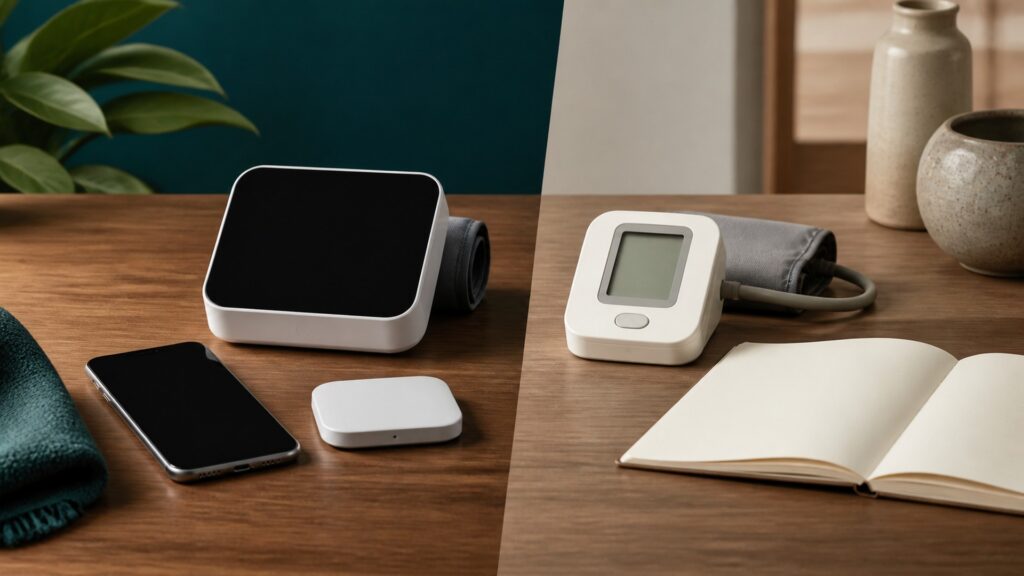
People-free comparison of connected health monitor with blank app screen and traditional standalone monitor on a home desk
What You'll Learn

Where Smart Features Enter the Monitoring Chain

Separate sensor quality from connectivity and examine what storage, trends, alerts, sharing, software, and privacy add to the result.

  • Why smart does not automatically mean more accurate
  • How local and cloud storage differ
  • Where algorithms turn readings into trends or alerts
  • When sharing improves follow-up
  • Which failures connectivity introduces
  • How to compare long-term ownership burden

Tip: Read the concept as part of a system, then connect it back to the use case.

Definitions

Key Concepts That Define What Makes Smart Health Monitors Different from Traditional Health Monitors

These definitions connect the main idea to the variables, limits, and practical signals readers need to compare options.

Connectivity

The wired or wireless route used to transfer readings

  • System role: Enables synchronization and remote access
  • Decision use: Follow connectivity when comparing the relevant input and output
  • Boundary: Connectivity does not represent every factor in the result

Local Display

The value shown directly on the measuring device

  • Why it matters: Keeps basic use independent of another screen
  • Observation: Changes in local display should be interpreted across comparable conditions
  • Caution: Treat local display as one signal rather than a complete conclusion

Trend Algorithm

Software that summarizes repeated readings across time

  • Primary function: Adds interpretation beyond a spot value
  • Comparison point: Check the stated range and method used for trend algorithm
  • Constraint: Context can change how trend algorithm affects the outcome

Alert Logic

Rules that trigger a notification from a value or pattern

  • Practical meaning: Can support action or create alarm fatigue
  • Buyer check: Ask how the product establishes or controls alert logic
  • Limit: A specification for alert logic needs real-use context

Data Portability

The ability to export records in a usable format

  • Working effect: Determines whether data can move between systems
  • Feedback: Repeated observations make data portability more interpretable
  • Uncertainty: Technique and conditions can alter the apparent result

Update Dependency

Reliance on apps, firmware, accounts, or services remaining compatible

  • Decision relevance: Adds a long-term ownership risk
  • Use case: Connect update dependency with a defined action or comparison
  • Scope: Keep claims about update dependency inside the intended-use boundary

Tip: Keep the definitions connected; the strongest answer usually comes from the whole system, not one term.

Measurement

Begin With the Same Fundamental Signal Problem

Both smart and traditional monitors rely on a sensor, placement, calibration, and technique before software can add value.

  • Compare measurement evidence first
  • Follow the intended use
  • Control placement and timing

Connectivity cannot repair a weak input.

Connection

Move Data Beyond the Device

Bluetooth, Wi-Fi, cable, or proprietary docks transfer readings to phones, hubs, cloud services, or care systems.

  • Check pairing and offline behavior
  • Understand account requirements
  • Test reconnection after interruptions

Transfer convenience creates new failure points.

Processing

Turn Readings Into History, Trends, and Alerts

Applications add timestamps, charts, averages, reminders, thresholds, and sometimes automated interpretations.

  • Distinguish raw data from estimates
  • Review how thresholds are set
  • Expect algorithm changes after updates

A software insight is a derived output, not the original measurement.

Workflow

Support Caregivers and Remote Review

Shared records can reduce transcription and make patterns visible across locations, but access rights and responsibility must be clear.

  • Choose who receives alerts
  • Export concise summaries
  • Plan for lost account access

Sharing is useful when someone is prepared to interpret and act.

Tradeoffs

Balance Convenience With Privacy and Longevity

Smart monitors may require subscriptions, phones, charging, permissions, servers, and updates; traditional devices may require manual logging but remain operationally simpler.

  • Review privacy and retention
  • Check support lifetime
  • Keep an offline procedure

Long-term fit includes the ecosystem, not only the sensor.

Quick Reality Check

Measurement Quality Versus Digital Workflow

Smart features can improve capture, organization, and sharing without inherently making the underlying sensor more accurate.

Where Smart Features Help

Automatic timestamps and synchronization can reduce transcription errors and reveal trends that isolated readings hide.

Remote sharing can support caregivers or clinical workflows when data responsibilities and response expectations are defined.

Where Simplicity Helps

Traditional monitors can avoid account, phone, network, subscription, and software-compatibility dependencies.

Neither product type can turn an imprecise input or poor technique into a clinically meaningful conclusion through interface design alone.

Common Myths

Misconceptions About What Makes Smart Health Monitors Different from Traditional Health Monitors

Common shortcuts and misunderstandings can make the topic seem simpler than it is.

Smart health monitors are always more accurate than traditional monitors

Connectivity, charts, and alerts describe the digital workflow, not necessarily the sensor. Accuracy depends on intended use, measurement method, validation, calibration, placement, user technique, and conditions rather than whether an app is included.

Traditional monitors cannot show useful long-term trends

A consistent manual log can reveal patterns when readings are collected reliably with dates and context. Smart storage reduces transcription work, but it is not the only way to create a usable history.

Cloud sharing guarantees someone will respond to an alert

Data delivery and clinical or caregiver responsibility are separate. Accounts, permissions, notification settings, staffing, connectivity, and the agreed care pathway determine whether an alert is seen, interpreted, and acted upon.

A smart monitor becomes useless without internet access

Some products can still measure and display locally, store readings for later synchronization, or transfer over a local connection; others depend heavily on cloud services. Offline behavior must be checked for the specific device.

Tip: Treat strong claims as starting points for comparison, not final answers.

FAQ

Frequently Asked Questions About What Makes Smart Health Monitors Different from Traditional Health Monitors

Concise answers to common questions readers may have after the main explanation.

What should I compare before choosing a smart monitor?

Start with intended use and measurement quality, then review phone compatibility, local display, offline behavior, battery, account requirements, export format, sharing controls, privacy, subscription costs, update policy, and customer support.

Can smart-monitor data be sent to a healthcare professional?

Some systems support exports, portals, or remote-monitoring programs, but compatibility and responsibility vary. Confirm the accepted format, review schedule, action thresholds, and whether anyone actually monitors incoming data before relying on sharing.

Are traditional health monitors more private?

They may keep data local and avoid accounts, but privacy still depends on memory, logs, household access, disposal, and any later transfer. Smart systems add network, app, cloud, vendor, and permission considerations.

What happens if the smart-monitor app stops being supported?

Measurement may continue, lose synchronization, or fail depending on the design. Check local display and storage, export options, supported operating systems, account recovery, firmware policy, warranty, and a practical manual backup method.

Bottom Line

Smart and traditional monitors may measure the same signal; smart models add a digital pathway for storage, interpretation, alerts, and sharing.

Compare sensor quality first, then decide whether the connected workflow earns its privacy, compatibility, power, account, subscription, and long-term support costs.

Next Steps

Go Deeper or Compare Your Options

Use these Review Streets paths to connect the explainer to related categories, comparisons, and next decisions.

Quick Summary

What Makes Smart Health Monitors Different from Traditional Health Monitors Explained

  • Smart features begin after the sensor input.
  • Connectivity does not guarantee accuracy.
  • Software outputs are derived interpretations.
  • Sharing needs a defined response owner.
  • Traditional devices reduce ecosystem dependencies.