
Why Assistive Devices Matter

Assistive devices matter because a small design change can alter whether someone communicates, moves, sees information, prepares food, manages medication, studies, works, or performs personal care. The device is valuable when it reduces a specific mismatch between a person and a task.

The category ranges from simple grips and magnifiers to communication systems and powered mobility. Effective use depends on assessment, fit, training, environment, maintenance, and acceptance. A technically capable product can fail when it adds effort, stigma, or complexity to the daily routine.

By: Review Streets Research Lab
Updated: August 20, 2026
Explainer · 8-12 min read
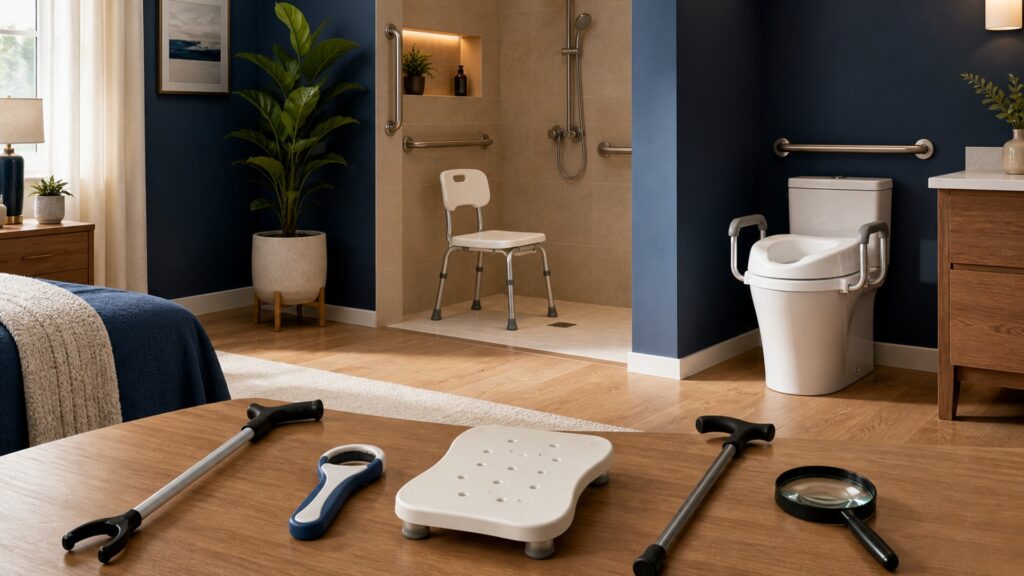
People-free editorial still life illustrating why assistive devices matter
What You'll Learn

Match technology to a functional gap

Evaluate task, user, environment, training, reliability, and follow-up so assistance produces practical access rather than unused equipment.

  • Define the blocked activity
  • Choose the simplest adequate function
  • Fit controls and interfaces
  • Train in real settings
  • Plan maintenance and backups
  • Measure participation outcomes

Tip: Read the concept as part of a system, then connect it back to the use case.

Definitions

Six Concepts That Shape This Decision

These definitions connect the main idea to the variables, limits, and practical signals readers need to compare options.

Assistive device

A product, component, or system used to improve or maintain an individual's functioning and participation.

  • The definition includes low-tech and high-tech solutions across many activities.
  • Describe the exact task and the device action that changes it.
  • A consumer convenience product is not automatically suitable assistive technology for every user.

Activity analysis

Breaking a task into physical, sensory, cognitive, communication, timing, and environmental demands.

  • Analysis reveals where the mismatch occurs and which feature could reduce it.
  • Observe the task in its normal setting and sequence.
  • Diagnosis alone cannot specify the best device without understanding the activity.

Interface

The point where the user perceives, controls, wears, grips, hears, or otherwise interacts with the device.

  • Interface fit determines access even when the underlying technology performs correctly.
  • Check reach, force, vision, hearing, sensation, language, and error recovery.
  • A feature-rich system can remain unusable when its interface is mismatched.

Accommodation

A change to a task, environment, schedule, communication method, or equipment that improves access.

  • A device often works best as one part of a broader accommodation.
  • Compare device use with simpler environmental or procedural changes.
  • An accommodation should not impose unnecessary segregation or loss of choice.

Training

Structured practice that teaches setup, operation, troubleshooting, and integration into daily activity.

  • Training helps the user build reliable technique and understand limitations.
  • Practice in the actual environments and include supporters when appropriate.
  • A demonstration is not enough for complex or safety-critical use.

Abandonment

Discontinuation of an assistive device after provision or purchase.

  • Abandonment can reveal poor fit, changing needs, maintenance burden, stigma, or inadequate involvement in selection.
  • Ask why use stopped before assuming noncompliance.
  • Keeping unused equipment does not represent a successful outcome.

Tip: Keep the definitions connected; the strongest answer usually comes from the whole system, not one term.

Need

Define the functional gap without starting from a catalog

Observe what the person wants to do, where the task breaks down, which strategies already work, and what consequence follows. The best intervention may be a device, environmental change, training, human assistance, or a combination.

  • Observe the real activity
  • Ask the user's priority
  • Identify successful strategies
  • Describe the failure consequence

Clear needs prevent impressive technology from solving the wrong problem.

Selection

Choose adequate function with manageable complexity

Compare performance, adjustability, compatibility, portability, durability, privacy, cost, and cognitive burden. A simpler tool may be more reliable, while a sophisticated system may enable functions unavailable otherwise. The user's preference is part of the evidence.

  • Trial more than one option
  • Count setup steps
  • Review privacy and data
  • Include ownership cost

The best device is one the user can and wants to operate.

Fit

Adapt the interface to the person

Handles, switches, screens, speech controls, straps, seating, feedback, and mounting determine usable access. Fatigue and fluctuating ability should be tested. Fit includes language and sensory preferences, not only physical dimensions.

  • Adjust contact points
  • Test under fatigue
  • Check error recovery
  • Respect sensory needs

A correct function behind an inaccessible interface remains inaccessible.

Integration

Practice within ordinary routines

Use at the desk, bathroom, vehicle, store, classroom, or community route where the task occurs. Supporters should understand their role without taking over. Establish storage, charging, cleaning, and backup methods before dependence grows.

  • Train in real settings
  • Assign maintenance ownership
  • Keep critical backups
  • Review helper boundaries

Integration turns a successful trial into dependable daily access.

Follow-up

Review outcomes and changing needs

Measure whether the device improves completion, effort, safety, privacy, speed, participation, or assistance burden. Repair delays, health changes, software updates, and new environments can alter fit. Follow-up should make replacement or modification normal rather than exceptional.

  • Track functional outcomes
  • Inspect condition
  • Update after life changes
  • Investigate nonuse respectfully

Successful provision is an ongoing service process, not a handoff.

Quick Reality Check

A device matters when it changes a valued activity

Assistive technology can reduce a task mismatch and expand participation. Benefit depends on selection, accessible interfaces, training, environment, maintenance, and continued user choice.

What can be demonstrated

A trial can show whether task completion, effort, privacy, safety, or assistance needs improve.

Follow-up can identify nonuse, repair problems, changing ability, and opportunities for better fit.

What technology cannot guarantee

A device cannot remove every social, architectural, financial, policy, or attitudinal barrier.

Technical operation does not prove that the device is acceptable, sustainable, or suitable for every setting.

Common Myths

Misconceptions That Distort the Decision

Common shortcuts and misunderstandings can make the topic seem simpler than it is.

Myth: assistive devices are only for permanent disabilities

People may use assistance temporarily during injury, recovery, pregnancy, illness, or changing work demands. Suitability depends on a functional need and expected context, not whether the condition fits a particular duration or identity.

Myth: high-tech devices are always more empowering

Advanced features can enable important functions but also add charging, updates, training, cost, privacy, and failure points. A low-tech device may provide greater independence when it is faster, reliable, and easier to maintain.

Myth: nonuse means the user resisted help

A device may be uncomfortable, stigmatizing, poorly fitted, difficult to repair, incompatible with the environment, or selected without the user's priorities. Investigate the system before blaming motivation or labeling the person noncompliant.

Myth: one successful clinic trial proves daily fit

Quiet, open, well-supported trials do not reproduce fatigue, noise, weather, time pressure, crowded routes, or changing caregivers. Real-setting practice and follow-up are necessary before relying on the device for essential tasks.

Tip: Treat strong claims as starting points for comparison, not final answers.

FAQ

Questions to Ask Before Choosing

Concise answers to common questions readers may have after the main explanation.

Who can help evaluate an assistive device?

Depending on the task, support may come from occupational or physical therapists, speech-language pathologists, audiologists, vision professionals, rehabilitation engineers, educators, clinicians, accessibility specialists, qualified suppliers, caregivers, and experienced device users.

What should be included in a device trial?

Test the exact task, environment, duration, setup, controls, feedback, comfort, errors, cleaning, storage, transport, maintenance, privacy, and helper involvement. Include fatigue, time pressure, and realistic disruptions when safe and appropriate.

How can abandonment be reduced?

Involve the user early, trial alternatives, fit the interface carefully, train in real routines, budget for maintenance, provide timely follow-up, and make it easy to modify or replace the device when needs change.

What belongs in a backup plan?

Identify how essential communication, mobility, medication, personal care, or safety tasks will continue during power loss, breakage, software failure, repair, forgotten equipment, or unavailable assistance. Practice the fallback before an emergency.

Bottom Line

Assistive devices matter when they reduce a specific task mismatch and expand the user's control or participation. Begin with the activity, select collaboratively, fit the interface, and practice in real settings.

Plan maintenance, repair, data privacy, support, and backups from the beginning. A device that remains in a closet is evidence to reassess the system, not proof that the user failed.

Next Steps

Go Deeper or Compare Your Options

Use these Review Streets paths to connect the explainer to related categories, comparisons, and next decisions.

Why Mobility Support Matters

Use the mobility Support Matters guide to examine a closely related decision that follows naturally from assistive Devices Matter.

Why Fall Prevention Matters

Continue into fall Prevention Matters for the neighboring mechanism, limitation, or use case most relevant to assistive Devices Matter.