
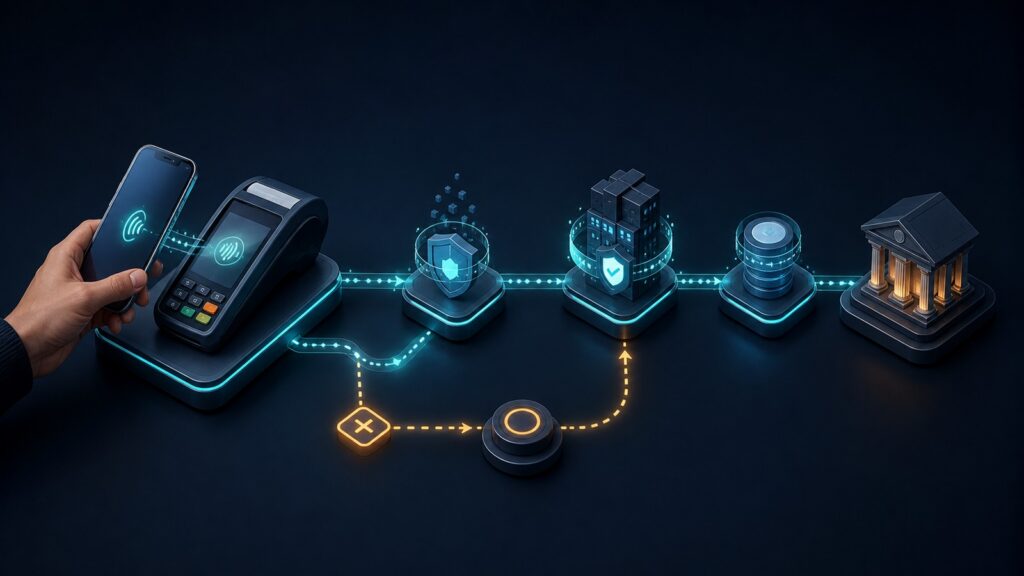
Why Mobile Payment Platforms Data Flow Matters

Mobile payment data flow determines whether a purchase made on a phone becomes the correct paid order, receipt, refund record, and bank deposit. When those records lose their connection, a customer can see a charge while the merchant sees an unpaid order. Staff then have to establish what happened before they can safely retry the payment or release the goods.

The essential task is to keep the order, payment attempt, and later money movements linked as information passes between the mobile app, payment provider, and business systems. Clear status updates and reliable recovery matter as much as a quick checkout. This is especially important when a phone loses connectivity, a customer returns from a wallet app, or the payment result reaches the server before it reaches the screen.

By: Review Streets Research Lab
Updated: September 25, 2026
Explainer · 8-12 min read
Editorial business scene illustrating mobile payment platforms data flow
What You'll Learn

From a Mobile Checkout to a Matched Bank Deposit

Follow the information a merchant needs to answer three questions: which order was paid, what happened to the payment, and where did the money go?

  • How order and payment identifiers prevent mix-ups between purchases
  • Why a token, an authorization, and a bank deposit mean different things
  • How a lost connection can leave a successful payment looking unfinished
  • Why repeated notifications must not trigger repeated deliveries
  • How refunds and fees explain differences between sales and payouts
  • What to test before relying on a mobile payment integration

Tip:Start with one test purchase and trace it from the order screen to the payment record and payout report. Every handoff should retain a reference you can follow.

Definitions

Six Terms That Explain Mobile Payment Data Flow

These terms describe different records and stages. Keeping them separate makes payment problems easier to diagnose.

Order and Payment Identifiers

An order identifier names the purchase in the merchant system. A payment identifier names the related payment record at the provider.

  • Relationship: Save the provider reference against the order so support can find both records.
  • Example: Order M-104 links to a failed attempt and a later successful payment.
  • Limit: Amount and time alone cannot reliably distinguish two customers making equal purchases.

Payment Token

A payment token is a substitute reference used in place of sensitive payment credentials within a supported payment system.

  • Purpose: It allows payment details to be handled through the provider’s approved collection process.
  • Example: A mobile checkout sends a provider-issued reference rather than adding a card number to the order notes.
  • Limit: Possession of a token does not prove that a payment was authorized or completed.

Authorization and Capture

For card payments, authorization approves a requested amount, often placing a hold. Capture submits the approved amount for collection.

  • Timing: Some integrations combine these steps, while others capture later.
  • Example: A merchant authorizes a purchase first and captures it when the order is ready.
  • Limit: An authorization is not the same as money deposited into the merchant’s bank account.

Webhook Notification

A webhook is a message a payment provider sends to a merchant’s server when a relevant event occurs.

  • Purpose: It lets the business receive updates even after the customer closes the app.
  • Example: A payment update lets the order system refresh an order that still appears pending.
  • Limit: Notifications can repeat or arrive out of order, so arrival alone is not a safe instruction to ship.

Idempotency

Idempotency means repeating the same operation does not create an additional business effect.

  • Purpose: A stable request key can make a retry refer to the original operation when the provider supports it.
  • Example: After a timeout, a supported retry retrieves the original result instead of creating a second charge.
  • Limit: Request retry protection and duplicate-notification handling are separate controls.

Payout Reconciliation

Payout reconciliation matches money sent to the merchant’s bank with the transactions and adjustments included in that payout.

  • Purpose: It explains the difference between recorded sales and the amount transferred.
  • Example: A report connects captured sales, refunds, and fees with a particular payout reference.
  • Limit: A payout may combine many orders, and its timing may differ from the day those sales occurred.

Tip:Give support staff a way to look up the order and its payment history without exposing sensitive payment credentials.

Transaction Identity

Keep the Order Linked to Every Payment Attempt

Consider a customer buying a $48 item in a mobile store. The order system knows the item, price, and delivery details. The payment provider knows whether a particular attempt succeeded. Saving their references together lets each system answer a different part of the same question without guessing from a name or amount.

  • Validate the amount and currency using trusted merchant records.
  • Retain the payment reference when the customer leaves and returns to checkout.
  • Keep failed attempts distinct from the successful payment.
  • Use the original payment reference when investigating a refund.

If the customer tries again after a decline, support should see the attempt history beneath one order. A second attempt should not silently become a second order awaiting delivery.

Mobile Connection

A Lost Screen Response Does Not Prove a Failed Payment

A phone can lose its connection after the provider accepts a payment but before the app receives the result. The screen may spin or display an error while the server already has a successful record. Treating that uncertainty as a definite failure invites a second charge.

  • Look up the existing payment before starting another attempt.
  • Show a clear pending or checking status while the result is unresolved.
  • Use supported secure collection components and keep credentials out of general logs.
  • Confirm the result on the server before triggering fulfillment.

For the $48 purchase, reconnecting should restore the existing payment result. If an in-person mobile system supports offline collection, queued payments need separate handling: collecting details offline does not guarantee later authorization. Availability and limits depend on the provider and device.

Reliable Updates

Repeated Messages Must Not Create Repeated Actions

A provider may retry a notification because it did not receive an acknowledgment. Events can also arrive in a different order from the underlying activity. A dependable receiver checks authenticity, records what it has processed, and applies valid payment-state changes without repeating the associated business action.

  • Verify webhook signatures using the provider’s documented method.
  • Track processed event identifiers to detect repeated deliveries.
  • Check the current payment record when an update conflicts with local state.
  • Make order release and receipt sending safe to repeat as well.

Two deliveries of the same payment notification should still produce one shipment. Do not assume that every provider supplies consecutive event numbers; recovery should use its documented status and event retrieval tools.

Refund History

Keep Refunds Attached to the Original Purchase

A refund adds another money movement to the sale’s history. It should not erase the fact that the original payment occurred. Customer service needs to see the requested amount, the provider’s result, and the remaining amount that could still be refunded.

  • Link each refund to the original payment and merchant order.
  • Distinguish a submitted refund from a confirmed result.
  • Retain partial refunds separately so the remaining balance is clear.
  • Track disputes separately from voluntary refunds to avoid confusing their outcomes.

If $12 of the $48 purchase is refunded, the original $48 charge and the $12 refund should both remain visible. Where no other adjustments apply, the customer has paid $36 net. Fees and payout timing still need their own accounting treatment.

Matching the Deposit

Explain the Difference Between Sales and Bank Payouts

A payout groups transactions and adjustments according to the provider’s timing and rules. It may be smaller than gross sales because of refunds, fees, or other deductions. Matching only the day’s checkout total to the bank deposit hides these details and can make ordinary timing differences look like missing money.

  • Use the payout reference to identify the included transactions.
  • Separate sales amounts from refunds, fees, and other adjustments.
  • Check currency, merchant account, and reporting period before matching totals.
  • Assign unresolved differences to someone who can investigate their source.

For example, a payout containing $480 of sales, a $12 refund, and $14 of fees would total $454 if there were no other adjustments. Those figures are illustrative, not a fee quote. A match should explain every component and retain the underlying order references.

Quick Reality Check

What Reliable Data Flow Can and Cannot Solve

Connected records reduce uncertainty, but they cannot remove every payment risk.

What It Makes Easier

Support can distinguish an unpaid order from a successful payment whose screen response was lost.

Finance can trace a deposit back to sales and adjustments instead of manually guessing which transactions belong together.

What Still Needs Judgment

A technically successful payment can still be disputed later. Fraud review and fulfillment policies remain necessary.

Accurate delivery of incorrect order data does not make the order correct. Price, tax, and customer details need validation at their source.

Common Myths

Misconceptions About Mobile Payment Records

Four assumptions that can turn a routine connection problem into a customer-service or accounting problem.

A success screen means the money is already in the bank

The screen usually reports a checkout or payment result. Authorization, capture, provider balance availability, and bank payout are separate stages. Use the provider’s records to establish which stage has completed.

A timeout means it is safe to charge the customer again

A timeout describes a missing response, not necessarily a rejected payment. Retrieve the existing result and use the provider’s supported retry controls before attempting another charge.

Every webhook is a new transaction

A notification can be delivered more than once. Repeated delivery should update or confirm the same record, not cause another shipment, receipt, or refund.

Matching the total is enough to reconcile a payout

Equal totals can hide an omitted sale and an unrelated adjustment that cancel out. Matching transaction references as well as amounts makes the explanation more reliable.

Tip:Ask what each status actually confirms. “Received,” “authorized,” and “paid out” answer different questions.

FAQ

Frequently Asked Questions About Mobile Payment Data Flow

Practical answers for checkout recovery, customer support, and financial records.

What should happen if the customer closes the app during payment?

The merchant’s server should continue checking the payment through supported notifications or status retrieval. When the app reopens, it should fetch the existing order state rather than assume that closing the screen canceled the transaction.

Which records should customer service be able to find?

Start with the merchant order ID, provider payment ID, amount, currency, attempt status, and any refund references. Authorized staff can use those links to investigate the payment without requesting or displaying the customer’s full card credentials.

Does a digital wallet remove the need to reconcile payments?

No. A wallet changes how the customer presents or approves payment credentials. The merchant still needs to link the resulting payment to an order and account for refunds, fees, and payouts.

How can a business test the integration safely?

Use the provider’s test environment to simulate a lost response, a duplicate notification, a delayed update, and a partial refund. Confirm that each order has the expected payment history and that retries do not create extra charges or fulfillment actions.

Which problems are worth monitoring after launch?

Watch for payments that stay pending, paid orders that never reach fulfillment, repeated business actions, and unmatched payout items. Track how long exceptions remain unresolved as well as their count, so an old missing payment does not disappear inside a healthy daily total.

Bottom Line

Reliable mobile payment data flow lets a business trace one purchase from the phone to the order record, through refunds, and into a matched payout.

Keep identifiers connected, distinguish payment stages, and make retries safe. The practical test is whether staff can explain what happened to a customer’s payment without guessing or charging again.

Next Steps

Trace a Purchase Through Your Payment System

Choose one completed purchase and check its order reference, payment status, refund history, and payout entry. Then use these guides to examine the surrounding process.