
Audio Signal Chain
The sequence carrying program information through source, processing, amplification, wiring, loudspeakers, and cabin acoustics.
- Output is sound pressure
- Channels can cover different bands
- Seat position changes the result
Car audio systems and driving displays often meet in the same dashboard, yet they solve different output problems. Audio equipment selects, routes, amplifies, and converts signals into pressure waves across the cabin. A driving display organizes visual information such as speed, warnings, navigation, camera views, settings, and system status for a particular viewing position.
The overlap can hide the distinction. A touchscreen receiver may show maps while feeding speakers, and a factory screen may depend on audio hardware for tones. The useful boundary is not the bezel; it is the information path, the human sense receiving the output, and the consequence when that path fails.
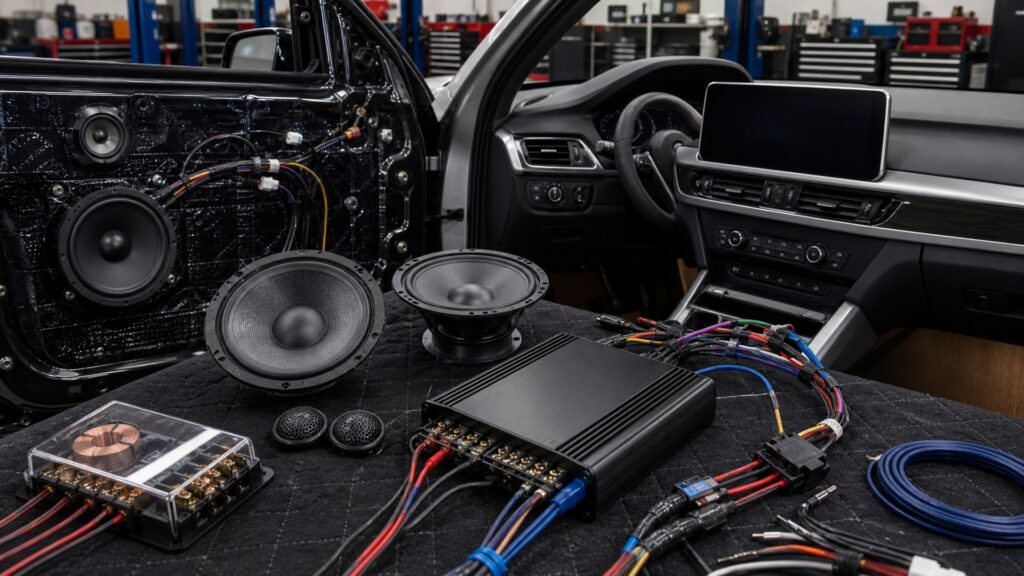
The comparison follows what each system carries, how it presents information, where the driver receives it, and why shared hardware does not erase different verification and safety duties.
Tip: Ask what information disappears when the component fails: program sound, an audible alert, a visual driving cue, or several independently routed outputs.
These terms mark the output medium, attention channel, shared interface, and vehicle-data boundary that distinguish the two categories.
The sequence carrying program information through source, processing, amplification, wiring, loudspeakers, and cabin acoustics.
A screen or projected field presenting vehicle status, navigation, warnings, camera imagery, or controllable functions to occupants.
Conversion of an electrical waveform into diaphragm motion and then acoustic energy.
The ordering that makes urgent, current, and secondary information distinguishable on a display.
A display that controls media while also presenting navigation, cameras, phone functions, or selected vehicle settings.
A vehicle communication network carrying commands and status among modules rather than ordinary analog program audio.
Tip: Classify every feature by the information it receives and the sense it addresses before calling the dashboard device an audio system or a driving display.
Music and speech become timed amplitude information across channels and frequencies. Driving displays receive values, icons, maps, camera frames, menu state, and warnings. Both may originate digitally, but their payloads and acceptable losses are different.
A digital connector does not make two information jobs equivalent.
An audio system depends on amplifiers, electrical loads, driver motion, enclosures, and cabin reflections. A display depends on pixels, brightness, contrast, graphics, viewing angle, and software state. Their performance evidence therefore differs at the final output.
The categories diverge most clearly at the human-facing transducer.
Speakers can be placed around the cabin and combined acoustically. Critical visual information must appear where it can be seen and interpreted with limited attention away from driving. A large screen does not compensate for poor location or confusing hierarchy.
Acoustic coverage and glance efficiency are separate design problems.
A multimedia receiver may render a camera, navigation, or phone interface while also controlling audio. The screen is then a shared control and presentation point, but external amplifiers, speakers, factory modules, clusters, and head-up displays retain separate responsibilities.
Shared hardware creates integration dependencies, not a single undifferentiated category.
Weak bass, noise, or a silent speaker directs testing through signal and power paths. A blank camera image, unreadable warning, frozen menu, or lost gauge directs testing through data, video, display power, trigger, and software paths.
The failed human output selects the diagnostic path.
Modern dashboards combine controls and cues, so the right classification follows the output and failure consequence rather than the physical housing.
Distributed speakers and amplification remain an acoustic system even when controlled by a touchscreen.
Instrument status, camera imagery, and visual warnings remain display functions even when hosted beside media controls.
Prompts can use both a visual card and an audible tone, creating parallel paths that must be verified independently.
Replacing an integrated screen can affect audio, climate, cameras, settings, and vehicle data, so a component label alone does not define scope.
These misconceptions come from judging the dashboard by its visible screen rather than by the information and output paths behind it.
Its screen can present driving-related information, but the receiver may also decode media, control volume, create preamp or speaker outputs, and manage calls. Classify each function separately instead of making the entire device one visual category.
Speakers can improve the audibility of prompts but cannot change map legibility, camera detail, warning placement, or menu hierarchy. Visual clarity belongs to the display path; prompt routing and intelligibility belong to the audio path.
Size can improve legibility, yet reach, location, menu depth, visual clutter, glare, task design, and motion lockouts also affect glance demand. Evaluate the complete interaction rather than treating diagonal measurement as a safety result.
A working image does not prove retained chimes, steering controls, factory amplification, microphones, cameras, climate screens, vehicle settings, or data messages. Each original function needs an explicit operating-state check after integration changes.
Tip: When one housing serves both categories, test the audible and visual results separately before assigning the fault or replacement scope.
These answers resolve common category-boundary questions created by integrated receivers, audible prompts, cameras, and factory vehicle screens.
Yes. A multimedia receiver can control and output audio while presenting navigation, camera, phone, or vehicle information. Its roles still have separate inputs, outputs, limits, and tests, even though one screen and processor host them.
A warning may have visual and audible presentations generated by different modules. The screen or cluster carries the visual state; the audio path carries the tone or voice. Integration must preserve and verify both forms where equipped.
A driver must see and interpret visual information while maintaining road attention, so sightline, reach, glare, obstruction, and task time matter. Speakers can be distributed around the cabin because their output reaches listeners acoustically.
The camera creates a video signal and the receiver may display it, but that does not make imaging an acoustic function. Power, trigger, format, view, guidelines, and safe use belong to the camera-display path.
Name the missing output first, then trace its source, transport, processing, trigger, and human-facing device. Test related audio and visual cues separately so one functioning path does not conceal a failure in the other.
Car audio systems create and distribute cabin sound; driving displays organize visual information for recognition and control.
They can share a receiver, data bus, phone connection, and warning event without becoming interchangeable. Follow the information to its human output, then apply the placement, safety, and diagnostic rules for that channel.
These explainers show the broader electronics architecture, the complete audio mechanism, and the narrower head-unit comparison that often creates category confusion.
See how displays, cameras, audio, phones, sensors, and vehicle networks exchange information across the wider electronics architecture.
Follow source data, processing, amplification, speakers, and cabin acoustics to understand the sound path on its own terms.
Compare the complete audio chain with the head unit that may also host navigation, cameras, and vehicle-data screens.
Choose a retailer
Prices checked regularly. We may earn a commission at no cost to you.