
Cloud Recording
Storage and indexing of selected video in provider-operated infrastructure reached through a network connection.
- Upload: sends streams or events
- Service: manages storage and search
- Tenant: separates customer data
Cloud and local security camera systems can use similar lenses, sensors, codecs, and network cameras. Their defining difference is where recording, indexing, management, and viewing services operate. Cloud systems send footage or events to provider infrastructure, often retaining some edge storage. Local systems store and manage video on an onsite recorder, server, or appliance, sometimes with cloud-assisted access.
That boundary changes upstream bandwidth, administration, updates, retention, evidence export, data custody, cost, and failure behavior. A cloud outage may remove viewing while cameras continue recording locally; an internet outage may prevent uploads; a local recorder failure may affect many cameras at once. The useful comparison traces every function and degraded state instead of assuming cloud means resilient or local means private.
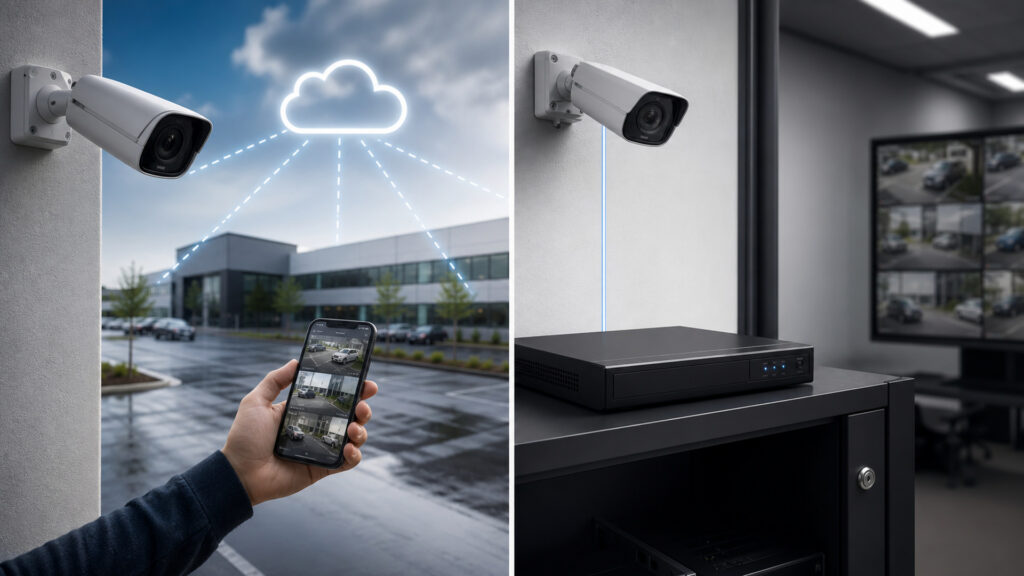
Compare image flow, local and cloud storage, bandwidth, remote access, security, outages, retention, exports, lifecycle, cost, and fit.
Tip: Diagram live view, continuous recording, event upload, search, export, firmware update, user login, and internet-loss paths; label storage duration and responsible owner at every node.
These terms identify recording locations, network paths, retention, and control boundaries in cloud and local video architectures.
Storage and indexing of selected video in provider-operated infrastructure reached through a network connection.
An onsite appliance or server that receives, indexes, and stores camera streams.
Recording retained on the camera or nearby gateway rather than only at a central recorder.
Site-to-provider network capacity consumed when camera video leaves the premises.
Controls separating one customer's identities, configuration, footage, keys, and administration from others in a shared service.
Controlled extraction of selected footage and metadata for investigation, sharing, or legal process.
Tip: Ask where the authoritative copy exists at each moment: camera buffer, gateway, local recorder, provider region, viewer cache, export workstation, or evidence repository—and who can access or delete it.
Cloud systems upload continuous streams, clips, metadata, or events to provider storage; local systems send streams across the LAN to onsite disks. Hybrids combine camera, recorder, and cloud copies.
Architecture matters because evidence availability follows the actual retained copies, not the location of the viewing interface.
Cloud ingestion uses upstream internet continuously or during events. Local recording stays on the LAN, but remote viewing can traverse internet gateways or relays. Multisite cloud portals can reduce customer-operated remote-access infrastructure.
Cloud simplifies some remote operations by accepting a permanent external dependency and bandwidth budget.
Providers may operate storage, APIs, identity features, updates, and threat controls; customers still control cameras, networks, users, roles, retention choices, exports, and physical access. Local systems add recorder hardening, backups, and remote access.
Neither model is private by location alone; trust follows identities, keys, access logs, support paths, integrations, and physical custody.
Edge storage can preserve selected footage during internet loss; local recorders can continue without WAN but fail with onsite power, disks, fire, theft, or software. Updates and support follow provider or customer lifecycle authority.
Resilience depends on independent copies and observed recovery behavior, not whether the primary recorder is described as cloud or local.
Cloud often fits distributed sites, centralized remote administration, limited local server staff, and elastic retention. Local recording can fit high stream volumes, constrained upload, controlled data environments, and onsite integration capability.
The right boundary matches bandwidth, retention, data control, failure tolerance, operating capability, and multiyear cost.
Both can capture excellent or unusable footage; scene engineering remains the same.
It centralizes multisite administration, remote access, provider-operated storage, updates, and retention expansion.
Edge buffering can preserve selected outage footage.
It avoids continuous upstream dependence and gives direct onsite custody and high-volume ingest.
Customers inherit recorder security, disks, backups, updates, capacity, and remote-access design.
These claims confuse service placement with privacy, remote access, bandwidth, and outage immunity.
Architectures vary. Cameras may buffer locally, gateways may record, uploads may be event-based, and cloud retention may use several tiers. Verify what is stored, when it uploads, how gaps recover, and which copy is authoritative.
Local recorders can provide controlled remote access through VPNs, gateways, relays, or vendor services. Remote viewing is an access-path feature, not proof of cloud recording; it still requires strong identity, encryption, and exposure control.
Onsite footage can still be exposed through shared accounts, weak remote access, stolen recorders, broad exports, insecure backups, integrations, malware, or insiders. Privacy depends on purpose, access, retention, security, custody, and deletion.
Internet outages, camera power loss, provider incidents, account errors, expired subscriptions, retention settings, failed edge synchronization, software defects, or deletion can create gaps. Independent monitoring and tested fallback are required in every architecture.
Tip: Compare functions rather than labels: capture, encode, buffer, upload, index, retain, search, view, export, delete, update, authenticate, monitor, fail, and recover.
These questions clarify bandwidth, outages, security, retention, exports, and migration.
Demand depends on resolution, frame rate, codec, scene motion, bit rate, audio, continuous versus event upload, camera count, simultaneous viewing, and backlog recovery. Measure actual streams and preserve failure-state business capacity.
Some retain footage on camera or gateway storage and upload later; others lose selected functions or recording. Capacity, encryption, overwrite behavior, event indexes, clock, reconciliation, and exact supported offline duration must be tested.
They reduce some provider and upload exposure but add onsite recorder, remote-access, patching, backup, physical theft, and administrator duties. Compare the complete attack and support path rather than assuming location establishes security.
Cloud services can expand retention through subscription tiers, while local systems add disk, recorder, or archive capacity. Cost, upload, retrieval, deletion, legal holds, redundancy, export time, and provider limits determine practical suitability.
Native recordings, metadata, analytics, user roles, audit history, and device configuration may not migrate cleanly. Preserve required evidence through controlled exports, maintain playback capability, document custody, and stage camera replacement or re-enrollment.
Cloud camera systems place recording or management functions in provider infrastructure; local systems retain primary recorders onsite. That boundary changes upload demand, administration, security responsibility, data custody, outage behavior, lifecycle, and cost.
Choose after tracing every video copy and failure state. Image quality still begins at the scene, while trustworthy evidence depends on observed recording, searchable retention, controlled access, reliable export, privacy, and tested recovery in either model.
These explainers deepen the imaging-and-evidence chain and compare the wireless and wired transport paths that feed either recording architecture.
Understand scene design, imaging, recording, verification, exports, privacy, and custody.
Compare radio and cable transport, power, capacity, interference, placement, security, and maintenance.
Map failure domains, diversity, degraded capacity, monitoring, and recovery.
Choose a retailer
Prices checked regularly. We may earn a commission at no cost to you.