
Wireless Camera
A camera using radio for some or all network communication.
- Link: associates with an access network
- Airtime: shares radio capacity
- Power: comes from a separate source
Wireless and wired security cameras differ primarily in how encoded video and management traffic reach the network. A wireless camera uses Wi-Fi or another radio link. A wired camera uses Ethernet, coaxial cable, or another physical connection. The image sensor and recording destination can otherwise be similar.
Power is a separate decision. Ethernet cameras often receive Power over Ethernet, while wireless models may use mains adapters, low-voltage wiring, solar systems, or batteries. Those choices change installation and failure behavior. Radio permits placement where data cabling is difficult, but shares finite airtime and faces interference and attenuation. Cable provides an observable path and centralized power, but requires routes, penetrations, switch ports, surge protection, and physical installation. Neither medium guarantees usable evidence.
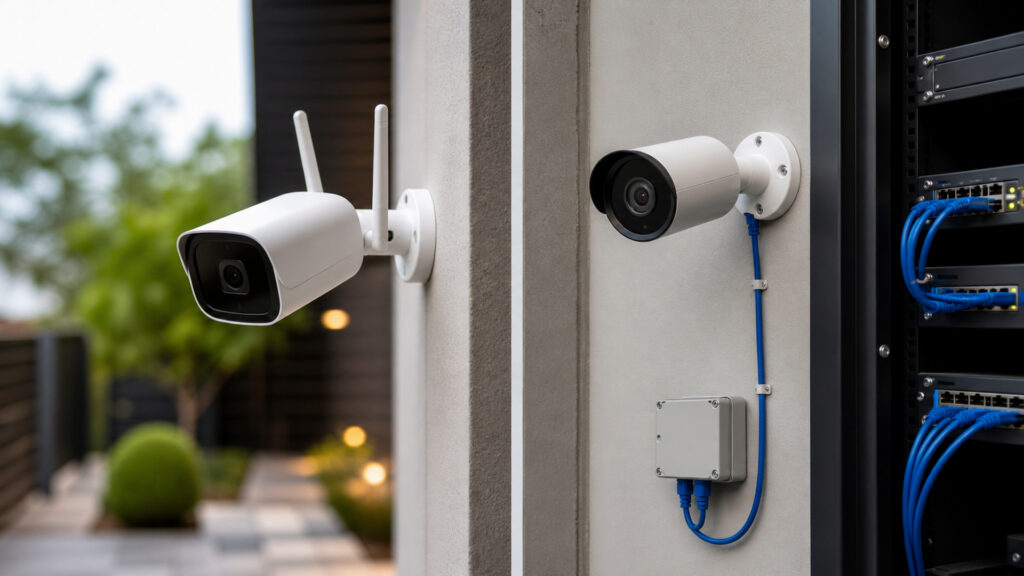
Compare radio airtime, cable capacity, power, placement, interference, security, failure, monitoring, installation, maintenance, and evidence continuity.
Tip: For every proposed camera, document transport, power, average and peak bit rate, signal or cable path, failure alarm, backup runtime, recording gap behavior, maintenance access, and expected evidence during the worst condition.
These terms describe the radio, cable, power, capacity, and supervision mechanisms that distinguish camera connectivity.
A camera using radio for some or all network communication.
A camera transmitting video over a physical cable path.
The finite channel time shared among wireless transmissions and retransmissions.
Standards-based power delivered with Ethernet data to compatible devices.
Reduction in radio strength through distance, walls, materials, weather, orientation, or obstruction.
Monitoring that detects camera reachability, stream loss, weak signal, errors, or interrupted recording.
Tip: A signal-strength reading does not prove video capacity. Measure channel utilization, retries, latency, loss, bit rate, neighboring interference, and behavior when all cameras transmit their busiest scenes.
Wireless frames compete for half-duplex shared airtime and may retransmit. Switched Ethernet provides per-port links with known rates before traffic aggregates at uplinks, recorders, or cloud connections.
Wired links usually offer more predictable continuous capacity; wireless works when measured airtime and signal margins remain adequate.
PoE centralizes data and power, while wireless cameras still need local mains, low voltage, solar, or batteries. Battery conservation can make cameras sleep, reduce pre-event footage, delay wake-up, or limit continuous streaming.
Power architecture can affect evidence coverage more than the choice between radio and cable transport.
Wireless links reduce data-cable routes at difficult, temporary, or historic sites. Wired installation must reach each scene through approved pathways but can place cameras for imaging rather than mutual radio coverage.
Wireless solves selected pathway constraints; it does not excuse poor scene geometry or unreliable power.
Wireless can fail through interference, congestion, deauthentication, weak coverage, or jamming. Wired paths can be cut, unplugged, flooded, surged, or disabled at a shared switch. Both need authentication, encryption, segmentation, updates, and physical protection.
No path is disruption-proof; reliability comes from bounded failure domains, supervision, retained copies, and response.
Wired cameras generally fit permanent, high-volume, critical, and dense deployments. Wireless fits temporary locations, cabling exceptions, moderate streams, and sites with strong managed radio and maintainable power.
A hybrid system is sound when connectivity follows each scene's consequence and physical constraint rather than one sitewide label.
Either camera can form useful images; the transport and power path decide whether those images reach storage continuously.
Radio reduces data-cabling work in temporary, inaccessible, protected, or changing locations.
Managed links can support moderate streams when signal and airtime are verified.
Cable and PoE provide predictable capacity, centralized power, easier supervision, and simpler dense scaling.
Installation requires pathways, labor, switches, protection, and physical access.
These claims confuse wireless transport with no wires, easy placement, secure cable, or equivalent continuous recording.
Wireless describes network transport. Cameras still need mains, low-voltage, solar, or battery power, and some use local gateways. Battery models require charging or replacement and may alter recording behavior to conserve energy.
Signal strength is only one input. Channel utilization, interference, retries, airtime, bit rate, access-point capacity, roaming, uplinks, power, and neighboring networks determine whether continuous encoded streams reach storage without gaps.
Cables can be cut or unplugged, switches can fail, PoE budgets can exhaust, uplinks can saturate, and shared closets can lose power. Physical protection, supervision, redundancy, edge storage, and response remain necessary.
They may use the same codec and recorder, but battery duty cycles, radio loss, congestion, retries, link recovery, and edge buffering can change gaps and pre-event coverage. Validate actual recording under representative failure conditions.
Tip: Separate six layers: scene, camera processing, power, local transport, recording destination, and monitoring. Wireless versus wired changes mainly the middle paths, not every layer.
These questions explain bandwidth, PoE, batteries, jamming, outdoor use, and hybrid systems.
No fixed count is reliable. Capacity depends on encoded bit rates, motion, resolution, frame rate, radio bands, channel width, signal, retries, competing clients, viewing, uplink, access-point design, and acceptable recording loss.
PoE centralizes power and data, enables managed port monitoring, and can use protected switch power. Reliability still depends on cable, connectors, switch, power budget, uplink, recorder, network design, and physical protection.
Runtime varies with battery size, temperature, age, radio quality, motion frequency, recording duration, live viewing, analytics, illumination, and upload behavior. Test the actual scene and establish monitored replacement intervals with accountable owners.
Radio interference can be accidental or deliberate and may prevent transmission. Use spectrum planning, link supervision, edge recording, physical detection, response procedures, and wired paths for scenes whose evidence consequence exceeds accepted radio risk.
Yes, when the recorder or cloud platform supports both through compatible networks and codecs. Apply common identity, time, retention, health, security, evidence, and response controls while documenting each camera's distinct transport and power path.
Wireless cameras use shared radio for network transport; wired cameras use a physical path, often combining Ethernet and PoE. That difference changes capacity predictability, interference, placement, power, security, fault isolation, installation, and maintenance.
Use wired paths for permanent or critical continuous evidence when feasible. Use wireless for defined cabling constraints after measuring airtime, signal, power, and outage behavior. In either case, scene quality, recording, supervision, privacy, and response determine security value.
These explainers show how connectivity feeds the evidence chain and how local or cloud recording changes retention, access, security, and outage behavior.
Understand scene design, imaging, encoding, retention, verification, evidence, privacy, and health.
Compare recording location, upload, access, security, outages, lifecycle, and cost.
See how failure domains, capacity, monitoring, and recovery preserve service.
Choose a retailer
Prices checked regularly. We may earn a commission at no cost to you.