Why Ergonomic Equipment Matters

Ergonomic equipment matters because work reaches the body through interfaces. Chairs support contact areas, keyboards and tools require force and repetition, displays set visual distance and angle, desks establish reach and height, and lighting changes what the eyes must resolve.

The equipment is useful when those interfaces can be matched to a person, task, duration, and environment. Adjustment can reduce avoidable reach, contact pressure, awkward joint positions, excessive grip, or visual demand, while movement and task variation limit prolonged static exposure. The label “ergonomic” proves none of this. Range, setup, usability, training, workload, and reassessment determine whether a feature changes the actual exposure. Equipment supports fit; it does not diagnose symptoms or guarantee a health outcome.

By: Review Streets Research Lab
Updated: August 26, 2026
Explainer · 8-12 min read
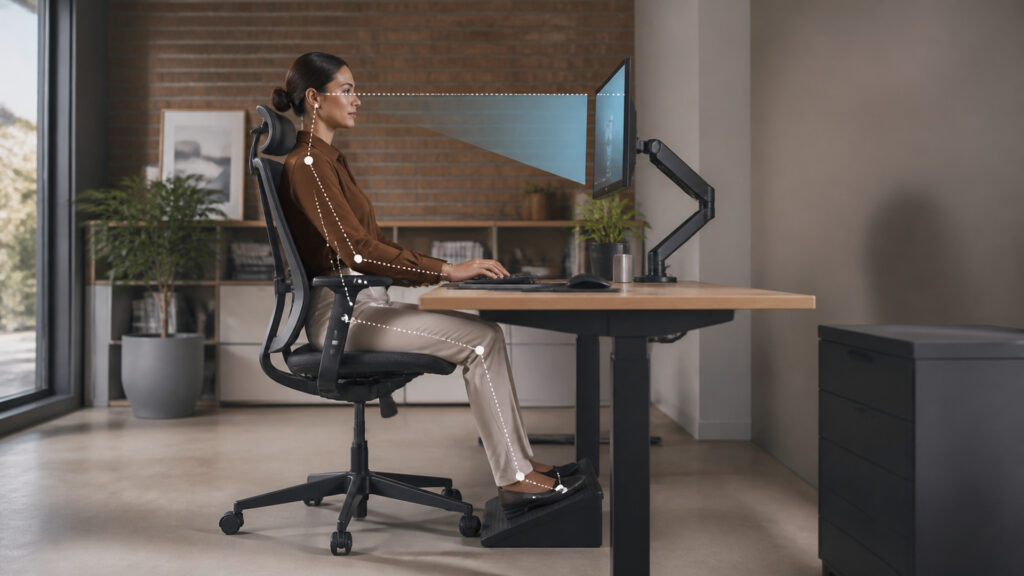
Editorial business scene illustrating ergonomic equipment
What You'll Learn

How Equipment Changes the Exposure Built Into Work

Ergonomic value is causal: a feature must alter reach, force, repetition, contact, visual demand, static loading, or variation for the actual user and task.

  • How task frequency and duration change equipment importance
  • Why adjustability needs a usable range
  • How reach and force interact with repetition
  • Why contact pressure and visual geometry matter
  • How movement and task variation differ from ideal-posture rules
  • What setup and training contribute
  • When reassessment or formal accommodation is needed

Tip: For each frequent task, observe where the user looks, reaches, grips, presses, supports weight, and remains still; connect every proposed feature to one specific exposure change.

Definitions

Key Concepts That Define Ergonomic Equipment

These terms describe the measurable relationship between users, tasks, equipment interfaces, and exposure over time.

Anthropometric Range

The span of relevant body dimensions a product or workstation is intended to accommodate.

  • Dimension: may include stature, reach, or segment length
  • Population: defines intended users
  • Adjustment: must translate range into usable fit

Reach Envelope

The area a user can access from a working position without excessive movement or loss of support.

  • Primary: holds frequent controls and tools
  • Secondary: holds occasional items
  • Variation: changes with posture, mobility, and task

Contact Pressure

Localized force where the body meets an edge, surface, support, grip, or tool.

  • Area: smaller contact concentrates force
  • Duration: prolonged pressure increases exposure
  • Padding or geometry: redistributes contact

Static Loading

Sustained muscular effort used to hold a body segment or tool in position.

  • Posture: changes required muscle activity
  • Duration: accumulates without movement
  • Support: can reduce effort when placed appropriately

Force Demand

The effort needed to press, grip, move, lift, or control equipment during a task.

  • Magnitude: amount of force per action
  • Frequency: number of forceful actions
  • Technique: changes how force is produced

Accommodation

A documented change enabling an individual to perform work in light of specific functional needs.

  • Individual: responds to particular limitations
  • Process: may involve qualified assessment
  • Review: confirms effectiveness and continued fit

Tip: Adjustment range is not the same as accommodation range: controls must be reachable, understandable, stable, and compatible with the complete task at the selected setting.

Task and Exposure

Why Equipment Must Be Matched to Real Work

The same device can be suitable for occasional use and unsuitable for continuous work. Frequency, duration, force, precision, visual detail, pace, environment, and recovery opportunities determine which interface demands deserve attention.

  • Observe representative work rather than relying on job titles
  • Separate frequent tasks from rare exceptions
  • Record force, repetition, reach, contact, and viewing demands
  • Include peak periods and interrupted work
  • Consider how errors and time pressure change technique

Ergonomic equipment matters when it changes a meaningful exposure in the work pattern, not when it merely adds a recognizable feature.

Range and Adjustability

How One Product Serves Different Bodies and Tasks

Seat height, arm support, desk height, display position, tool angle, handle span, and input-device placement can change the relationship between body segments and the task. Useful controls must cover the intended population.

  • Verify minimum and maximum effective settings
  • Keep adjustment controls accessible from realistic positions
  • Avoid adjustments that solve one interface while breaking another
  • Provide stable settings that do not drift during use
  • Document alternatives for users outside the standard range

Adjustability has value only when it produces a coherent setup for the person and task without requiring awkward control or constant correction.

Force, Reach, and Contact

How Equipment Geometry Changes Physical Demand

Long reach increases leverage demands; small hard edges concentrate pressure; poor handle geometry can increase grip; unstable supports require corrective effort. Equipment can alter these pathways through placement, shape, support, and assistance.

  • Place frequent items inside the primary reach envelope
  • Match handles and controls to required precision and force
  • Distribute support across suitable contact areas
  • Reduce unnecessary lifting, holding, or repeated repositioning
  • Test gloves, clothing, and environmental constraints where relevant

The benefit is mechanical: changing distance, leverage, support, or contact changes the effort required for each repeated action.

Vision and Variation

Why Seeing and Moving Belong in the Same System

Display distance, text scale, contrast, glare, lighting, source switching, and document placement affect visual demand and head position. Task variation and position changes interrupt prolonged static loading without declaring one posture perfect.

  • Set readable content before moving the user closer
  • Control glare at the source and surface
  • Place primary visual targets to limit repeated extreme rotation
  • Alternate tasks or positions where work permits
  • Preserve task accuracy during any change in setup

A usable workstation supports clear seeing and feasible movement; forcing variation that disrupts the task simply moves the problem elsewhere.

Implementation and Review

How Equipment Becomes an Effective Workplace Control

Selection is followed by assignment, fitting, instruction, observation, maintenance, and reassessment. New tasks, symptoms, pregnancy, injury, disability, remote work, or equipment changes can alter fit and trigger individualized review.

  • Teach users what each adjustment changes
  • Record nonstandard equipment and support ownership
  • Reassess after material task or workload changes
  • Repair controls, supports, and moving parts promptly
  • Route symptoms and accommodation needs through qualified processes

Ergonomic equipment matters most as part of a feedback system that detects when the original setup no longer matches the person or work.

Quick Reality Check

Equipment Can Change Exposure; It Cannot Guarantee an Outcome

Ergonomic design improves the controllability of work interfaces while health, comfort, and performance depend on many interacting factors.

What Well-Matched Equipment Can Do

It can reduce unnecessary reach, grip, contact pressure, visual effort, and unsupported static loading for a defined task and user.

It can also make position and task variation practical without repeated workstation reconstruction.

What Equipment Cannot Solve Alone

It cannot correct unreasonable pace, inadequate staffing, missing breaks, poor training, bad workflow, environmental stress, or untreated medical conditions by itself.

A feature that helps one person or task may be neutral or counterproductive for another.

Common Myths

Misconceptions About Ergonomic Equipment

These misconceptions replace fit and exposure analysis with product labels or universal posture rules.

An ergonomic label proves the product prevents injury

The label has no universal performance meaning. A product must fit the user, task, duration, environment, and surrounding equipment; be adjusted correctly; and change a relevant exposure without creating a different problem.

There is one perfect working posture

Workable alignment ranges exist, but prolonged stillness can remain demanding even in a reasonable posture. Task variation, movement, support, visual requirements, individual needs, and symptom response matter more than holding one prescribed position indefinitely.

The most adjustable product fits everyone

Large adjustment ranges can still miss important body dimensions, accessibility needs, control reach, stability, or task constraints. More controls also add setup complexity, and unusable adjustments provide no practical accommodation.

Equipment can compensate for excessive workload

A better interface may reduce demand per action, but very high repetition, force, duration, pace, or insufficient recovery can preserve substantial exposure. Work organization and process redesign may be necessary alongside equipment changes.

Tip: Require a visible mechanism for every ergonomic claim: name the user, task, exposure, equipment feature, expected change, and method used to verify fit after deployment.

FAQ

Frequently Asked Questions About Ergonomic Equipment

These questions clarify how to evaluate and implement ergonomic equipment without turning general guidance into medical advice.

What makes equipment ergonomic?

It is ergonomic when its dimensions, controls, adjustability, support, force, feedback, and interface fit intended users and tasks while reducing avoidable demand. No single feature or certification guarantees fit in every context.

How should ergonomic equipment be selected?

Observe representative tasks, define user and accessibility ranges, identify relevant exposures, test candidate adjustments with real equipment and software, evaluate stability and usability, document exceptions, and confirm that the change improves the intended interface.

Why is training needed for adjustable equipment?

Users may not know what a control changes, may copy unsuitable settings, or may avoid complex adjustments. Brief task-based instruction and follow-up help convert available range into a stable, usable personal setup.

When should a workstation be reassessed?

Reassess after task, workload, location, software, equipment, schedule, or user changes; after repeated workarounds or equipment failures; and when symptoms, disability, injury, pregnancy, or a formal accommodation process indicate different needs.

Does ergonomic equipment improve productivity?

It may reduce avoidable interaction effort, errors, or interruption when poor fit was a genuine constraint. Outcomes depend on task, workflow, training, software, workload, and individual response, so improvement should be measured rather than assumed.

Who should handle pain or accommodation questions?

Use the organization's qualified health, safety, human-resources, accessibility, and medical processes as appropriate. Equipment guidance should not diagnose symptoms or replace individualized professional assessment, treatment, legal obligations, or documented accommodation decisions.

Bottom Line

Ergonomic equipment matters when it changes a real exposure—reach, force, repetition, contact pressure, visual demand, static loading, or lack of variation—for a defined person and task.

Useful equipment provides range, stable control, and compatible interfaces, then enters a process of fitting, instruction, observation, maintenance, and reassessment. Labels and universal posture rules are not substitutes for evidence.

Next Steps

Continue Into Desks, Workstation Devices, and Office Systems

These explainers connect ergonomic fit to adjustable desk mechanics, recurring office-device interactions, and the managed technology environment where workstation tasks occur.

Why Office Technology Matters

Explore how endpoints, identity, applications, collaboration, documents, management, and support form a dependable office system.