What Makes Standing Desks Different from Traditional Desks

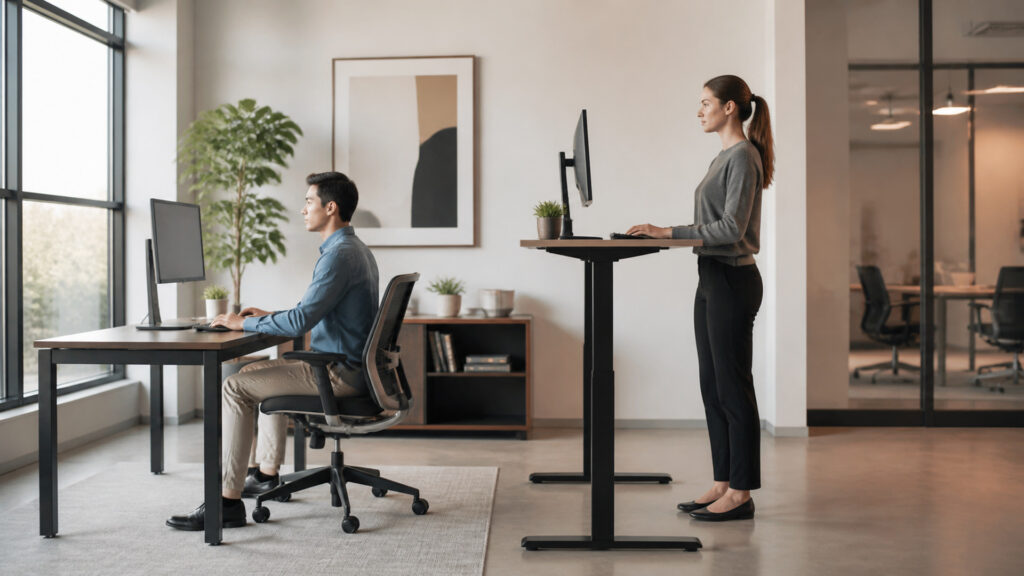
A traditional desk establishes one fixed work-surface height. A standing desk—more precisely, a sit-stand or height-adjustable desk—lets the user move that reference plane between lower and higher positions using manual cranks, pneumatic assistance, or synchronized electric lifting columns.

That variable height is the meaningful difference. It can accommodate a wider range of seated and standing setups and make posture transitions practical, but it also creates moving loads, changing stability, collision risks, cable travel, control logic, and range limits. A fixed desk is structurally simpler and can be very stable, yet often needs chair, keyboard, monitor, or foot-support adjustments to fit different users. Neither category guarantees a good workstation; fit is evaluated at the task interfaces.

By: Review Streets Research Lab
Updated: August 26, 2026
Explainer · 8-12 min read
Editorial business scene illustrating standing desks and traditional desks
What You'll Learn

What Changes When the Work Surface Becomes Adjustable

Height adjustment changes the desk from a static support into a moving workstation system with range, synchronization, stability, safety, and transition requirements.

  • How fixed and adjustable desks establish work height
  • What lifting columns, motors, and controls do
  • Why usable height range matters more than labels
  • How stability changes with extension and load
  • Why cables and nearby objects become moving-system constraints
  • How memory presets affect transitions
  • Why the complete workstation must be evaluated at every intended height

Tip: Measure keyboard, pointing-device, display, and task-surface relationships at the user's actual seated and standing reference heights; a desk specification alone cannot confirm fit.

Definitions

Key Concepts That Define Standing and Traditional Desks

These terms describe the mechanical range and workstation geometry that distinguish an adjustable desk from a fixed support surface.

Height Range

The minimum-to-maximum work-surface positions the desk can achieve under specified assembly and load conditions.

  • Minimum: affects smaller seated users and accessories
  • Maximum: affects taller standing users
  • Usable range: accounts for worktop and input-device geometry

Lifting Column

A telescoping leg assembly that extends and retracts to change desk height.

  • Stages: determine travel and overlap
  • Guide surfaces: resist side load and play
  • Drive: receives motor, crank, or pneumatic force

Synchronization

Control that keeps multiple lifting columns at matched extension during travel.

  • Position: compares column movement
  • Correction: limits racking and uneven height
  • Fault: stops motion when mismatch exceeds tolerance

Dynamic Load

The supported mass permitted while the desk is moving, often lower or more constrained than static capacity.

  • Distribution: affects column loading
  • Acceleration: adds transient force
  • Duty: influences motor temperature and wear

Collision Detection

A control that stops or reverses powered motion when resistance suggests contact with an obstruction.

  • Threshold: distinguishes load from collision
  • Response: limits continued force
  • Limit: does not replace clearances and supervision

Memory Preset

A stored height target that lets the control drive the desk toward a repeatable position.

  • Reference: saves preferred working height
  • Transition: reduces setup friction
  • Verification: still requires clear path and correct equipment placement

Tip: Published desk height is only the worktop plane; keyboard trays, thick surfaces, floor mats, footwear, and monitor mounts change the effective body-to-equipment relationships.

Structure and Lift

How Adjustable Desks Move a Loaded Surface

Electric models use motors, gear trains, drive shafts or independently driven columns, position sensing, and a controller. Manual models exchange speed and convenience for simpler force input. Frame geometry transfers the changing load into the floor.

  • Keep load within moving and static specifications
  • Distribute heavy equipment near supported frame zones
  • Assemble column orientation and fasteners correctly
  • Respect motor duty cycle during repeated adjustment
  • Inspect unusual noise, binding, or uneven travel

A standing desk is mechanically different because its support structure must remain aligned while raising a populated workstation through repeated cycles.

Range and Fit

Why Adjustability Expands—but Does Not Guarantee—Accommodation

The desk must place input devices and work materials at usable heights for intended users in both seated and standing positions. Range endpoints, control placement, accessories, and wheelchair clearance determine actual accommodation.

  • Evaluate minimum and maximum effective input height
  • Include chair, foot support, keyboard tray, and floor surface
  • Keep controls reachable without obstructing the user
  • Check thigh, knee, and mobility-device clearance
  • Provide justified alternatives when one range cannot fit everyone

Variable height creates fit options; the organization still must match those options to specific users, tasks, and accessibility needs.

Stability and Motion

Why Extension Changes the Workstation's Mechanical Behavior

As telescoping columns extend, overlap decreases and the center of mass rises. Frame width, column play, foot depth, crossbars, floor level, monitor arms, and typing force influence visible motion.

  • Test front-back and side-side movement at intended heights
  • Level feet on the actual floor
  • Evaluate monitor-arm amplification of small desk motion
  • Secure casters or mobile bases before work
  • Avoid interpreting static weight capacity as vibration performance

A desk can lift its rated load yet still feel unsuitable if motion disturbs pointing, handwriting, camera framing, or visual focus.

Collision and Cabling

How a Moving Desk Changes Clearance and Connection Risk

The surface can contact shelves, windowsills, chairs, cabinets, people, or under-desk objects. Power, display, network, and peripheral cables must travel through the full range without tension, pinching, or snagging.

  • Sweep the complete travel envelope before commissioning
  • Provide controlled service loops and strain relief
  • Mount power distribution to the moving frame where appropriate
  • Keep loose objects away from column and pinch zones
  • Treat anti-collision as a secondary safeguard, not primary clearance

Every connected device becomes part of the moving system; poor cable design can damage ports, disconnect work, or defeat an otherwise safe transition.

Transitions and Work Design

Why Position Choice Matters More Than the Desk Label

Memory positions and accessible controls reduce the interruption required to change working height. Useful variation depends on task, duration, footwear, fatigue, concentration, and whether monitors and inputs remain aligned.

  • Store verified positions rather than arbitrary numbers
  • Transition before discomfort or fatigue forces a change
  • Use sitting, standing, and movement as options rather than targets
  • Recheck display distance and input alignment after movement
  • Observe whether work tasks actually support position changes

The functional advantage is low-friction variation: the desk lets a user change the work relationship without rebuilding the workstation each time.

Quick Reality Check

Adjustability Creates Options, Not a Universal Posture Prescription

Standing and sitting are both working positions whose suitability changes with the person, task, duration, and surrounding equipment.

What Height Adjustment Can Do

It can improve fit across different body dimensions, support task-specific surface heights, and make transitions between seated and standing work repeatable.

It can also reduce dependence on extreme chair or accessory adjustments when a fixed surface is poorly matched.

What the Desk Cannot Determine

The mechanism cannot decide appropriate duration, eliminate static loading, or correct monitor, keyboard, lighting, workflow, and break-design problems automatically.

Users with symptoms or accommodation needs may require individualized assessment rather than generic standing schedules.

Common Myths

Misconceptions About Standing and Traditional Desks

These assumptions turn an adjustable support surface into an unsupported health claim or overlook its moving-system constraints.

Standing all day is the purpose of a standing desk

The practical advantage is variation and fit, not replacing one prolonged static position with another. Appropriate use depends on the person, task, footwear, environment, symptoms, and guidance from qualified professionals when needed.

Any height-adjustable desk fits every employee

Minimum and maximum height, worktop thickness, keyboard accessories, knee clearance, control reach, stability, and wheelchair access can exclude users. A broad advertised range does not verify complete workstation accommodation fully.

A high weight rating guarantees a stable desk

Capacity indicates supported load under defined conditions, not resistance to front-back wobble, side play, floor movement, monitor-arm amplification, or typing forces. Stability must be tested at representative heights and configurations.

Anti-collision control prevents all desk damage

Detection depends on resistance thresholds, motion direction, speed, and controller design. Small objects, soft contact, cable tension, pinch zones, and sudden movement may not trigger protection, so clear travel remains essential.

Tip: Evaluate the desk as a moving workstation: range, effective input height, stability, travel envelope, cable motion, control access, and actual task transitions all need evidence.

FAQ

Frequently Asked Questions About Standing and Traditional Desks

These questions translate desk mechanics and fit into practical evaluation without prescribing medical or ergonomic outcomes.

What height range should a standing desk have?

It should cover the effective seated and standing input heights of intended users after accounting for worktop thickness, trays, floor surfaces, footwear, mobility devices, and task requirements. Population ranges require representative measurement.

Why do standing desks wobble more when raised?

Extending telescoping columns reduces structural overlap and raises the work surface and attached mass. Column clearances, frame geometry, foot depth, crossbars, fasteners, floor level, casters, and monitor arms influence resulting motion.

Are dual-motor desks always better than single-motor desks?

Not automatically. Separate motors can provide direct column drive and control flexibility, while drive-shaft designs can synchronize mechanically. Compare load, speed, noise, alignment, controller protection, serviceability, warranty, and tested stability.

How much cable slack does an adjustable desk need?

Each cable needs a controlled path through the full travel range, with strain relief and enough service loop for motion but not enough to snag. Test power, display, network, audio, and peripheral cables.

Do memory presets make adjustment safer?

They make repeatable positions easier, but automatic travel can still contact objects or tension cables. Users should confirm the path, understand stop controls, supervise movement, and avoid storing positions that create poor equipment alignment.

How should a standing desk be tested before deployment?

Load the representative workstation, verify full travel, effective height range, synchronization, stability, controls, collision response, cable paths, clearances, noise, floor contact, and position repeatability with intended users and actual tasks.

Bottom Line

Standing desks differ from traditional desks by turning a fixed work surface into an adjustable, moving reference plane. That expands fit and posture options while adding mechanical and control requirements.

Range, lifting architecture, stability, load, collision behavior, cable travel, accessibility, and transition quality determine whether adjustment is useful. Neither sitting nor standing is inherently correct for every person or task.

Next Steps

Continue Into Ergonomic Fit and Workstation Equipment

These explainers connect desk mechanics to individualized ergonomic fit, the broader workstation equipment system, and the actuator and safety principles behind powered business devices.

How Business Equipment Works

Explore the general mechanics of actuators, sensors, controls, duty cycles, safety interlocks, maintenance, and lifecycle support.