
Postural Support
The seat and body geometry that carries mass while maintaining stable alignment and access to controls.
- Locate the postural support
- Observe postural support changes
- Verify the postural support
Interior comfort is the occupant's changing response to the cabin rather than a single softness or temperature rating. Seat geometry supports body mass and distributes pressure; climate surfaces and air move heat and moisture; glazing and shades alter solar radiation; seals, tires, and materials influence sound and vibration. Controls, visibility, and reach also shape effort.
These inputs interact over time. A cushion that relieves one pressure point may change belt contact or pedal reach, and strong cooling airflow may reduce heat while creating noise or local discomfort. Occupants differ in body size, clothing, mobility, sensitivity, and trip duration. Useful comfort therefore comes from balanced person-to-vehicle fit, not maximum output from one accessory.
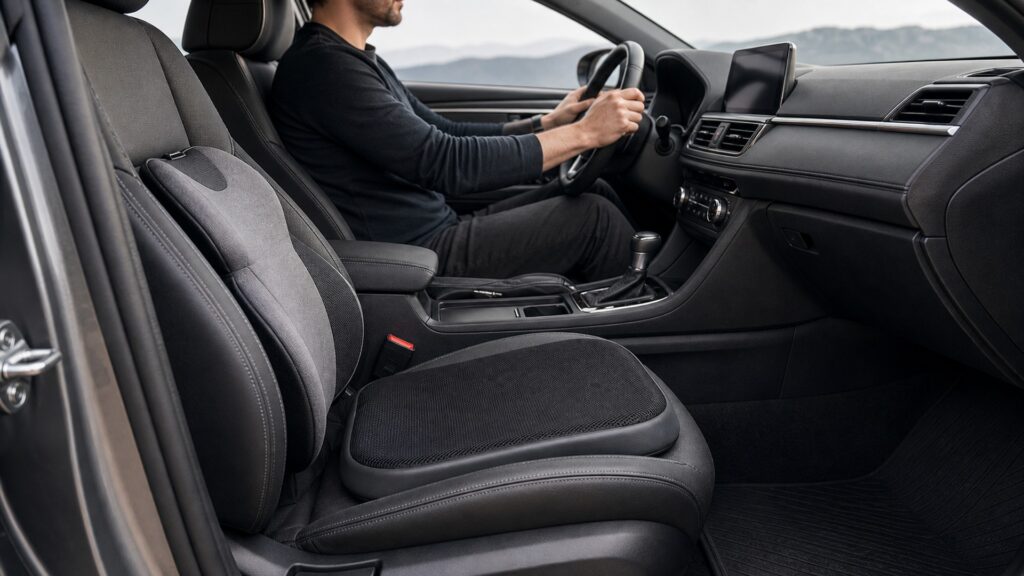
The mechanism follows mechanical contact, heat exchange, airflow, acoustics, tactile surfaces, visibility, reach, motion, and adaptation.
Tip: Define the uncomfortable sensation, its body location, and its operating conditions before changing the cabin.
These terms describe separate physical inputs that the occupant integrates into one experience.
The seat and body geometry that carries mass while maintaining stable alignment and access to controls.
The pattern and duration of force across contact areas such as the thighs, hips, back, shoulders, arms, and feet.
The changing relationship among body heat production, conduction, convection, radiation, evaporation, clothing, and cabin climate.
The direction, velocity, temperature, and distribution of moving air around occupants and interior surfaces.
The combined sound level, spectrum, variation, vibration, and duration reaching occupants from vehicle, road, climate, and audio sources.
The three-dimensional area an occupant can access while maintaining intended seating, restraint use, visibility, and vehicle control.
Tip: Measure or observe each input before assigning a solution.
Seat height, distance, recline, cushion angle, lumbar shape, head restraint, steering wheel, and pedal relationship distribute body weight and determine whether muscles hold an unnecessary static load.
Comfort begins with supported posture rather than added softness.
Sunlight heats skin and materials; contact surfaces conduct energy; ventilation convects heat; humidity changes evaporation; and heated or cooled accessories add local flux. Comfort depends on rate and distribution, not one temperature reading.
Thermal comfort is a balance among several paths that change during a trip.
Road texture, tires, powertrain, wind, climate fans, loose accessories, and audio contribute different frequencies and timing. Motion exposure and visual mismatch can add fatigue or nausea independent of seat softness.
Reducing the dominant input matters more than adding a generic quiet or soft layer.
Covers, armrests, steering surfaces, shades, displays, and trim contact skin or vision repeatedly. Rough seams, slippery materials, reflected light, blocked windows, or unstable accessories can replace one discomfort with another.
Comfort surfaces must remain predictable without hiding required information or views.
A position comfortable for minutes may create pressure or fatigue over hours. Body dimensions, mobility, clothing, temperature preference, and task demands vary, so adjustment needs a representative trip and safe opportunities to stop.
The final judge is repeatable function over time, bounded by safe vehicle fit.
Deep cushions can destabilize posture, strong local cooling can create cold spots, and thick covers can change support, restraint, or thermal-control behavior.
Pressure, posture, temperature, sound, touch, visibility, and reach remain acceptable together.
The occupant can operate the vehicle without compensatory movement or repeated adjustment.
Accessories cannot repair damaged seats, climate faults, water leaks, abnormal vibration, or excessive noise at its source.
Subjective improvement does not override airbag, belt, head-restraint, control, or visibility requirements.
These myths reduce a multi-input human response to one material or setting.
Excess softness can concentrate pressure elsewhere, reduce pelvic stability, alter spinal support, trap heat, or change control reach. Comfort depends on distributed support, movement, material response, and trip duration rather than initial hand feel.
High airflow or low temperature may cool quickly but create dry eyes, local cold stress, noise, or unequal conditions among occupants. Manage solar load, vent direction, humidity, clothing, and gradual temperature change together.
Noise may come from a worn component, open seal, tire condition, loose object, fan, or audio distortion that needs diagnosis. Added material can alter weight, moisture, trim fit, or safety access without correcting the source.
Cushions, covers, shades, heaters, fans, and organizers can change posture, belt fit, airbags, views, pedals, controls, heat, wires, or distraction. Every comfort change needs a vehicle and occupant fit check.
Tip: Find the dominant source and preserve the complete occupant-vehicle relationship.
These answers clarify adjustment, thermal comfort, long trips, accessories, and evaluation.
Adjust the seat, steering wheel, mirrors, head restraint, climate vents, clothing, and normal vehicle settings for the actual occupant. Describe the remaining sensation, body location, road condition, temperature, and time until it appears.
Use a representative drive, note when and where pressure develops, observe posture and compensatory movement, change one supported adjustment at a time, and confirm that relief does not reduce belt contact, visibility, stability, or control reach.
Solar radiation, surface temperature, vent direction and speed, humidity, clothing, seat ventilation or heating, body contact, cabin leakage, and trip phase all matter. Separate warm surfaces from warm air before choosing an intervention.
Begin with stable posture and reachable controls, manage climate gradually, reduce dominant noise or glare sources, keep hydration and appropriate breaks in the plan, and reassess pressure, numbness, fatigue, or motion symptoms over time.
Install it exactly, inspect airbags, belts, head restraint, views, controls, pedals, seats, vents, wiring, and exits, then complete a representative trip and record both the intended improvement and any new heat, movement, pressure, or distraction.
Interior comfort is a balanced human-system response.
Posture, pressure, heat exchange, airflow, sound, vibration, touch, glare, reach, motion, and duration interact. Adjust the vehicle first, identify the dominant remaining input, and accept accessories only when comfort improves without compromising safety interfaces.
These explainers apply the comfort model to a specific occupant and separate it from floor contamination control.
Fit posture, support, climate, sightlines, controls, restraints, and accessories to the actual occupant and vehicle.
Separate occupant response from floor wear and contamination control.
Understand how seat protection changes contact surfaces while preserving seat safety and support functions.
Choose a retailer
Prices checked regularly. We may earn a commission at no cost to you.