What Makes Car Stereo Head Units Different from Driving Displays

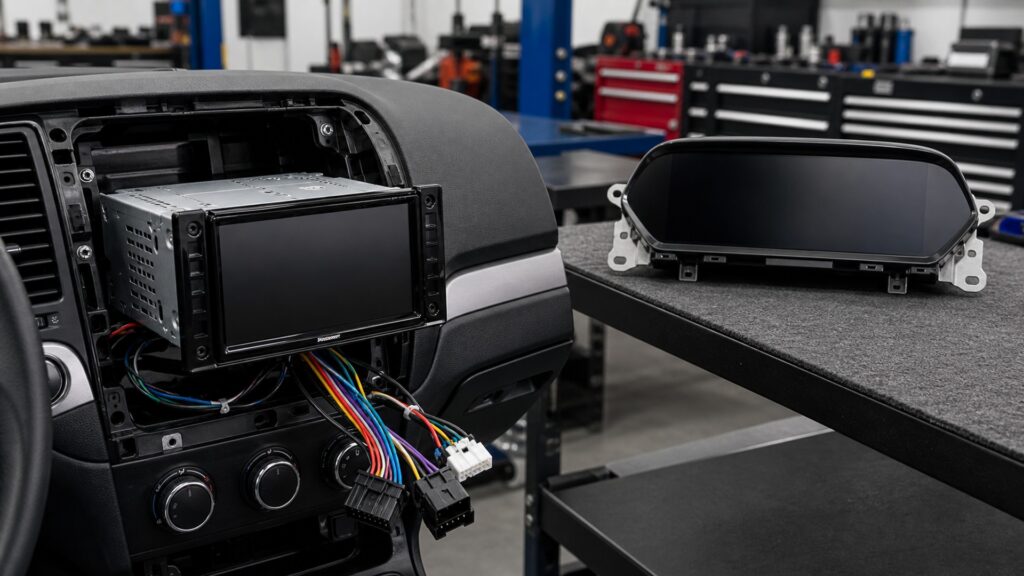
A car stereo head unit primarily manages media sources, user commands, calls, navigation content, and audio outputs. A driving display primarily communicates vehicle state: speed, warnings, range, driver-assistance status, or other information that supports immediate operation. Both can use color screens, but their information has different authority and urgency.

The distinction survives modern integration. A center display may host audio menus beside climate status and camera views, while an instrument cluster may show song titles or navigation arrows. Shared pixels do not make the roles identical. Follow where data originates, what action it supports, how long it remains relevant, and what happens if it disappears.

By: Review Streets Research Lab
Updated: September 2, 2026
Explainer · 8-12 min read
car stereo head units different from driving displays explainer hero image for Review Streets
What You'll Learn

Separate Media Interaction from Operational Awareness

The comparison follows information origin, driver task, output type, priority, and failure consequence instead of judging devices by screen size.

  • Which sources normally belong to the receiver
  • Which vehicle states normally belong to driving displays
  • Why one interface invites interaction and the other favors glances
  • How alerts can override ordinary content
  • Where audio and visual outputs diverge
  • Why integrated screens still keep logical roles
  • What a failure removes from the driver

Tip: Ask whether the content helps choose entertainment or understand the vehicle's present condition; that question usually reveals the governing role.

Definitions

Key Concepts That Define Car Stereo Head Units and Driving Displays

These definitions distinguish media control from operational information while allowing for integrated hardware.

Media Receiver

Hardware and software that acquire entertainment or phone sources, accept commands, and create audio or related interface outputs.

  • Source choice is central
  • Interaction may be extensive while parked
  • Audio continues without constant viewing

Driving Display

A presentation surface dedicated mainly to vehicle operation, status, warnings, or driving-support information.

  • Information is typically glanceable
  • Vehicle modules supply authoritative data
  • Loss can affect situational awareness

Vehicle-State Data

Measurements or computed states produced by vehicle systems, such as speed, energy, faults, or assistance status.

  • Update timing can be safety relevant
  • Units and context matter
  • The receiver does not invent the state

Telltale

A standardized or vehicle-defined visual indication communicating a condition, warning, or system status.

  • Color and persistence carry meaning
  • Some indications demand prompt response
  • Exact requirements vary by vehicle and market

Display Priority

Rules deciding which message, camera view, warning, or menu may occupy a screen at a given moment.

  • Urgent content can interrupt media
  • Reverse state may trigger a camera
  • Software coordinates competing layers

Integrated Cockpit

An architecture in which several vehicle and media roles share computers, screens, controls, or networks.

  • Shared hardware keeps logical boundaries
  • Failures may cross domains
  • Updates require broader regression tests

Tip: Classify the message before the screen: source, authority, urgency, and required response matter more than the bezel around it.

Information Origin

Receivers Acquire Programs while Driving Displays Read Vehicle State

A receiver begins with broadcasts, stored files, phones, microphones, or media apps. A driving display begins with sensors and vehicle controllers that publish operating values or conditions. Navigation may bridge the roles, yet source authority remains identifiable.

  • Name the module that owns each value
  • Separate phone content from vehicle data
  • Confirm units and update behavior
  • Treat derived estimates as estimates

The same screen can render both streams without making their origins interchangeable.

Driver Task

One Supports Selection; the Other Supports Awareness

Receiver interfaces often help choose a station, track, destination, call, or sound setting. Driving displays compress information so a driver can recognize present state with limited visual demand. That difference affects hierarchy, persistence, and appropriate interaction depth.

  • Keep operational state visible and stable
  • Configure layered menus while stationary
  • Use predictable controls and feedback
  • Avoid obscuring important vehicle messages

Interaction is optional for much media content but awareness is the purpose of driving-state content.

Output Domain

Audio Is a Receiver Endpoint, Not a Driving-Display Requirement

The head unit routes program audio, calls, prompts, and sometimes vehicle chimes toward speakers or amplifiers. A driving display's defining output is visual state, even when an audible warning accompanies it through another module or the audio system.

  • Trace sound to its originating function
  • Do not infer data authority from speaker location
  • Verify warning and media levels separately
  • Preserve mute or ducking priorities

Shared speakers may carry multiple roles, just as shared glass may show multiple roles.

Priority and Persistence

Operational Messages Can Override Ordinary Media Content

A track title can disappear without changing vehicle control, while a warning, reverse image, or assistance state may need immediate prominence. Integrated software applies priority rules that temporarily replace menus, reduce audio, or lock out tasks.

  • Trigger warnings and overlays deliberately
  • Observe return to the previous media state
  • Check camera and alert precedence
  • Retest after interface or software changes

Priority behavior reveals which content serves immediate operation rather than personal media choice.

Failure Evidence

Loss Removes Different Capabilities

A failed head unit can remove source control, calls, navigation audio, or sound outputs while core gauges remain. A driving-display fault can remove speed or warning visibility even if music continues. Integrated systems can fail together, so diagnosis must still trace domains.

  • Record exactly what disappeared
  • Check whether vehicle data still exists elsewhere
  • Test audio and visual paths independently
  • Escalate critical vehicle warnings appropriately

What remains working is as informative as the black or frozen screen itself.

Quick Reality Check

Functional Boundaries Remain Even When Hardware Is Shared

Modern dashboards consolidate screens and computers, but media selection and vehicle-state communication retain different purposes and acceptance tests.

What the Distinction Explains

It clarifies data authority, interaction depth, message priority, output paths, and the practical consequence of a failure.

It prevents a large touchscreen from being mistaken for an instrument function merely because both are visual.

Where the Boundary Blurs

Navigation, cameras, chimes, climate status, phone projections, and configurable clusters can cross or share both domains.

A single software or network failure may affect several roles, so physical boxes alone cannot define diagnostic scope.

Common Myths

Misconceptions About Car Stereo Head Units and Driving Displays

These myths use location or screen technology as a shortcut for function.

Any screen near the driver is a driving display

Location alone does not define the role. A receiver screen may emphasize media, calls, and navigation interaction, while a driving display emphasizes vehicle state and warnings. Integrated panels can present both through separately governed layers.

Driving displays never show entertainment information

Clusters and head-up displays may show track names, call status, or navigation prompts. Those secondary items do not erase the display's main vehicle-awareness role, and priority rules should keep critical operating information available.

A head unit creates the speed or warning data it shows

The receiver may render information supplied by vehicle modules or an integration interface. It does not become the authoritative sensor or controller merely by displaying the value; timing, validity, and diagnostic meaning remain vehicle dependent.

If music plays, all dashboard information systems are healthy

Audio playback proves only a narrow source-to-output path. Vehicle-data reception, telltales, camera overlays, cluster operation, warning priority, and retained settings can fail independently, particularly after an interface or software change.

Tip: Follow the message from its authoritative source to the decision it helps the driver make.

FAQ

Frequently Asked Questions About Car Stereo Head Units and Driving Displays

These answers clarify overlapping screens, navigation, cameras, chimes, and diagnostic boundaries.

Is a center touchscreen a head unit or a driving display?

It can serve both roles. Classify each function separately: media source and audio control are receiver work, while vehicle state, warnings, and some camera or assistance information are driving-display work. Shared hardware does not merge responsibilities.

Where does navigation belong?

Navigation spans domains. Route search and destination entry resemble interactive receiver functions, while upcoming maneuvers can become concise driving information. The phone, receiver, vehicle computer, cluster, and audio path may each own a different stage.

Why can a warning chime depend on the head unit?

Some vehicles route synthesized warnings through factory audio components or use the receiver for volume and speaker distribution. Replacement integration must preserve the documented signal path, but the vehicle module still originates the underlying warning condition.

Can a receiver replace an instrument cluster?

Only an explicitly designed and supported vehicle architecture should present required operating information. A general receiver screen is not automatically authoritative, redundant, visible, or compliant enough to substitute for the vehicle's dedicated driving display.

How should shared-screen operation be tested?

Exercise media, calls, navigation, cameras, warnings, settings, startup, reverse, and shutdown. Check which content gains priority, whether the prior state returns correctly, and whether critical information remains clear when multiple functions compete.

Bottom Line

Car stereo head units differ from driving displays by purpose: receivers manage interactive media and audio paths, while driving displays communicate concise vehicle state and warnings.

In integrated dashboards, classify each function by its data source, driver task, priority, output, and failure consequence. One panel can host both without making their responsibilities equivalent.

Next Steps

Explore the Boundaries around the Shared Dashboard

These articles develop receiver mechanics, the wider electronics architecture, and a comparison from the car-audio side of the screen boundary.