What Makes Laser Printers Different from Inkjet Printers

Laser and inkjet printers differ at the moment the page image becomes physical. A laser printer uses electrostatic charge to form a latent image on a photoconductor, develops it with powdered toner, transfers that toner to paper, and bonds it with heat and pressure.

An inkjet rasterizes the same page but ejects microscopic liquid droplets through nozzles directly onto the media, commonly using thermal bubbles or piezoelectric actuators. Toner transfer and fusing favor different startup, speed, paper, and maintenance behavior than droplet placement, absorption, and drying. Those mechanisms explain the categories more reliably than feature lists. The best fit depends on document coverage, color expectations, idle periods, batch shape, media, finishing, and support—not purchase price alone.

By: Review Streets Research Lab
Updated: August 26, 2026
Explainer · 8-12 min read
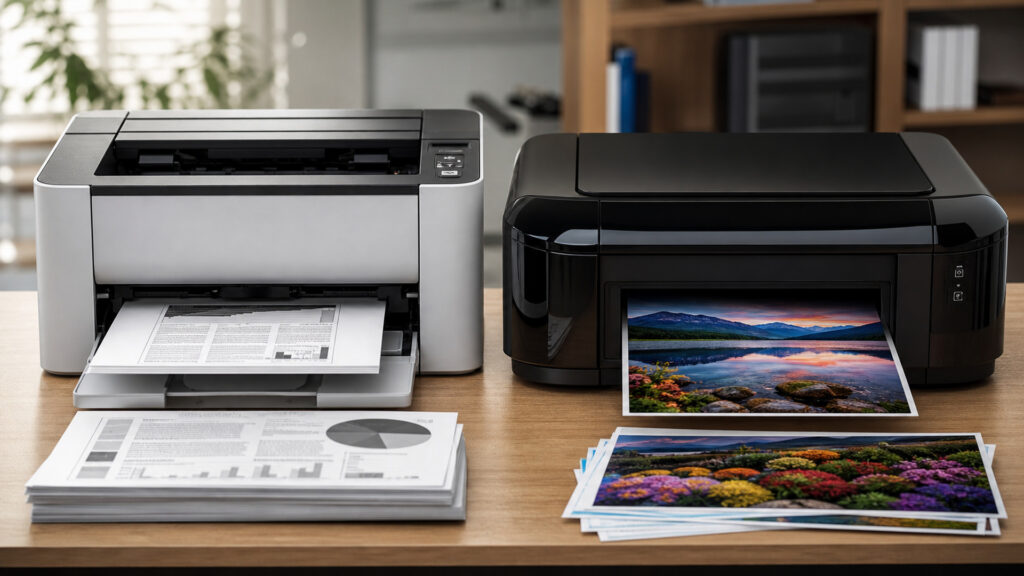
Editorial business scene illustrating laser printers and inkjet printers
What You'll Learn

How Two Image-Formation Mechanisms Create Different Printer Behavior

Electrostatic toner imaging and liquid-droplet deposition impose different physical limits on warm-up, sustained output, media interaction, maintenance, and cost.

  • How a laser engine charges, exposes, develops, transfers, and fuses
  • How thermal and piezoelectric inkjet heads create droplets
  • Why first-page time differs from pages per minute
  • How toner heat and ink absorption constrain media
  • Why text, gradients, photos, and solid fills stress engines differently
  • What idle time does to consumables and maintenance
  • How coverage changes real cost per page

Tip: Compare one representative document set by first-page time, complete-batch time, duplex behavior, coverage, media, acceptable defects, cleaning consumption, and operator intervention—not engine speed alone.

Definitions

Key Concepts That Define Laser and Inkjet Printers

These components reveal where laser and inkjet engines create, transfer, stabilize, and maintain the printed image.

Photoconductor Drum

A light-sensitive surface whose electrostatic charge pattern carries the latent page image in a laser engine.

  • Charge: prepares a uniform electrical state
  • Exposure: selectively changes charge
  • Rotation: presents the image for development and transfer

Toner Development

The process that attracts charged toner particles to the latent image on the photoconductor.

  • Particle: contains pigment and fusible resin
  • Bias: controls electrostatic attraction
  • Density: affects coverage and image consistency

Fuser

Heated pressure components that melt and bond transferred toner into the media surface.

  • Heat: softens toner resin
  • Pressure: fixes contact with paper
  • Control: adjusts temperature for speed and media

Thermal Inkjet

A printhead method that heats ink to form a vapor bubble that expels a droplet through a nozzle.

  • Pulse: creates the bubble
  • Nozzle: shapes and directs the droplet
  • Refill: draws ink into the chamber

Piezoelectric Inkjet

A printhead method that deforms a piezoelectric element to pressurize ink and eject a controlled droplet.

  • Actuator: changes chamber volume
  • Waveform: controls droplet formation
  • Ink: can support formulations beyond thermal limits

Page Coverage

The proportion and distribution of a page receiving toner or ink under a defined test document.

  • Yield: changes consumable life
  • Drying or fusing: changes engine load
  • Cost: makes simple page counts misleading

Tip: A rated cartridge yield assumes a defined coverage pattern; dense graphics, cleaning cycles, mixed color, and unusable residual consumable can change actual yield substantially.

Laser Imaging

How Charge Becomes a Fused Toner Image

The engine conditions the photoconductor, writes the raster image with laser or LED exposure, develops charged areas with toner, transfers the powder to media, fuses it, and cleans residual toner for the next cycle.

  • Maintain controlled charge across the photoconductor
  • Register color separations and paper position
  • Transfer toner without disturbing the powder image
  • Apply sufficient heat and pressure for the selected media
  • Remove residual charge and toner before reuse

Because a full page image is formed electrostatically, laser engines can sustain crisp text and repeated office pages once the paper path and fuser reach operating state.

Inkjet Imaging

How Timed Droplets Build the Page Directly

A moving or page-wide printhead ejects cyan, magenta, yellow, black, or specialty ink droplets at precise locations. The media coating and ink chemistry control spreading, absorption, color mixing, and drying.

  • Keep nozzles primed and firing consistently
  • Control droplet size and placement timing
  • Advance media without banding or skew
  • Match ink formulation to coating and absorbency
  • Allow sufficient drying before duplexing or stacking

Inkjet places color without a toner-transfer stage, enabling fine modulation and broad media possibilities while making nozzle health and liquid-media interaction central.

Time and Throughput

Why Warm-Up, Coverage, and Batch Shape Change the Result

Laser devices may spend time heating or calibrating before a fast batch; inkjets may start with little fuser warm-up but slow for high quality, dense coverage, head passes, or drying. Duplex paths add another constraint.

  • Measure wake-to-first-page separately from engine speed
  • Time representative mixed and duplex batches
  • Include calibration and cleaning interruptions
  • Watch output-bin, memory, and finishing limits
  • Distinguish peak speed from sustainable monthly workload

A short occasional job and a continuous departmental queue can favor different mechanisms even when advertised pages per minute appear similar.

Output and Media

How Heat and Liquid Interact Differently With Paper

Fusers subject media to temperature and pressure; inkjets depend on wetting, coating, absorption, and evaporation. These interactions affect curl, smear, gloss, edge sharpness, color gamut, substrate thickness, and two-sided handling.

  • Test the actual paper and specialty media
  • Inspect fine text, reversals, gradients, photos, and solid fills
  • Check rub, moisture, light, and highlighter resistance as needed
  • Validate envelopes, labels, transparencies, or coated stock explicitly
  • Allow for color-management and finishing requirements

Print quality is task-specific: ledger text, barcode edges, photographic gradients, proofing color, and durable labels impose different acceptance tests.

Maintenance and Economics

Why Idle Behavior and Coverage Change Ownership Cost

Laser engines consume toner plus drums, transfer components, waste containers, and fuser life; inkjets consume ink through printing, priming, and cleaning while printheads may be replaceable or permanent. Serviceability and workload matter.

  • Calculate consumable cost using representative coverage
  • Include maintenance kits and unusable residual supply
  • Track nozzle cleaning or calibration consumption
  • Plan for long idle periods and environmental conditions
  • Compare downtime, intervention, energy, and support alongside supplies

The lower-cost engine is the one whose supplies, wear parts, intervention, and output acceptance align with the real workload over time.

Quick Reality Check

Engine Type Explains Tendencies, Not Every Product Outcome

Specific implementations can cross traditional category expectations, so the mechanism should guide testing rather than replace it.

Workloads Often Favoring Laser

Laser commonly fits sustained plain-paper text, sharp small type, predictable duplex office batches, and environments where long idle periods should not threaten nozzle health.

Fast engines can amortize warm-up across substantial queues and use high-yield toner systems.

Workloads Often Favoring Inkjet

Inkjet can fit photographic or graphics-heavy output, low wake energy, specialized media, wide-format work, or applications where liquid-ink color behavior is advantageous.

Dense coverage, drying, cleaning, and paper compatibility still require representative testing.

Common Myths

Misconceptions About Laser and Inkjet Printers

These claims mistake broad category tendencies, laboratory yields, or one output sample for a complete workload comparison.

Laser printers are always cheaper per page

Toner yield can be economical for suitable volume, but drums, fusers, transfer parts, waste containers, coverage, color use, service, energy, and downtime affect total cost. Some ink systems achieve lower costs.

Inkjet printers cannot produce sharp business text

Modern heads and suitable paper can produce precise text. Laser often offers consistent edge sharpness on ordinary stock, but actual legibility depends on resolution, ink spread, toner placement, alignment, font size, and media.

Pages per minute identifies the faster printer

Rated speed may exclude wake-up, rasterization, calibration, duplex reversal, mixed media, quality modes, drying, output handling, and operator intervention. The relevant measure is completed acceptable work across representative job arrivals and batches.

Cartridge yield predicts how long supplies will last

Standardized yields use defined pages and conditions. Real life changes with coverage, color balance, cleaning, calibration, environmental conditions, job size, residual supply, and device behavior, so measured cost requires actual consumption records.

Tip: Tie every comparison to a documented workload: job arrival pattern, page count, coverage, color, duplexing, paper, required defects, idle duration, and finishing.

FAQ

Frequently Asked Questions About Laser and Inkjet Printers

These questions translate print-engine mechanics into practical evaluation criteria for office and business workloads.

Why do laser printers need warm-up time?

The fuser must reach and regulate a temperature that bonds toner at the selected speed and media type. Devices may also initialize motors, charge systems, color registration, and calibration after sleep or environmental change.

Why do inkjet printers run cleaning cycles?

Nozzles can trap air, accumulate dried ink, or fire inconsistently. Purging and wiping restore droplet formation, but consume ink and time. Frequent cleaning may indicate long idle periods, environment, supplies, or printhead problems.

Which technology is better for barcodes and small text?

Both can work when edge definition, contrast, quiet zones, scaling, media, and durability meet the scanner or legibility requirement. Test the final workflow because compression, drivers, ink spread, toner defects, and resizing matter.

How should color output be compared?

Use controlled source files, application and driver settings, intended media, calibrated viewing, and task-specific tolerances. Evaluate neutrals, skin tones, gradients, fine lines, solid fills, repeatability, metamerism, and any required color-management workflow.

Does monthly duty cycle show recommended volume?

Not necessarily. A maximum duty figure may describe an occasional upper boundary, while recommended volume reflects sustainable wear, supplies, intervention, and service expectations. Verify both definitions and compare them with peak and average workload.

What costs belong in a printer comparison?

Include device, ink or toner, drums, heads, fusers, transfer and waste parts, paper waste, energy, service, downtime, user intervention, secure print, finishing, usable floor space, fleet administration, and end-of-life handling.

Bottom Line

Laser printers build an electrostatic toner image and fuse it with heat; inkjets eject controlled liquid droplets directly onto media. Those physical mechanisms create their most durable differences.

Choose by representative first-page and batch time, coverage, output acceptance, media, idle behavior, duty, maintenance, intervention, and lifecycle cost. Category labels should determine what to test, not preselect the winner.

Next Steps

Continue Into Equipment Systems and Document Workflows

These explainers connect print-engine mechanics to the equipment lifecycle, shared office document flow, and physical placement demands around recurring print work.

How Business Equipment Works

Understand the power, sensing, control, duty-cycle, consumable, maintenance, and workflow principles common to business devices.