
Radio Observation
Energy measured within a detector's configured frequency and pattern search space.
- Source identity remains uncertain
- Geometry controls strength
- Filters change presentation
Radar detectors and dash cameras observe different environments and serve different moments. A detector listens for configured radio patterns or senses supported laser pulses, then issues a real-time warning based on uncertain classification. Its value exists during the encounter, and it may retain little evidence afterward.
A dash camera collects visible light from a limited scene, encodes sequential frames, and stores video segments for later retrieval. It can preserve traffic context the detector never observes, but it does not identify radar bands or guarantee a usable view. One product supports immediate awareness; the other creates a historical visual record. Combined mounting does not merge those evidence standards.
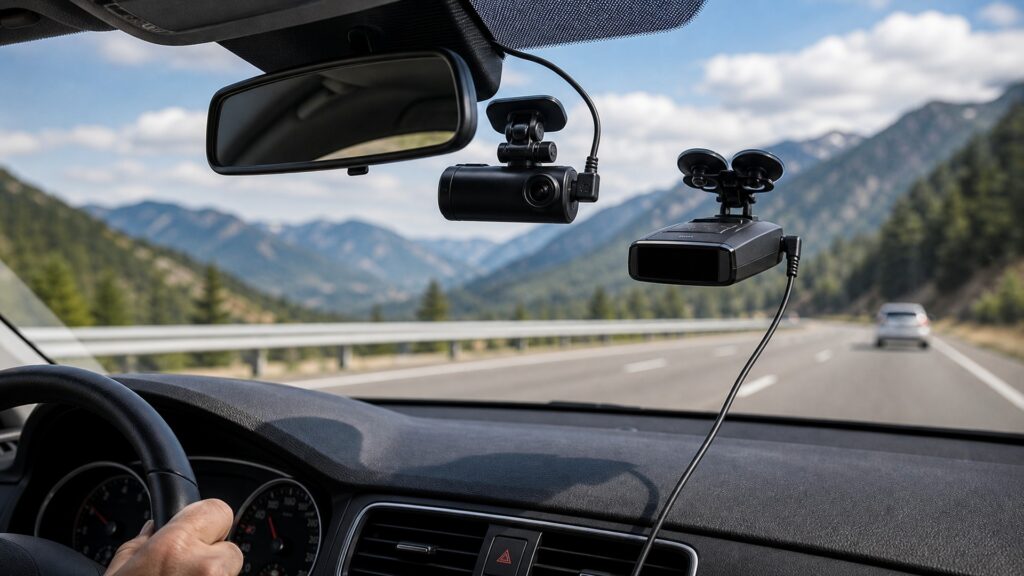
The detector interprets signals now; the camera preserves bounded visual history for later review.
Tip: Ask whether the decision needs information during the encounter or evidence afterward; then verify the corresponding source and artifact.
These terms keep radio events distinct from stored optical evidence.
Energy measured within a detector's configured frequency and pattern search space.
Visible or infrared light entering the camera lens from a bounded field of view.
A tone, voice, arrow, strength indication, or display presented during a classified detector event.
A closed video file or storage unit containing sequential frames and metadata from part of the camera timeline.
Automatic reuse of eligible storage when capacity is reached.
Comparison of detector alert time, camera clock, visual events, and any saved logs to establish a common timeline.
Tip: Record device clocks and verify actual files whenever the two timelines will be compared.
The detector responds to microwave energy or pulsed light patterns; the camera forms images from the scene. A radar source can be outside the camera frame, and a visible patrol vehicle need not be transmitting.
Sensor boundaries determine what each device can honestly report.
Detector processing emphasizes rapid notification and may discard most observations. Dash-camera processing emphasizes continuous encoding, segment closure, retention, protection, and later retrieval. Their clocks and buffering rules differ.
A simultaneous screen indication does not guarantee a retained synchronized record.
Band, direction, and strength can describe the detector's radio observation. Video can show lanes, signals, traffic, weather, and vehicle motion within view. Neither artifact automatically proves measured speed, intent, or responsibility.
Each record is strongest when used inside its actual sensing scope.
Two windshield devices can obstruct each other, compete for outlets, add cables, create electrical noise, heat together, or affect vehicle sleep. Camera Wi-Fi and power converters may also influence the detector environment.
Coexistence begins with two clean standalone baselines.
Validate the detector's configuration, known sources, direction, mute, and recovery. Separately verify camera aim, exposure, audio policy, segment continuity, overwrite, protection, time, and export before assessing interaction.
A combined product passes only when both the moment and the record remain dependable.
The warning may be correct without recording the source, and video may show an encounter without proving any radar transmission or detector classification.
A camera can supply visible context around a detector alert if clocks and retention align.
A detector can mark an event worth locating in the video timeline when logging is supported.
Neither device alone establishes calibrated speed measurement, targeting, legal fault, or complete surroundings.
No retrieved file means a preview or remembered alert cannot substitute for stored evidence.
These myths mistake a current warning for a historical record or an image for radio evidence.
The transmitting source may be outside the lens view, hidden by traffic, or visually indistinguishable. The detector classifies radio energy, while the camera records light; neither automatically identifies the other's source.
The camera may be unpowered, mis-aimed, overexposed, writing another segment, suffering storage failure, or overwriting old files. Confirm the actual clip, adjacent segments, time, continuity, and export before relying on footage.
A visible vehicle does not establish that speed-measurement equipment transmitted, targeted this vehicle, or produced the detector alert. Other emitters, reflections, and timing differences require independent evidence and careful interpretation.
Radar antennas, laser sensors, camera lenses, driver sightlines, wipers, glass coatings, rear exposure, heat, cables, and legal mounting rules create different placement needs. Plan the combined envelope rather than stacking hardware casually.
Tip: Keep the two artifacts separate until timing is verified.
These answers clarify event timing, evidence, clocks, combined power, and post-incident preservation.
A lawful, correctly configured radar detector is designed for immediate signal awareness. A dash camera mainly records the scene for later review, though its screen or driver-assistance features should never become a distracting substitute for observation.
A dash camera may provide retrievable visual context if the relevant files survived and coverage is usable. Save original and adjacent segments promptly; a detector contributes only whatever alert history or logs it actually retained.
Record each displayed time and zone, identify an event visible in footage and known independently, calculate the offset, and preserve that note. Do not assume phone synchronization or matching minute displays provides frame-level alignment.
Switching converters and cables can radiate or conduct noise near a sensitive receiver. Compare the detector with camera power removed, change one component or route at a time, and use supported low-noise installation hardware.
Protect original and adjacent camera segments, metadata, device settings, clock offset, any detector alert history, location data, and installation notes. Avoid editing or clearing records before copying them through supported methods.
Radar detectors differ from dash cameras because detectors classify radio or optical signal events for immediate awareness, while cameras encode a bounded visual scene into files for later retrieval.
Their sensors, timelines, uncertainty, failures, and proof are different. When both are installed, validate reception and recording separately, then test shared glass, power, heat, cables, clocks, and recovery.
These explainers trace how each device creates its artifact and how operating checks make alerts or files credible.
Trace radio capture, filtering, classification, context, and real-time presentation.
Trace optics, sensing, encoding, segmentation, overwrite, protection, and retrieval.
Test camera startup, recording, protection, storage failure, parking, and recovery states.
Choose a retailer
Prices checked regularly. We may earn a commission at no cost to you.