When to Use Car Stereo Head Units Instead of Dash Cameras

Use a car stereo head unit when the desired result is interactive access to radio, phone audio, calls, navigation, media controls, receiver settings, or compatible vehicle features. Those tasks require a human interface and live audio or display outputs. They do not require the device to preserve a continuous visual record of the road.

Use a dash camera when the defining need is time-stamped video capture, loop storage, protected event files, or supported parking recording. A receiver may display a reversing image and a dash camera may have a screen, but display and recording are separate functions. Choose by the missing outcome, then plan coexistence where both are genuinely needed.

By: Review Streets Research Lab
Updated: September 2, 2026
Explainer · 8-12 min read
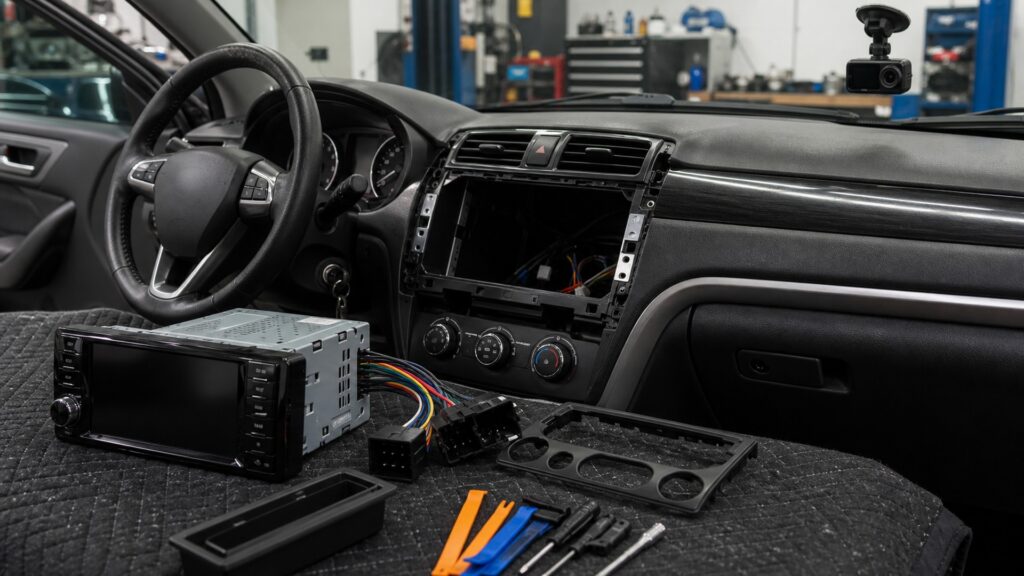
car stereo head units instead of dash cameras explainer hero image for Review Streets
What You'll Learn

Choose Interactive Control or Recorded Evidence

The decision separates live source-and-control tasks from continuous capture, then evaluates shared screen, camera, power, placement, storage, and privacy constraints.

  • When source and phone control make a receiver relevant
  • When navigation and compatible vehicle data need a display
  • Why a camera input does not create an event recorder
  • How loop recording and file locking define dash-camera use
  • Why parking capture changes the power plan
  • Where placement and driver attention differ
  • When both devices should coexist

Tip: Write the required artifact in one sentence: live control and playback, or retrievable video from a defined field of view and time window.

Definitions

Key Concepts That Define Car Stereo Head Units Instead of Dash Cameras

The terms distinguish live interaction from persistent capture and expose the shared interfaces that can mislead a buyer.

Interactive Media Control

A live interface for selecting sources, navigating menus, changing playback, managing calls, and adjusting receiver functions.

  • Commands expect immediate feedback
  • Driver use needs limited visual demand
  • No persistent road record is implied

Camera Display Input

A video connection that lets a receiver show an external camera image when selected or triggered.

  • It may not record
  • Formats and triggers must match
  • The view depends on camera placement

Continuous Capture

Ongoing recording of sequential video segments while a dash camera has power and storage capacity.

  • Coverage depends on field of view
  • Files cycle as storage fills
  • A failure can occur without obvious warning

Loop Recording

A storage method that overwrites older ordinary clips with newer footage when available space is exhausted.

  • Protected files may be excluded
  • Card endurance affects reliability
  • Retention time depends on settings

Event-File Protection

Marking selected footage to reduce ordinary loop overwriting after a trigger or manual action.

  • Triggers can miss or overreact
  • Protected space can fill
  • File integrity still needs checking

Parking-Mode Power

A controlled supply strategy allowing supported recording after the vehicle is parked while limiting battery depletion.

  • Hardware and thresholds matter
  • Vehicle sleep systems can be affected
  • Heat and privacy remain relevant

Tip: Do not let the presence of a screen or camera connector substitute for the required output: controllable media or saved footage.

Choose a Head Unit

Select the Receiver for Live Sources, Calls, and Dashboard Control

A head unit is appropriate when the unresolved need is radio reception, supported phone projection, hands-free calling, media decoding, accessible controls, navigation presentation, or integration with steering buttons and compatible vehicle functions.

  • List the live source or control required
  • Verify phone and format support
  • Confirm microphone and output needs
  • Map every vehicle feature the receiver must retain

Receiver success is demonstrated during interaction, not by the creation of a video archive.

Choose a Dash Camera

Select the Recorder for Road-Event Capture and Retrieval

A dash camera is appropriate when the outcome is recorded video from a chosen field of view, divided into retrievable clips, with reliable timestamps, storage management, and supported event protection. Image quality alone does not establish dependable capture.

  • Define front, rear, or cabin coverage
  • Estimate required retention time
  • Use supported high-endurance storage
  • Practice locating and exporting a test file

Recorder success is the usable saved file, not the live preview on a small screen.

Do Not Confuse Display with Recording

A Receiver Camera View and a Dash-Camera Record Solve Different Problems

A reversing camera usually provides a live maneuvering view when triggered. The receiver may display it without saving anything. A dash camera records a wider time sequence but is not a substitute for direct observation, mirrors, or a purpose-designed reversing view.

  • Identify whether any recording function exists
  • Confirm trigger and video format
  • Keep the reversing view appropriately aimed
  • Treat both images as aids rather than guarantees

The word camera describes an input device, not the storage behavior behind it.

Shared Vehicle Constraints

Both Choices Need Deliberate Power, Placement, and Interaction

Receivers use accessory and constant power states; dash cameras may require ignition-switched or parking-mode supplies. Screens, microphones, camera cables, antennas, and mounts must avoid airbag zones, sightline obstruction, loose wiring, glare, and excessive driver interaction.

  • Use approved power and shutdown methods
  • Route away from restraints and moving parts
  • Configure complex settings while parked
  • Verify battery sleep and restart behavior

The selected function does not excuse a poor vehicle installation.

Use Both When Needed

Coexistence Works When Each Device Keeps a Clear Assignment

A receiver can handle media, calls, navigation, and a reversing display while a separate dash camera records road events. Coordinate power budgets, cable routes, microphone and camera placement, wireless connections, screen behavior, and retrieval procedures so the devices do not interfere.

  • Assign the live and recorded views
  • Avoid competing phone connections
  • Test radio and GPS interference
  • Document storage, privacy, and shutdown settings

Two devices are justified when they provide two independently required outputs and pass together.

Quick Reality Check

Neither Device Replaces Driving Judgment or Complete Evidence

A receiver organizes interaction and a dash camera stores a limited view; each leaves important information outside its frame.

What Each Choice Does Well

A supported receiver consolidates live audio, phone, navigation, camera display, and selected vehicle controls into an accessible upstream interface.

A maintained dash camera can preserve a time sequence that aids recollection and review beyond what a momentary live screen provides.

Where Expectations Need Limits

A head-unit screen cannot make complex interaction risk-free, and a dash-camera file cannot capture every direction, sound, speed, context, or cause.

Recording reliability depends on power, temperature, storage, placement, settings, maintenance, and legal constraints; footage does not automatically establish responsibility or admissibility.

Common Myths

Misconceptions About Car Stereo Head Units Instead of Dash Cameras

These myths arise when a screen, camera input, or live preview is mistaken for the device's primary outcome.

A head unit with a camera input replaces a dash camera

A camera input commonly provides a live reversing or accessory view but may not encode, timestamp, loop, protect, or export footage. Confirm explicit recording behavior before expecting retrievable road-event video from the receiver.

A dash-camera screen can replace a multimedia receiver

The screen is usually intended for setup, status, or playback. It does not necessarily provide radio, robust media decoding, hands-free calling, preamp outputs, steering-control integration, navigation presentation, or the vehicle functions supported by a head unit.

Parking mode means the camera can record indefinitely

Retention is bounded by battery protection, storage capacity, heat, camera power demand, recording settings, and vehicle sleep behavior. Parking capture can stop before an event, so test actual duration and status rather than assuming continuous coverage.

Recorded video always settles what happened

A camera captures only its field of view with available light, frame timing, audio setting, and storage integrity. It may omit surrounding actions or context, and legal interpretation depends on jurisdiction and the complete evidence.

Tip: Verify the saved artifact or live interaction separately; appearance alone cannot prove either function is complete.

FAQ

Frequently Asked Questions About Car Stereo Head Units Instead of Dash Cameras

These answers clarify camera inputs, recording behavior, parking power, shared phone connections, and the decision to install one device or both.

Should I choose a head unit for Apple CarPlay or Android Auto?

Choose a compatible receiver when phone projection, navigation, calls, messaging controls, and audio apps are the required outcome and the exact phone, vehicle, interface, microphone, and control setup is supported. Configure complex options while parked.

Can a dash camera display through a head unit?

Some compatible combinations can send live or recorded video to a receiver through supported inputs or dedicated interfaces. Confirm format, trigger, control, and playback limitations; display compatibility does not automatically provide recording control or file transfer.

What makes dash-camera storage reliable?

Use manufacturer-supported capacity and format, favor suitable endurance media, protect the card from heat, review camera status, perform instructed formatting, and periodically retrieve a test clip. A card can fail even while the camera appears powered.

Can both devices share one power circuit?

Only when vehicle and product instructions support the circuit, protection, current, shutdown, and parking behavior. Receiver and camera loads, adapters, battery monitoring, wire routes, and vehicle sleep systems must be assessed together rather than joined for convenience.

When is installing both the better decision?

Use both when live media, calls, navigation, or vehicle control and retrievable road-event recording are independently required. Define each assignment, then verify coexistence across power states, wireless connections, visibility, distraction controls, privacy, and file retrieval.

Bottom Line

Use a car stereo head unit for interactive media, calls, navigation, audio outputs, and compatible vehicle control; use a dash camera for deliberate video capture and retrieval.

Do not confuse a live camera display with recording or a recorder's small screen with a receiver. Install both only when both outputs are needed and their power, placement, interaction, storage, and privacy plans can coexist.

Next Steps

Compare the Two Device Roles in Their Native Systems

These explainers develop head-unit operation, dash-camera purpose, and the broader electronics architecture that must support both devices without functional conflict.

Why Dash Cams Matter

Examine why dash-camera value depends on coverage, recording continuity, storage, retrieval, and realistic evidence limits.

Quick Summary

Car Stereo Head Units Instead of Dash Cameras Explained

  • Head units serve live interaction and audio control.
  • Dash cameras serve continuous capture and file retrieval.
  • A displayed camera view is not proof of recording.
  • Parking mode is bounded by power, storage, heat, and policy.
  • Both devices can coexist when their assignments remain distinct.