
Persistent Video Record
A stored visual sequence available after the captured event, subject to coverage, storage, and retrieval limits.
- It survives ordinary shutdown
- It can be copied elsewhere
- It includes only the installed view
Use a dash camera when the missing outcome is a retrievable visual record of travel or a supported parked event. Its defining work is automatic capture, loop storage, event protection, and later file access. A head unit may display a camera image, but ordinary receiver operation does not create that persistent road timeline.
Use a head unit when the need is live radio or phone media, calls, navigation interaction, audio routing, a reversing display, or compatible vehicle controls. Choose both when those outcomes are independently important and the installations can share the cabin without power, visibility, wireless, privacy, or attention conflicts.
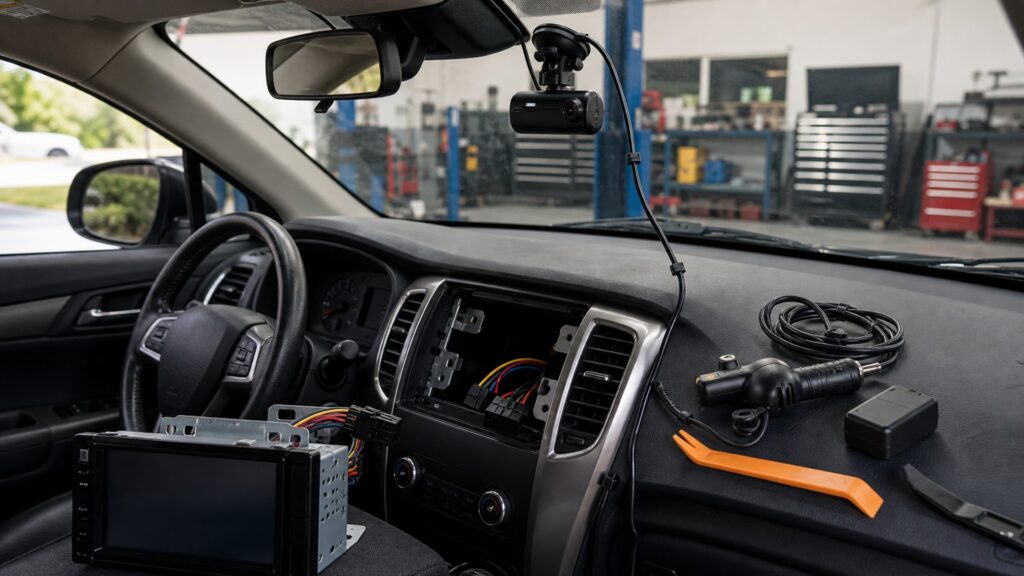
A preserved clip and a live interactive dashboard are different outcomes, even when both devices include screens, microphones, or phone apps.
Tip: Finish the sentence 'afterward I need…': a playable time-stamped clip points to recording, while media and control available now point to a receiver.
These concepts establish the output, time, and interaction boundaries behind the choice.
A stored visual sequence available after the captured event, subject to coverage, storage, and retrieval limits.
The rolling time window kept before eligible old segments are overwritten.
Supported recording while the vehicle is unattended using defined triggers or time-based strategies.
Receiver controls for sources, calls, navigation, audio settings, and connected-device feedback during use.
A receiver path that shows compatible live video in a selected or triggered state.
A joint installation design covering circuits, grounds, placement, wireless connections, sleep states, attention, and privacy.
Tip: Do not compare screen sizes before deciding whether the task ends in a file or in live vehicle interaction.
Choose dash-camera scope when the useful result is visual context that remains after a collision, close call, road incident, or supported parking trigger. Coverage, clarity, time, and file preservation become the acceptance criteria.
If no saved artifact is required, recording may not address the real need.
A receiver ordinarily shuts down or changes state with the vehicle and is built for occupied use. A dash camera can support unattended modes when supplied by a compatible hardwire or battery arrangement with deliberate cutoffs and storage behavior.
Parking mode is a bounded operating plan, not a promise of continuous protection.
When the missing function is phone projection, radio, hands-free communication, navigation entry, source control, audio routing, or a reversing view, a receiver directly owns the required live interaction. A dash camera's display cannot replace that architecture.
A recorder may have a screen without being an infotainment control center.
A head unit can switch to a reversing or auxiliary input, and some combinations can play recorded clips. Unless it continuously captures, encodes, segments, protects, and indexes footage, the screen is presenting video rather than operating as a dash recorder.
Recording capability is defined by the complete file path, not the presence of a display.
A recorder and receiver can coexist when evidence capture and live media control both matter. Their placement, power, grounds, phone connections, microphones, alerts, sleep behavior, and driver interaction must be planned together and tested separately.
Two devices are justified by two jobs, not by overlapping feature lists.
The choice becomes clear when persistence is separated from interaction; neither device substitutes for the other's defining output.
The required outcome is retrievable road or supported parking footage with known view, time, continuity, and storage limits.
The camera can operate automatically without adding unnecessary driver interaction.
Calls, navigation entry, media selection, audio processing, reversing display integration, and vehicle controls remain receiver tasks.
Footage cannot guarantee complete context, unlimited retention, identification, or legal resolution.
These myths treat any screen or camera connector as equivalent to continuous recording.
A reversing camera supplies a nearby maneuvering view in a selected state. A dash camera is intended to record a wider travel timeline. Triggering, field of view, storage, retention, and evidence use are fundamentally different.
Video input proves the receiver can present a compatible signal, not that it captures continuously, creates loop segments, protects events, timestamps files, or records while the display shows another source or the vehicle is parked.
Power cutoffs, storage, heat, lens view, trigger rules, blocked sightlines, and event duration constrain parking operation. An incident can occur outside the frame or without a trigger, so review real coverage and limits.
A properly configured dash camera can operate automatically with its screen off, while a receiver provides familiar controls. Risk depends on placement, alerts, setup, and driver behavior; redundant interaction should be removed before driving.
Tip: Look for a complete path from lens to independently retrievable file.
These answers address evidence needs, reversing video, parking power, phone apps, and using both devices.
Choose it when a time-ordered road record is the primary missing output and the installation can provide suitable view, reliable storage, prompt retrieval, acceptable privacy settings, stable power, and low-interaction automatic operation.
Most receiver camera inputs are designed to display live video, not to maintain continuous loop files. Some specialized systems differ, so verify explicit recording, storage, overwrite, event, and export functions rather than inferring them from video input.
No. Driving footage alone may meet the requirement. Parking mode adds a separate unattended state with additional power, battery, trigger, heat, storage, privacy, and expectation limits that should be accepted deliberately.
They may, but wireless projection, camera Wi-Fi, Bluetooth, app permissions, and automatic reconnection can compete. Configure one workflow at a time while parked, then confirm that recording continues when the phone serves the receiver.
Verify camera startup, recording, event marking, shutdown, parking, and export; then receiver sources, calls, controls, audio, views, and retained features. Finally check common power, vehicle sleep, sightlines, alerts, and wireless coexistence.
Use a dash camera instead of a head unit when the required output is a persistent, retrievable view of road or supported parking events.
Use a receiver for live media and dashboard control. If both outputs matter, preserve their separate roles and verify that power, placement, connectivity, attention, and privacy can coexist.
These explainers show the camera's recording sequence, the receiver's interactive sequence, and the broader electronics environment that can support both.
Follow the optical, encoding, loop-storage, event, and retrieval mechanism behind persistent recording.
Trace the live source, command, audio-output, and accessory paths owned by a receiver.
Review how cameras, displays, audio, phones, and power states interact across vehicle electronics.
Choose a retailer
Prices checked regularly. We may earn a commission at no cost to you.