
Contact Resistance
Opposition introduced at a connector or joint that can cause voltage loss, heat, noise, or intermittent operation.
- Movement can reveal a weak joint
- Load makes voltage loss visible
- Oxidation is not the only cause
A head unit can deteriorate without a dramatic failure. A connector slowly gains resistance, a ground joint loosens, dust blocks airflow, a USB library corrupts, or a software update changes pairing behavior. Each small change can create resets, noise, missing sources, weak touch response, or intermittent accessory control.
Maintenance matters because it preserves known operating conditions and evidence. Clean, supported connections reduce electrical ambiguity; unobstructed ventilation protects thermal margin; documented settings and versions distinguish configuration from hardware faults; and periodic functional checks catch changes before several symptoms overlap. The goal is not constant adjustment. It is a stable reference against which a new behavior can be measured.
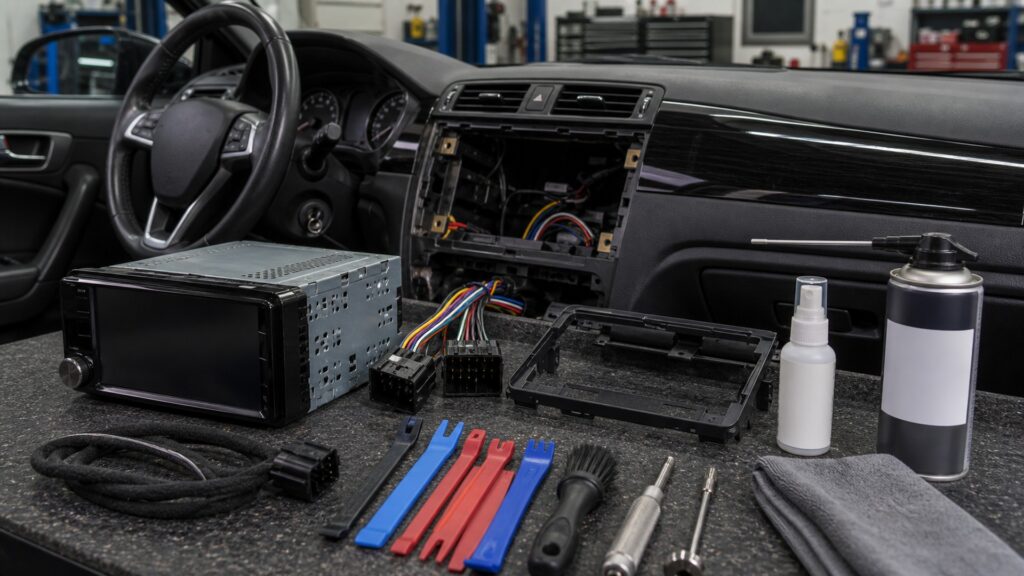
Connections, environment, software, user controls, and records drift at different rates, so maintenance gives each one a separate check.
Tip: Record the working source, vehicle state, and output before changing settings; a reproducible symptom is far easier to isolate than a vague impression.
These concepts describe the forms of drift that maintenance can observe without inventing a replacement schedule.
Opposition introduced at a connector or joint that can cause voltage loss, heat, noise, or intermittent operation.
Mechanical load transferred by a tight harness, unsupported adapter, or sharp bend into terminals and sockets.
The difference between present operating temperature and the point where performance or protection behavior changes.
The installed receiver and interface software versions together with their configuration and known compatibility behavior.
The receiver's catalog of files or devices used to present and locate media.
A dated record of startup, sources, controls, audio channels, calls, cameras, retained cues, and shutdown when all work acceptably.
Tip: Compare the current receiver against a documented baseline before resetting, updating, or unplugging anything.
Thermal cycles and vibration act on harness plugs, adapters, grounds, antenna connectors, USB extensions, and preout cables. Inspection looks for looseness, pin displacement, abrasion, corrosion, unsupported weight, and measurable voltage loss without disturbing a working connector unnecessarily.
A connector check should create evidence, not temporarily hide a fault by reseating everything.
Dashboard heat, direct sun, blocked vents, dust, liquid, and trapped cable bundles can change receiver temperature or contaminate controls. Maintenance keeps designed airflow open and removes only surface contamination by the product's instructions.
Cleaning is useful only when it protects interfaces and cooling rather than pushing material farther inside.
Receiver firmware, integration-module firmware, phone operating systems, app permissions, pairing records, and removable media all shape behavior. Record versions first, change one layer at a time, and retest the same task after any update or reset.
A factory reset erases evidence, so it belongs after documentation and simpler checks.
Knobs, buttons, touch panels, microphones, and USB sockets can become inconsistent before they stop entirely. Repeated inputs, dead regions, unintended double actions, crackling, or poor call capture should be compared by source and vehicle condition.
The first repeatable interface symptom is more diagnostic than waiting for complete loss.
A concise log connects dates, software versions, wiring work, battery service, phone changes, settings, and observed symptoms. Periodic checks use the same reference source and states, revealing which boundary changed instead of inviting an uncontrolled retune.
Maintenance records turn intermittent behavior into a sequence that can be tested.
Observation and careful upkeep protect connections, cooling, configuration, and evidence, while damaged electronics or incompatible software may still require service.
It finds strain, contamination, thermal blockage, storage problems, and configuration drift before diagnosis becomes a guess.
A repeatable baseline shows whether a change began after vehicle work, an update, a new phone, or a new setting.
Burned components, damaged displays, failing memory, broken sockets, or unsupported software cannot be restored by cleaning or resetting.
Opening powered electronics or improvising vehicle wiring can create hazards and should not replace qualified diagnosis.
These myths mistake resetting, cleaning, or retuning for a complete maintenance strategy.
Resetting can clear configuration, pairings, calibration, and fault clues before the original symptom is documented. Confirm power, connections, source behavior, versions, and settings first; use a reset only when supported and followed by complete reconfiguration tests.
Digital processing still depends on physical power, grounds, connectors, cooling, storage, microphones, controls, and compatible software. Their failures may appear intermittent or source specific, making a documented baseline especially valuable even without traditional mechanical service.
Tonal adjustment can conceal a failing channel, loose connection, damaged speaker, changed source level, or corrupted setting. Compare a known track with saved neutral settings and verify output paths before compensating for an unexplained change.
Coatings, plastics, adhesives, gaps, and touch sensors vary. Use the receiver manufacturer's cleaning method and a controlled applicator rather than spraying the panel; liquid entering controls or trim can cause more damage than surface dirt.
Tip: Preserve evidence first; change only the layer that the symptom actually implicates.
These answers cover inspection timing, software updates, storage, intermittent faults, and useful records.
Use condition and events rather than an invented universal interval. Check after installation, battery or dash work, liquid exposure, repeated resets, new noise, software changes, control inconsistency, or a new phone that changes established behavior.
Review the release notes, exact model, prerequisites, and known compatibility first. Preserve settings, use stable power and approved media, follow every instruction, then retest sources, controls, cameras, interfaces, audio outputs, startup, and shutdown.
The card or drive may have unsupported capacity, file system, folder depth, naming, codec, power demand, corruption, or connector trouble. Test known compatible media and files before assuming that the receiver's USB hardware has failed.
Record key state, cranking, road vibration, cabin temperature, active source, volume, attached devices, voltage at the receiver, shutdown timing, recent battery work, and whether settings persist. Those observations separate power interruption from thermal or software causes.
Document firmware, interfaces, phone and media versions, sound settings, each source, call microphone, controls, channel output, cameras, warning cues, startup during cranking, delayed shutdown, sleep behavior, and any known limitation of the installation.
Head-unit maintenance matters because connections, heat, software, storage, controls, and vehicle states can drift independently.
Preserve a known-good baseline, document changes before resets, and retest the exact failed path. Maintenance should reduce uncertainty and prevent strain or contamination, not become endless retuning or speculative parts replacement.
These explainers show the receiver paths a baseline should exercise, the installation constraints that create strain or heat, and the feature contracts worth retesting.
Use the receiver's power, source, command, output, and accessory sequence as a maintenance checklist.
Review rear clearance, harness support, ventilation, and service access that affect long-term condition.
Retest each feature by its required source, state, output, and dependency after service or updates.
Choose a retailer
Prices checked regularly. We may earn a commission at no cost to you.